Indietool
What Is Google Crawling: A Practical Guide for Founders
You launch a product page after weeks of work. The copy is finished, the design is polished, and the URL is live. Then you open Google Search Console, search for the page, and find nothing. A few days later, there's still nothing. The page exists for your users, but Google hasn't shown any sign that it knows about it.
That delay feels mysterious until you understand what Google crawling is. Google doesn't manually inspect the web one page at a time. Automated crawlers discover publicly accessible URLs, fetch them, follow links, and pass the resulting content into separate systems for processing and indexing. For an indie founder, the practical question isn't only whether a page is technically online. It's whether Google can discover that page, considers it worth fetching, and has enough crawl demand left to reach it.
Table of Contents
- The Indie Founder's Indexing Anxiety
- How Googlebot Discovers New Pages
- Understanding Crawl Budget and Demand
- Signaling Importance Through Sitemaps and Robots
- Crawling Versus Indexing, The Critical Distinction
- Actionable Steps to Improve Discoverability
- Mastering Your Site's Visibility Strategy
The Indie Founder's Indexing Anxiety
A founder usually describes the problem as, “Google hasn't indexed my page.” That diagnosis may be wrong. The page might not have been discovered or crawled yet, which is an earlier problem than indexing. Google explains that its Search index is built largely by automated crawlers that visit publicly accessible pages and follow links. The index contains hundreds of billions of web pages and is well over 100,000,000 gigabytes in size, according to Google's explanation of how it organizes information.
That scale changes the way you should think about launch SEO. Publishing a page is not the same as placing it in front of a reviewer. You've added a new document to an enormous, constantly changing library. Google's crawling processes keep running because the web changes continuously, but that doesn't mean every new URL gets immediate attention.

Discovery comes before evaluation
Suppose you launch a small SaaS tool with a homepage, pricing page, documentation, and a product use-case page. The use-case page has strong copy, but no other page links to it. You may believe Google can guess that the URL exists. In practice, the crawler needs a discovery path, such as a link from a page it already knows or a sitemap entry.
Practical rule: A page can't be evaluated for search visibility until Google has had an opportunity to discover and fetch it.
This is why a new launch can feel invisible even when the page works perfectly in a browser. A valid response, a clean layout, and thoughtful metadata don't guarantee a crawl. They help after Google reaches the page. They don't replace the discovery step.
The useful mindset is operational rather than emotional. Don't ask whether Google “likes” your launch yet. Ask whether the URL is connected to the site, included in the relevant discovery systems, accessible to Googlebot, and valuable enough to justify revisiting. Those questions lead to fixes. Repeatedly refreshing Search Console doesn't.
How Googlebot Discovers New Pages
Googlebot is best understood as a URL fetcher moving through a network of references. When it crawls a page, it can find links to other pages and add those URLs to its future work. Google describes an algorithmic process that determines which sites to crawl, how often to crawl them, and how many pages to fetch, with links from previously crawled pages serving as a primary way to discover URLs in its overview of how Search works.
Think of a librarian working through a collection of books. The librarian opens a book, follows its references, records the titles found there, and decides which items to retrieve next. A page with no meaningful inbound links is like a book stored outside the catalogue. It may exist, but the librarian has no obvious route to it.
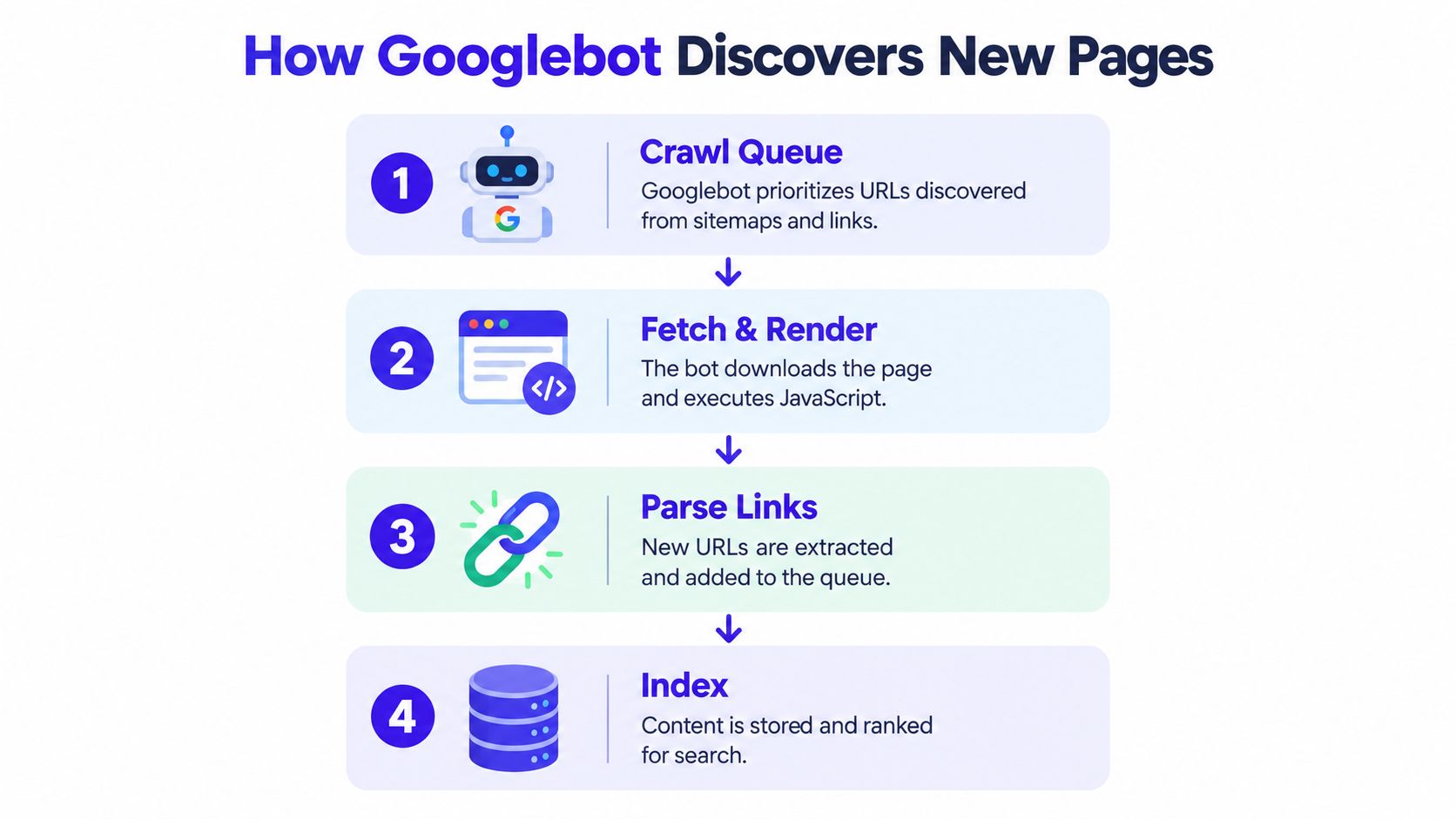
The crawl process looks roughly like this:
- A URL enters a crawl queue. Google may learn about it through an internal link, an external link, or an XML sitemap.
- Googlebot requests the page. It checks whether the server responds and whether the content can be accessed.
- Googlebot processes the fetched page. It can identify references and other signals that help Google understand the site's structure.
- Separate indexing systems evaluate the content. A fetched URL still needs to pass through indexing decisions before it can appear in Search.
Links are infrastructure, not decoration
Founders often treat internal links as a user experience detail added after publishing. They're also part of the crawler's map. If your new launch page is linked from the homepage, a relevant guide, and a product category page, Google has several routes to discover it. If the page is buried behind an interaction that exposes no normal crawlable path, discovery becomes less dependable.
That doesn't mean every link guarantees a visit. Google says most sites shouldn't be crawled more than once every few seconds on average, and its systems decide how frequently to request pages. A strong internal structure improves the routes available to Googlebot, but it doesn't let you command the crawl queue.
The distinction matters because founders often combine the stages into one vague expectation: “I published it, so Google should rank it.” The actual chain is more demanding. Google must learn the URL, request it, understand the content, decide whether to store it, and then determine where it belongs for relevant searches.
Understanding Crawl Budget and Demand
Google's crawl budget is a resource allocation problem. Google defines it through two variables: crawl capacity limit and crawl demand. Capacity concerns how many requests a site can handle without performance problems. Demand concerns how much Google wants to crawl that site and which URLs deserve attention, as documented in Google's crawl budget guidance.
That distinction exposes one of the most persistent pieces of bad SEO advice: “Make the server faster and Google will crawl more.” A responsive server is useful, but speed alone doesn't create demand. If Google has little reason to revisit a site, it may not increase crawling just because the infrastructure can handle more requests.
Capacity is only one side of the decision
A site can waste crawl capacity in several ways:
- Duplicate URL variants expose substantially similar content through multiple addresses.
- Parameter URLs create large numbers of low-value combinations.
- Thin utility pages consume attention without adding distinct information.
- Weak internal linking leaves important launch pages disconnected from the rest of the site.
- Stale sitemaps continue presenting outdated or less important URLs as candidates.
Google's documentation also connects content quality with the allocation of crawling resources. That makes crawl budget relevant even for smaller sites. You might not have a huge URL inventory, but a messy structure can still make it harder for Google to identify the pages that matter most.
Demand follows useful signals
Google's algorithmic process weighs signals such as freshness, uniqueness, and importance. Strong internal linking gives a page context within the site. Clean canonicalization reduces ambiguity around which URL represents the content. Updated XML sitemaps provide a current list of pages you want considered. None of these tools forces Google to crawl a URL, but together they make the crawl surface easier to interpret.
The practical trade-off is simple. You can spend days tuning server response time while leaving dozens of duplicate URLs exposed, or you can first reduce wasted crawl paths and strengthen the routes to revenue-generating pages. The second option usually addresses the more direct problem.
If your site has a complicated application layer, faceted navigation, or recurring indexing anomalies, it may be sensible to hire a technical SEO expert UK for a focused crawl and log analysis. The value isn't a generic “SEO boost.” It's finding where Googlebot spends attention and whether that attention reaches the pages you need discovered.
Signaling Importance Through Sitemaps and Robots
You can't set Googlebot's schedule, but you can make your site's priorities legible. An XML sitemap is a curated list of URLs you want search engines to know about. It's particularly useful for new pages, isolated pages, and sites where internal discovery paths aren't obvious.
A sitemap shouldn't become a dump of every URL your application can generate. Include the canonical, public pages that deserve consideration. Exclude obvious clutter such as temporary states, internal utility screens, and URL variants that don't represent distinct content. Google can discover URLs in several ways, so a sitemap is a signal, not a guarantee of crawling or indexing.
Use the sitemap as a product manifest
For a launch, the sitemap should reflect the product's current public surface:
- Include the launch page and the pages that explain its use cases.
- Update it when important content changes, rather than treating it as a file generated once and forgotten.
- Keep canonical choices consistent, so internal links and sitemap entries point toward the same preferred URLs.
- Inspect the submitted URLs in Search Console when a priority page remains absent.
A sitemap can tell Google which pages exist, but internal links tell Google how those pages relate to one another. Link the launch page from relevant, already-established content. A product page linked only from a footer is sending a weaker structural signal than a page connected from a relevant guide and a category hub.
For a broader launch checklist covering sitemap submission, URL inspection, canonical tags, and robots.txt checks, use this website launch SEO checklist. The useful part of a checklist is not ticking boxes for their own sake. It's confirming that the discovery path works before you start interpreting ranking data.
Treat robots.txt as a gate
Robots.txt controls which crawling paths you ask compliant crawlers to avoid. It isn't a ranking tool, and it isn't a substitute for removing low-value URLs from the site architecture. A careless rule can block a product page, documentation route, or asset needed for Google to understand the page.
Check the file after every deployment that changes routing or application behavior. Look for accidental broad disallow rules, staging rules copied into production, and important paths blocked because they resemble administrative URLs. You should also remember that allowing a crawl doesn't guarantee indexing. It only removes one possible access barrier.
Crawling Versus Indexing, The Critical Distinction
Crawling and indexing are separate gates. Google's documentation says the terms are often used interchangeably even though they describe different actions, a distinction explained in Google Search Central's indexing guidance.
| Stage | What happens | What it tells you |
|---|---|---|
| Crawling | Googlebot discovers and fetches a URL | Google could access the page |
| Processing | Google analyzes the fetched content and its meaning | Google has information to evaluate |
| Indexing | Google decides whether to store the page in its index | The page may become eligible for Search |
| Ranking | Search systems select and order results for a query | The page competes for visibility |
A page can be crawled without being indexed. Google may fetch content and decide that it duplicates another URL, offers little distinct value, or otherwise shouldn't be included. In that situation, requesting another crawl without improving the page or resolving the duplication won't address the core issue.
Diagnose the gate before choosing the fix
If Google hasn't crawled the URL, investigate discovery and access:
- Is the page linked from a page Google already knows?
- Is the URL present in the current XML sitemap?
- Does robots.txt prevent access?
- Does the server return the intended page consistently?
- Are redirects or application routes sending Google somewhere unexpected?
If Google has crawled the URL but hasn't indexed it, shift your questions. Check whether another URL is canonical, whether the page substantially overlaps with existing content, and whether the page offers a clear reason to exist independently. More links can help discovery, but they won't automatically make a weak or redundant page worthy of storage.
This is why the phrase “Google found my page” is incomplete. Finding means the crawler requested it. It doesn't mean Google accepted it into the index, understood its preferred canonical URL, or decided it should appear for a query.
For a plain-language explanation of the next stage, see this guide to what indexation means. Keep the terminology precise in your own audits. Otherwise, you'll try to fix an indexing decision with crawl tactics, or try to fix a discovery failure by rewriting content that Google hasn't fetched.
Actionable Steps to Improve Discoverability
Start with the pages that matter commercially, not with an abstract site-wide score. Your launch page, pricing page, documentation entry points, and core use-case pages should have clear routes from the existing site.
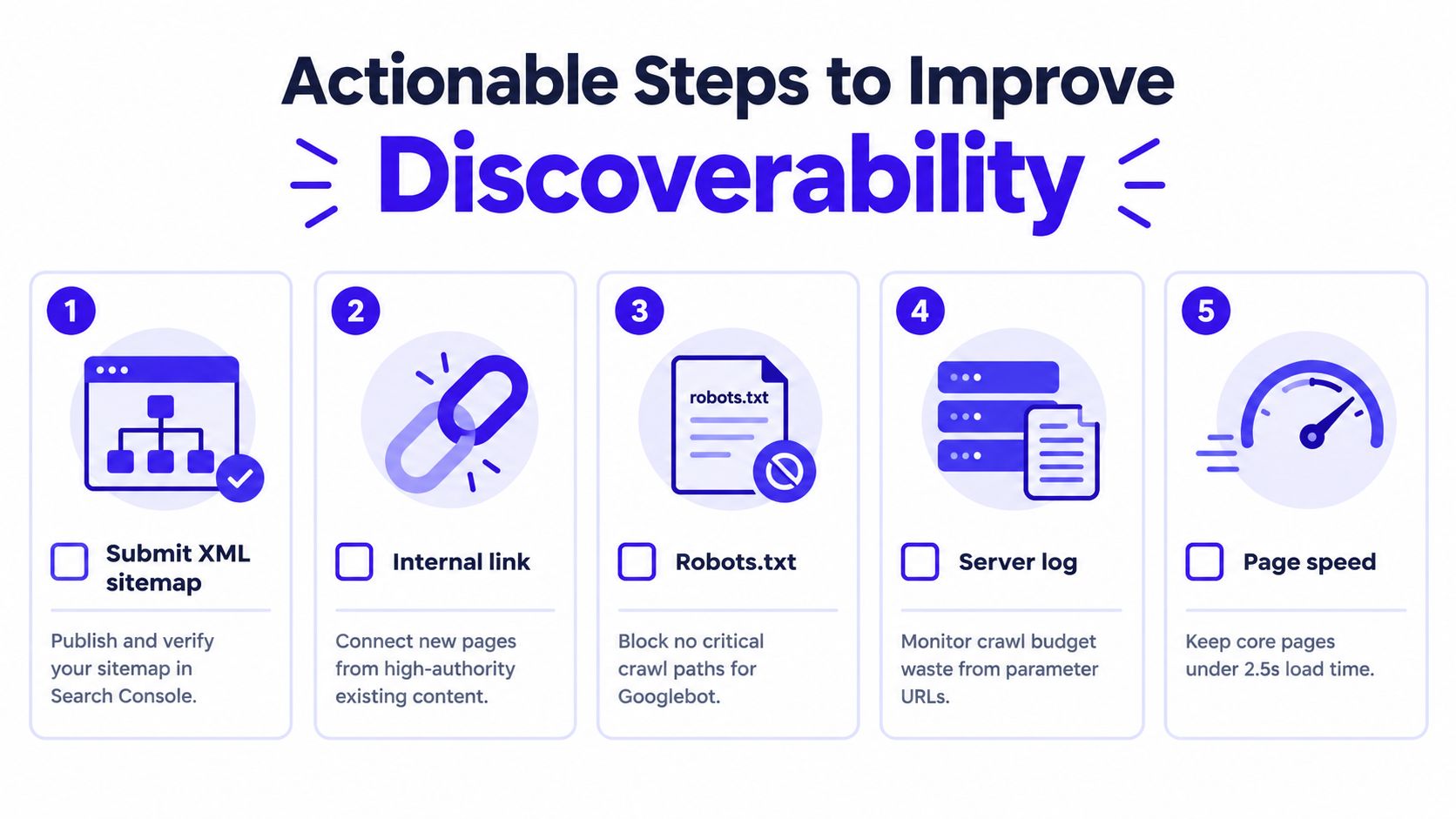
Use this sequence:
- Publish and verify the XML sitemap. Make sure it contains the preferred public URLs, then submit it through Search Console.
- Strengthen internal routes. Link new pages from relevant existing content instead of relying on an isolated footer link.
- Review robots.txt after deployment. Confirm that no rule blocks a critical product, documentation, or resource path.
- Inspect crawl waste. Use server logs or crawl reports to identify parameterized and duplicate URLs that consume attention without helping users.
- Keep core pages technically usable. Page speed supports reliable access, but it won't compensate for weak discovery signals or a bloated URL set.
Make the process repeatable
Generate the sitemap from the same content source that creates your public pages. If a deployment publishes a page but the sitemap updates only through a manual task, your technical workflow is creating an avoidable discovery delay.
Canonicalization deserves the same automation mindset. When several URLs expose substantially similar content, tell search engines which version represents the page and keep your internal links aligned with that choice. Google's crawl budget guidance specifically points to stronger internal linking, clean canonicalization, and updated XML sitemaps as ways to make important pages easier to prioritize.
For additional implementation ideas, consult this guide on how to get Google to crawl your site faster. Don't read “faster” as a promise that Google can be forced to visit on demand. The reliable objective is to remove wasted paths and make your important URLs easy to discover and interpret.
Mastering Your Site's Visibility Strategy
The founder who waits for Google is treating crawling as luck. The founder who maps internal links, maintains the sitemap, checks access rules, and reviews crawl waste is managing an allocation problem. That shift matters because search visibility starts with a page being reachable and understandable within a system much larger than the site itself.
A new product doesn't need every URL crawled. It needs the right URLs to be discoverable, accessible, distinct, and connected to the rest of the site. A fast server helps users and protects crawl capacity, but it doesn't create demand by itself. A sitemap helps Google locate priority pages, but it doesn't guarantee indexing. Internal links clarify importance, but they don't override Google's separate decision about whether a page belongs in the index.
The useful goal isn't maximum crawling. It's maximum attention on the pages that deserve to be found.
When a launch page remains absent, troubleshoot in order. Confirm discovery, verify access, inspect the crawl path, check canonical signals, and then evaluate whether the content earns a separate place in the index. That process replaces anxious checking with engineering work you can control.
IndieTool gives indie founders a directory listing and distribution channel for new products, with a permanent do-follow backlink, automated listing activation, and founder analytics for views, visitors, and outbound clicks. Visit IndieTool to submit your launch and create another legitimate discovery path for the product pages you want search engines and early adopters to find.