Indietool
What Is Indexation and Why It Matters for SEO
Indexation is the stage where a search engine analyzes a crawled page and stores it in its index so it can be returned for queries. A page can't rank in classic search or be cited by AI until this step happens.
You can publish a polished page, share it on social media, and still receive no search traffic because publication isn't the same as inclusion. Search engines must first discover the URL, fetch it, understand its contents, and decide whether to keep it in their searchable systems. That quiet decision is where many new websites lose visibility.
Table of Contents
- The Launch That Nobody Could Find
- What Indexation Actually Means
- What Happens Inside the Indexer
- Indexation as a Layered Visibility Gate
- Why a Page Gets Discovered but Never Indexed
- Two Paths to Faster Indexation
- A Founder Indexation Checklist for the First 48 Hours
- Treating Indexation as an Ongoing Contract
The Launch That Nobody Could Find
A first-time founder launches a product page after weeks of work. The copy is clear, the screenshots look professional, the pricing is easy to understand, and the founder announces the product across social channels. Then the waiting begins.
Days pass without organic visits. The founder searches Google using the exact brand name and a descriptive phrase from the page. The product doesn't appear near the top. It doesn't appear near the bottom. It isn't there at all.
That distinction matters. A low ranking means Google knows about the page but has decided that other results deserve more prominence. No result may mean Google never stored the page in its index. A page that hasn't entered the index has no opportunity to compete for a ranking.

The founder may have assumed that publishing created a direct path to visibility:
- Upload the page.
- Google finds it.
- Google ranks it.
- Visitors arrive.
The process has more gates. Google first needs to discover the URL, crawl the page, analyze its content, and store a usable representation in its index. Only then can ranking systems evaluate the page for a search, as described in Google's explanation of how Search works.
Practical rule: A published page is an available document. An indexed page is a document the search engine has chosen to keep available for retrieval.
The founder's missed step was indexation, the silent transition between being fetched and being eligible for search visibility. Understanding that transition turns an alarming blank result into a problem you can investigate.
What Indexation Actually Means
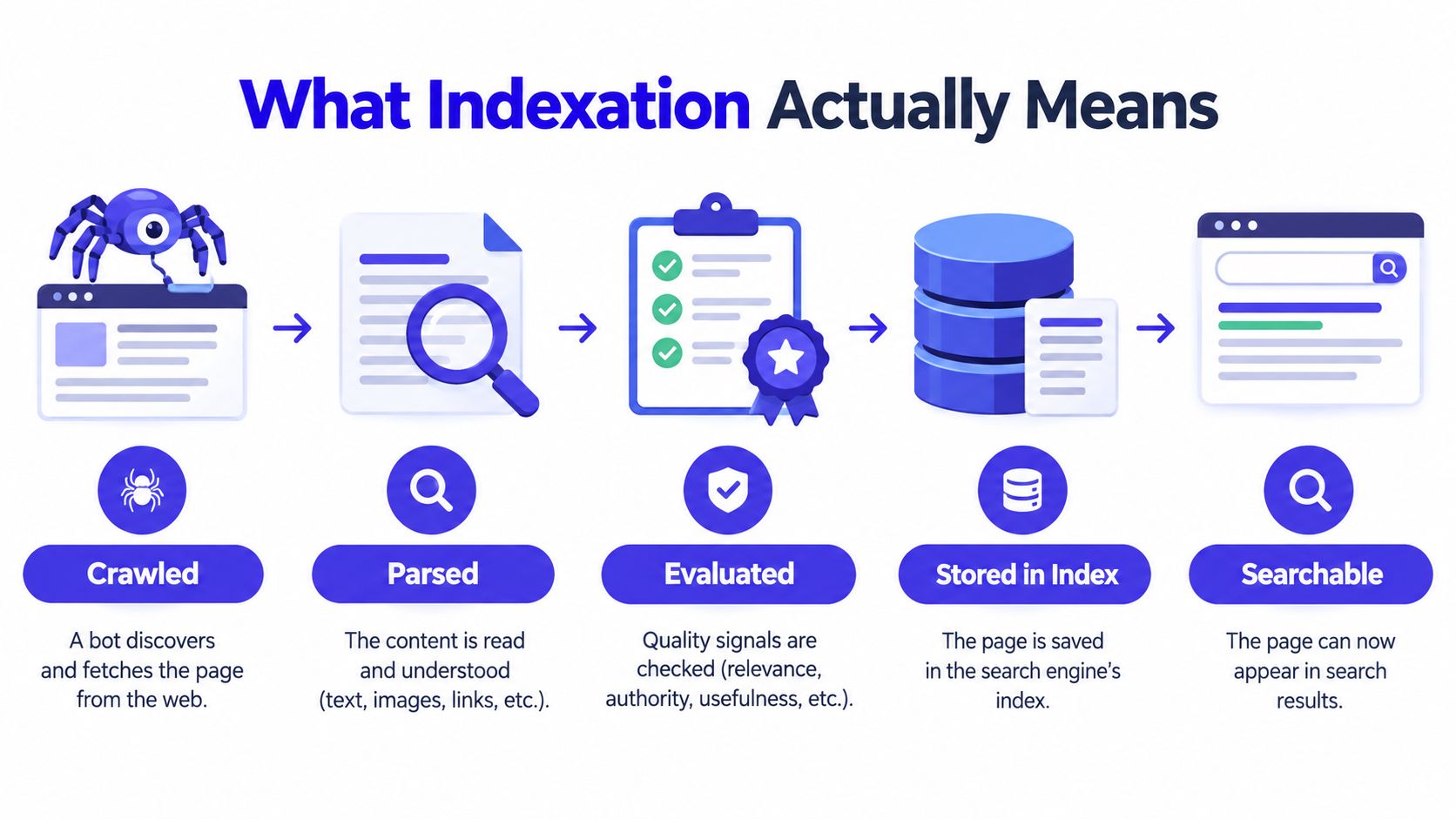
Indexation is the point at which a search engine processes a crawled page and stores the information it considers useful in a structured index. Google describes this process separately from crawling. A page must be discovered and crawled before the search engine can analyze it for inclusion, which makes crawl access and discovery prerequisites for indexation.
A library analogy makes the difference easier to remember:
- Crawling is a librarian walking through the aisles, finding books, and bringing selected books to the desk.
- Parsing is reading the book's title, chapters, author information, and references.
- Indexation is creating the catalog record so the library can retrieve the book later.
- Ranking is choosing which catalog records to show first when a visitor asks a question.
The catalog record isn't the book itself. Likewise, Google doesn't copy a web page and display it exactly as published. It extracts and organizes information so its retrieval systems can match pages to queries.
A useful one-sentence definition is:
Indexation is the search engine's decision to analyze and store a crawled page so it can be retrieved for relevant searches.
That makes indexation a visibility gate, not a ranking factor. Ranking systems can't meaningfully compare a page that the index doesn't contain. The same principle applies to enhanced search features and AI-generated answers. If a page isn't available to the retrieval system, it can't provide the source material for a classic result or an AI citation.
A page may also be crawled more than once without being indexed. Repeated fetching gives Google more opportunities to reassess the URL, but it doesn't guarantee admission. The engine may detect duplication, follow a canonical signal to another URL, encounter a noindex instruction, or judge the page too weak to retain.
What Happens Inside the Indexer
After fetching a URL, the indexer turns a web document into structured information. It can examine visible text, title elements, headings, metadata, links, media references, and structured data. It also needs to interpret how the page relates to other URLs on the site and across the wider web.
One important process is canonical clustering. If several URLs contain substantially similar material, the search engine may group them and select one representative URL. A canonical tag can suggest the preferred version, but it's a hint rather than an absolute command. Internal links, redirects, sitemap entries, page content, and other signals can support or contradict that suggestion.
The indexer also evaluates whether the page adds enough distinct value to justify storage. A near-copy, an empty template, a doorway page designed mainly to capture similar queries, or a thin product variant may be excluded even when the server returns a successful response.
The signals that shape inclusion
Control flags can change the outcome. A noindex instruction tells search engines not to include the page. A robots.txt rule can prevent crawling, which may stop the engine from seeing the page's content and other directives. A canonical pointing to a different URL can make the published address a poor candidate for the main index entry.
| Signal or flag | What the indexer looks at | Effect on indexation |
|---|---|---|
| Page content | Whether the page offers distinct, accessible information | Thin or repetitive content may be excluded |
| Canonical signals | Which URL appears to represent the preferred version | Near-duplicates may be consolidated under another URL |
| Meta robots | Whether the page contains a noindex instruction |
The page is directed away from the index |
robots.txt |
Whether crawlers are allowed to fetch the URL | Blocked URLs may not be properly evaluated |
| Sitemap entry | Whether the submitted URL is valid and consistent | Errors weaken discovery and validation |
| Rendering | Whether important content appears after JavaScript runs | Missing rendered content can limit understanding |
| Links and structure | How the page connects to the rest of the site | Isolated URLs are harder to interpret and revisit |
These signals don't operate as a simple checklist where one green mark guarantees inclusion. The indexer combines them with broader assessments of usefulness, duplication, accessibility, and site structure.
A founder can influence much of this system. Make the intended URL clear, remove contradictory instructions, expose meaningful content in the rendered page, and connect the URL to relevant internal pages. Indexation remains a search engine decision, but it isn't an unknowable one.
Indexation as a Layered Visibility Gate
Indexation works better as a stack of gates than as a single on or off switch. A page must first be discoverable and crawlable. It then needs to pass technical controls and earn a place in the main index before ranking systems can decide where it belongs.
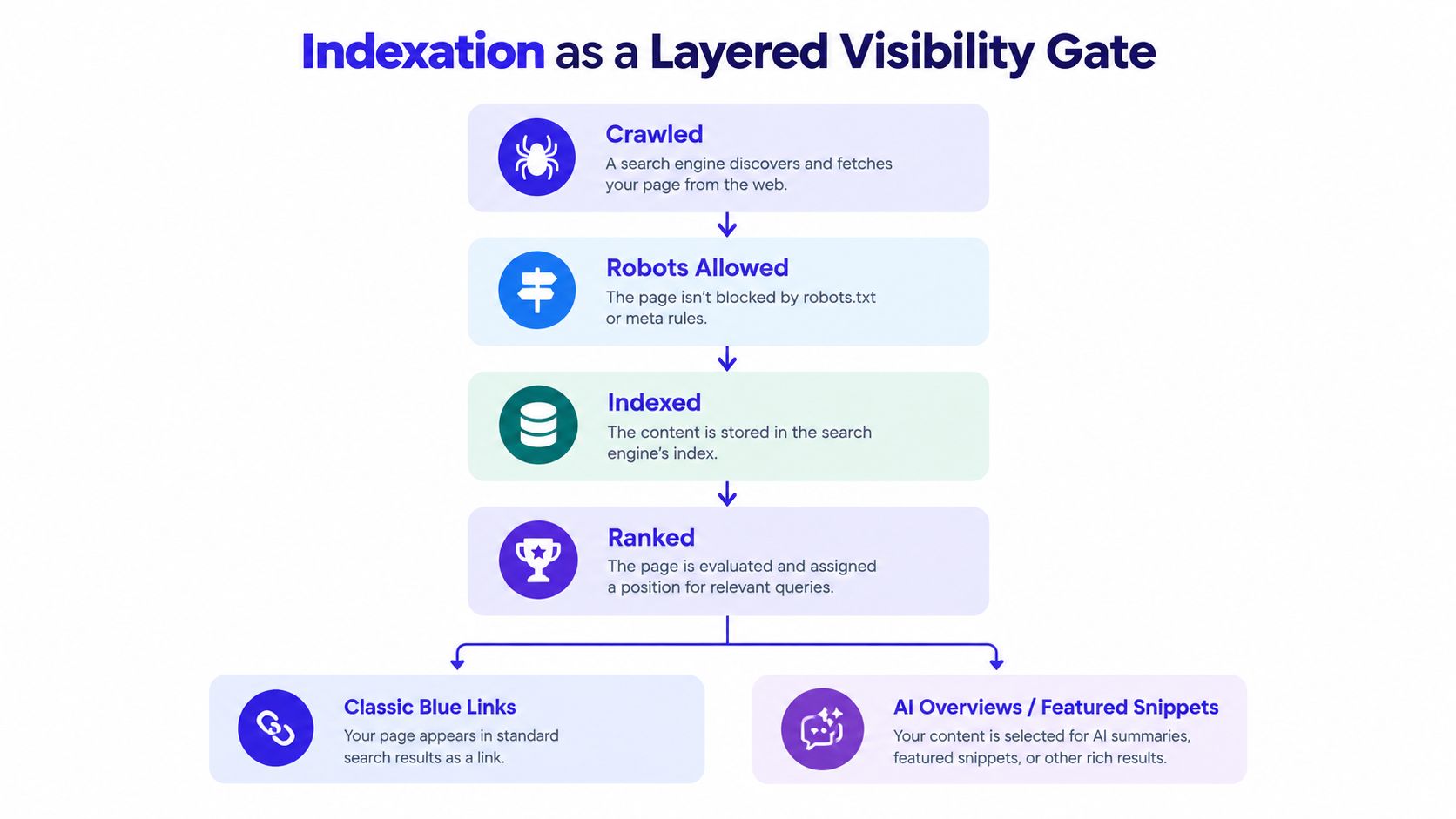
Classic blue links are only one possible destination. Indexed content may become eligible for features such as featured snippets, People Also Ask results, image surfaces, video results, or Discover, depending on the query, format, quality signals, and feature requirements. Eligibility isn't automatic. Inclusion in the standard index doesn't guarantee that Google will select a page for a particular result type.
AI search adds another layer. AI Overviews and generative answer systems need retrievable information that can support an answer, not merely a URL that exists somewhere on the web. Current discussions about the evolving role of indexes distinguish between selecting documents for people to visit and selecting evidence that an AI system can use responsibly, as explained in Microsoft Bing's discussion of indexing and AI answers.
That distinction changes how founders should think about page quality. Clear claims, identifiable entities, useful context, consistent business details, and content that can be understood in discrete passages may help a page become useful beyond a standard result.
The practical model looks like this:
- Crawled: The search engine fetched the URL.
- Allowed: Technical directives don't prohibit processing or inclusion.
- Indexed: The engine stored a representation of the page.
- Ranked or retrieved: The page matches a search or answer need.
- Selected for a surface: A system chooses it for a specific feature or generated response.
Each layer can close independently. A canonical decision can change the URL represented in the index. Weak content can reduce retrieval opportunities. Unclear authorship or unsupported claims can make a page less useful as evidence. Indexation is therefore the foundation, but the foundation doesn't determine every later outcome.
Why a Page Gets Discovered but Never Indexed
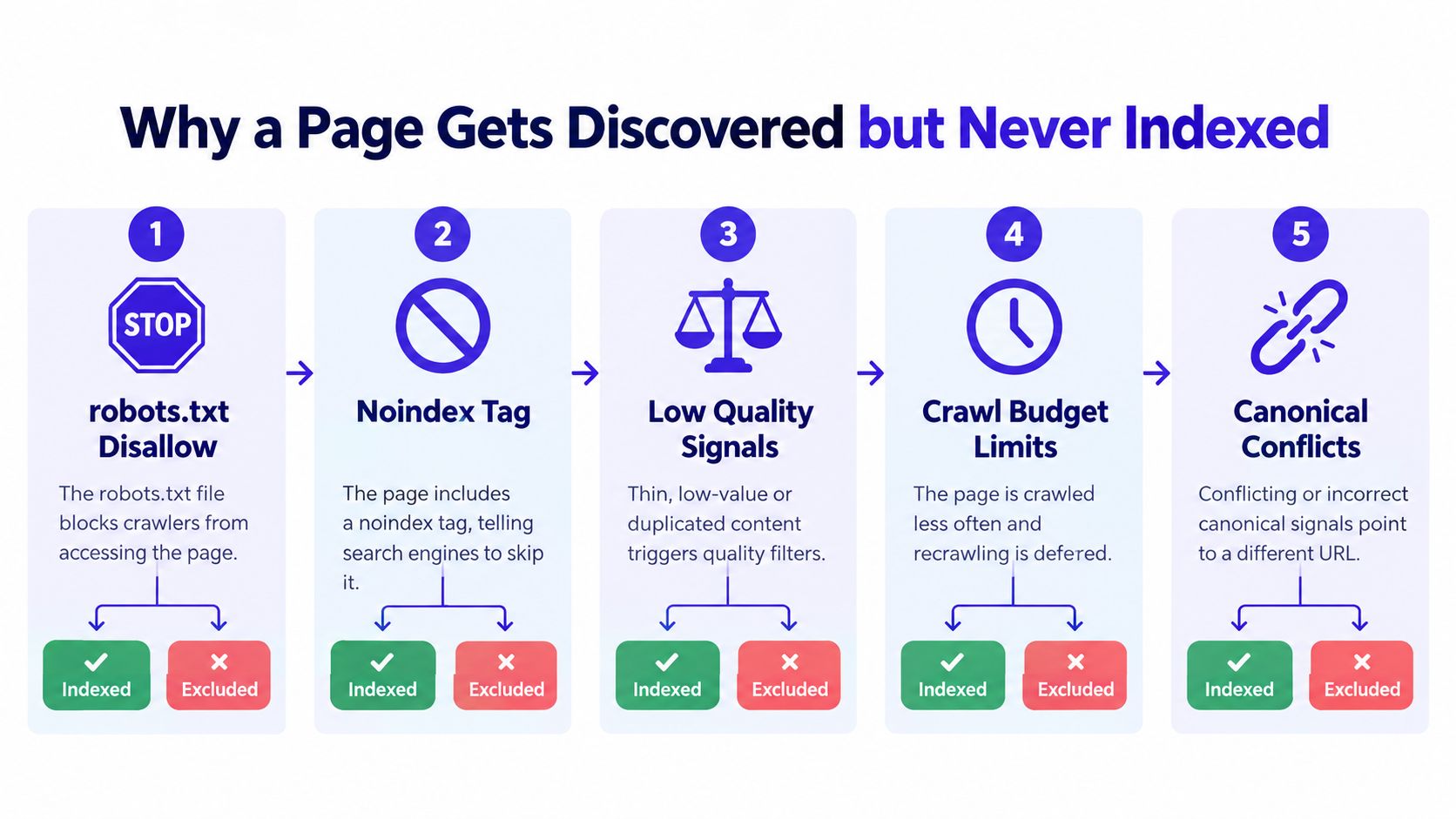
“Discovered, currently not indexed” usually means Google knows the URL exists but hasn't stored it as an eligible indexed page. The label doesn't identify every underlying cause, so diagnosis should move from the exact URL status to the signals controlling access, representation, and quality.
Start with the URL, not the template
Open Google Search Console's URL Inspection tool and inspect the exact address. Record the reported indexing state, the selected canonical, the user-declared canonical, and the last crawl information. Don't assume that the homepage's status applies to a newly published product page.
Then follow this decision path:
- Is crawling blocked? Review
robots.txtfor a matchingDisallowrule. A blocked URL may be known through a sitemap or link while remaining unavailable for full evaluation. - Does the page contain
noindex? Inspect the rendered HTML and response headers. Staging templates, CMS defaults, or copied page settings can carry an exclusion directive into production. - Does the canonical point elsewhere? Compare the canonical tag with the URL you want indexed. If another product, parameter version, or old address is nominated, Google may consolidate the page under that alternative.
- Is the sitemap entry valid? Confirm that the submitted URL resolves successfully, uses the intended version, and doesn't lead to a redirect, missing page, or error response.
- Can Google render the content? A page may return HTML while relying on JavaScript to insert the title, main copy, or product details. If rendering fails, the fetched document may look incomplete.
- Does the page look useful and distinct? Very short copy, repeated descriptions, empty category pages, and near-duplicate variants can create index bloat. Google may decide that storing every version adds little value.
- Does it resemble a soft 404? A page can technically return a successful response while presenting an empty, unavailable, or generic experience. Search engines may treat that as missing content.
A crawler such as Screaming Frog can expose stray noindex directives, canonical inconsistencies, status codes, and sitemap mismatches across many URLs. Search Console is better for Google's interpretation of a specific page. Use both perspectives.
The diagnostic question is not “Did Google find this URL?” It's “What did Google fetch, which URL did it choose, and what signal made storage unattractive or impossible?”
Fix the specific branch, then request another inspection. Removing a blocker won't instantly create ranking strength, but it gives the page a clean opportunity to be evaluated again.
Two Paths to Faster Indexation
Founders usually have two ways to improve the speed at which new pages enter search systems. The first is to make the site easier for search engines to process. The second is to create additional places where crawlers can encounter the URL.
| Dimension | Owned technical fixes | External discovery surfaces |
|---|---|---|
| Primary purpose | Remove barriers to crawling and inclusion | Create more paths to discover the URL |
| Typical actions | Correct the sitemap, remove noindex, fix canonicals, improve internal links, request indexing |
Earn relevant links, submit to directories, participate in launch communities, secure digital PR |
| Control | High, because you control the site | Lower, because third-party platforms control publication and crawling |
| Best fit | Existing sites with structural or template problems | New domains with limited discovery signals |
| Durability | Usually durable when the underlying issue is fixed | Depends on the quality and persistence of the external mention |
| Main risk | Repeated submissions won't solve a content or access problem | More mentions can't compensate for a blocked or contradictory page |
Owned fixes should come first. A clean XML sitemap in Google Search Console, strong internal links from relevant pages, corrected canonical tags, and removal of accidental noindex rules address the plumbing. For participating search engines, an indexing API can provide an additional notification route, but it doesn't override exclusion directives or guarantee inclusion.
External discovery helps when a new domain has few links and little crawl history. A relevant directory listing, a launch page, a community discussion, or a genuine editorial mention can give crawlers another route to the product. The link should be contextually useful, not placed indiscriminately across low-value pages.
IndieTool is one example of a distribution option for indie products. Its listing service provides a product page and do-follow backlink, while its directory distributes submitted product information across category and alternative pages. Treat that as an external discovery channel, not as a substitute for a technically accessible, distinctive page on your own site.
The rule is simple: fix the plumbing first, then amplify discovery. External signals can't rescue a page that tells Google not to index it, points its canonical elsewhere, or renders without meaningful content.
A Founder Indexation Checklist for the First 48 Hours
Launch day should include an indexation check, not just a deployment check. Run the following sequence while the site structure is still familiar.
- Verify crawl access. Open
robots.txtand confirm that production URLs aren't blocked. Check the page's meta robots directive and response headers for accidental noindex instructions. - Submit the XML sitemap. Add the sitemap in Google Search Console and confirm that it contains the preferred, live URLs rather than redirects, obsolete paths, or duplicate variants.
- Prioritize key pages. Use URL Inspection to request indexing for the most important launch URLs, such as the homepage, primary product page, pricing page, and a core feature or use-case page.
- Inspect exclusions. Review the Pages report for immediate errors. Separate “Discovered, currently not indexed” from “Crawled, currently not indexed,” because the first points toward processing or prioritization while the second indicates that Google fetched the page and chose not to retain it.
- Create a legitimate discovery path. Publish one relevant external mention, such as a launch discussion or directory listing, where people can reasonably discover the product. Don't scatter links through unrelated communities.
- Check the next day. Search for the brand and use a
site:query as a quick directional check, then rely on Search Console for the more authoritative status of individual URLs.
If a page is excluded, don't keep resubmitting it without changing anything. Inspect the canonical, directives, sitemap entry, rendered content, and distinctiveness first. A request for indexing asks Google to revisit a page. It doesn't ask Google to ignore a technical instruction or accept content that provides little independent value.
Treating Indexation as an Ongoing Contract
Indexation isn't a launch task you complete once. A page can lose visibility after a template adds noindex, a migration changes canonicals, a server outage prevents fetching, or a later evaluation finds the content less useful than competing versions. AI surfaces inherit the availability of the underlying search and retrieval systems, so a page that disappears from the index also loses a basic route into generated answers.
Build recurring checks into normal marketing operations:
- Audit the sitemap regularly. Remove dead URLs and confirm that important pages use their preferred addresses.
- Monitor excluded URLs. Investigate both discovered-but-not-indexed and crawled-but-not-indexed groups for patterns.
- Track migrations carefully. Renamed products and moved pages need consistent redirects, internal links, canonicals, and sitemap updates.
- Reinspect meaningful edits. After changing a page's main content or structure, request a fresh crawl for priority URLs.
- Review AI visibility separately. Being indexed creates eligibility, not citation. Compare the clarity, evidence, and entity information on your page with the sources appearing in generated answers.
Founder questions answered
How long does re-indexing take after an edit? There's no universal timetable. It depends on discovery, crawl scheduling, site accessibility, and the search engine's decision about whether the changed page merits another indexed representation.
Does indexing guarantee ranking? No. Indexing makes a page eligible to compete. Relevance, quality, links, intent match, and many other systems influence whether it appears prominently.
What should you do when an AI Overview cites a competitor? Check whether your page is indexed, then improve the specific evidence gap. Make the answer explicit, identify the business or product clearly, support important claims with trustworthy references, and ensure the relevant content is available in rendered HTML.
Treat every important URL as a contract between your site and search systems. Keep the page accessible, coherent, distinct, and easy to verify, then monitor whether the systems continue to keep and retrieve it.
Review your launch today by inspecting your robots rules, canonical tags, sitemap, and top product URLs in Search Console. If you need another discovery route, submit your product to IndieTool to create a directory listing and external link that can support early crawl discovery.