Indietool
How to Get Google to Crawl Your Site Faster in 2026

You ship a landing page on Friday, submit it to a few directories over the weekend, and open Google Search Console on Monday to find zero impressions. URL Inspection says “Discovered, currently not indexed.” It feels like a penalty or a broken setting, but for a fresh site with little crawl history, that status often means Google knows the URL exists and hasn't assigned a crawl yet.
Learning how to get Google to crawl your site faster starts with dropping the idea of a single acceleration switch. Crawl speed depends on several connected signals: whether Google can reach the page, how quickly your server responds, whether the URL sits in a current sitemap, how many internal links lead to it, how much duplicate inventory competes for attention, and whether external sites create new discovery paths.
The practical objective isn't to make Googlebot burst through every URL. It's to make valuable pages easy to discover, inexpensive to fetch, and clearly worth revisiting.
Table of Contents
- Why Your New Site Is Invisible to Google
- Diagnosing Crawl Health in Search Console
- Sitemap and Index Management Essentials
- Crawl Budget Tactics That Actually Work
- Internal Links and Fetch Tools for Faster Discovery
- Programmatic Distribution to Create More Crawl Paths
- A Repeatable Crawl Monitoring Workflow
Why Your New Site Is Invisible to Google
A new domain has no established crawl pattern. Google has less historical evidence about which pages matter, how often content changes, and whether the server can handle repeated fetching. That doesn't mean the site is blocked. It means the scheduler has limited reasons to prioritize it over pages with clearer demand and stronger discovery signals.
Google describes crawl demand through signals including popularity, content uniqueness, serving capacity, and overall user value in its crawl guidance for site owners. Those signals work together. A sitemap can expose a URL, but it won't compensate for a page that's blocked, duplicated, buried deep in the site, or slow to render.
Think in layers, not toggles
For an indie launch, I'd check crawl speed through five layers:
- Accessibility: Robots.txt, meta robots directives, canonical tags, and server availability must allow the intended URL to be fetched.
- Discovery: XML sitemaps, HTML links, navigation, and external references give Google paths to the page.
- Architecture: A page linked from a relevant hub is easier to find than an orphan several clicks away.
- Fetch efficiency: Duplicate URLs, soft 404s, redirect chains, and slow responses consume attention without adding useful content.
- Demand: Distinctive pages with useful information and credible references give Google more reason to crawl and revisit the site.
“Discovered, currently not indexed” and “Crawled, currently not indexed” require different responses. The first points toward discovery or crawl allocation. The second means Google fetched the page but didn't include it, so improving the content, differentiation, or technical signals matters more than sending another request.
You can use this guide to checking whether a website is indexed by Google as a quick companion to Search Console. For the actual diagnosis, use Google's first-party reports rather than treating a site: search as a precise inventory.
Practical rule: Fix access and discovery before trying to manufacture urgency. Google can't prioritize a page it can't crawl cleanly.
Diagnosing Crawl Health in Search Console
Search Console gives you enough information to build a useful crawl diagnosis without guessing. Start with Pages, then move through Crawl Stats, Links, and URL Inspection. Each report answers a different question, so jumping straight to a manual indexing request often skips the cause.
Start with Pages
Open the Page indexing report and filter the “Why pages aren't indexed” groups. Look first for patterns, not isolated URLs.
- Discovered, currently not indexed: Check internal links, sitemap inclusion, server capacity, and low-value URL volume.
- Crawled, currently not indexed: Review thin, duplicated, or weakly differentiated content.
- Blocked by robots.txt: Confirm the block is intentional. If the page should rank, remove the conflicting rule.
- Excluded by noindex: Remove the directive only when the URL is meant to be indexed.
- Duplicate or alternate canonical: Verify that the selected canonical is the version you want in search.
An orphaned important page is an architecture problem. Add links from a relevant hub and related pages before making repeated requests.
Use Crawl Stats for the operational picture
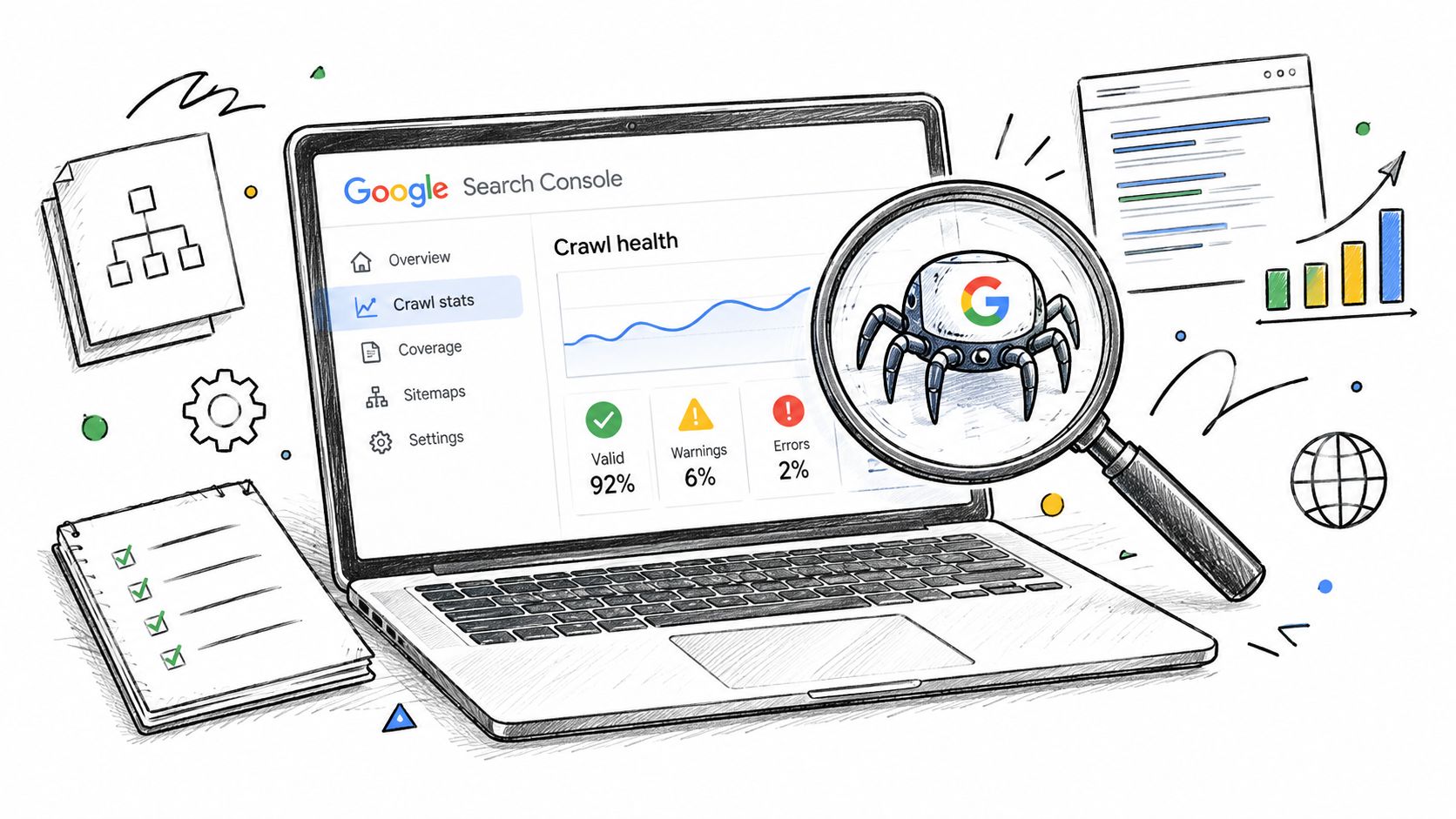
The Crawl Stats report shows crawl requests, download size, average response time, host status, crawl responses, file type, crawl purpose, and Googlebot type, as documented by Google's Search Console crawl documentation. Filter for response codes and file types that dominate the report.
A spike in 5xx responses points toward hosting or application reliability. Many 3xx responses suggest redirect chains or unnecessary redirects. A large share of HTML requests for parameter variations suggests that your URL inventory needs consolidation.
The report retains crawl data for the past 90 days, which makes it useful for spotting regressions after a deployment or migration.
Confirm paths with Links and URL Inspection
The Links report shows which pages receive the most internal links. Compare that list with your priority URLs. If a valuable page has no meaningful internal references, add it to a hub, relevant article, or primary navigation path.
URL Inspection shows the indexed version's status, last crawl information, indexing errors, and canonical selection. Use the live test to check the current page, but remember that the indexed information comes from Google's last crawled version, as explained in Google's announcement of URL Inspection. The live page and Google's stored understanding can differ.
A ten-minute triage should produce a ranked list:
- Confirm the priority URL is accessible and indexable.
- Check its Page indexing status and selected canonical.
- Review Crawl Stats for response and host problems.
- Check whether internal links lead to the URL.
- Compare the sitemap entry with the live canonical URL.
- Fix the highest-impact pattern before requesting another crawl.
Sitemap and Index Management Essentials
A sitemap is a persistent discovery signal, not a launch-day notification. Google says sitemaps are read regularly, and that keeping them current with accurate last-modification dates helps Google discover new or changed URLs through normal crawling. Submit the sitemap in Search Console, then maintain the file as part of publishing and release operations.
Only include URLs that you want Google to crawl and consider for indexing. Every entry should resolve to the preferred canonical URL, return a successful response, and avoid indexability conflicts.
Keep the inventory deliberate
Include:
- Canonical, indexable product pages.
- Important landing pages.
- Published articles that offer distinct value.
- Image or news sitemap entries when those formats are relevant.
- Updated URLs with an accurate last-modification date.
Exclude:
- Parameter combinations.
- Internal search results.
- Paginated duplicates that don't represent standalone value.
- Pages carrying
noindex. - Redirect targets.
- URLs returning errors.
A CMS often exports tag pages, filters, and archive variants automatically. Don't list every generated URL because the plugin includes it. A smaller sitemap that reflects your real indexable inventory gives Google a clearer map.
When a sitemap property exceeds its file or URL limits, split it into focused child sitemaps and submit a sitemap index. The important principle is separation by meaningful content groups, such as products, articles, images, or news, rather than arbitrary duplication.
IndexNow can complement this workflow for engines that support it, but it isn't a replacement for Google's sitemap and Search Console processes. Treat it as an additional notification channel, not as a Google indexing guarantee.
A practical monthly routine is simple:
- Validate the XML: Confirm syntax, canonical URLs, and current last-modification values.
- Prune failures: Remove URLs returning 4xx or 5xx responses.
- Compare against the site: Identify important live pages missing from the sitemap.
- Resplit when needed: Keep content groups understandable as the site grows.
- Resubmit changed files: Refresh the relevant sitemap entry in Search Console instead of repeatedly submitting every file.
For launch distribution planning, product listing optimization can help you prepare the metadata and page details that external listing pages use when linking to your site.
Crawl Budget Tactics That Actually Work
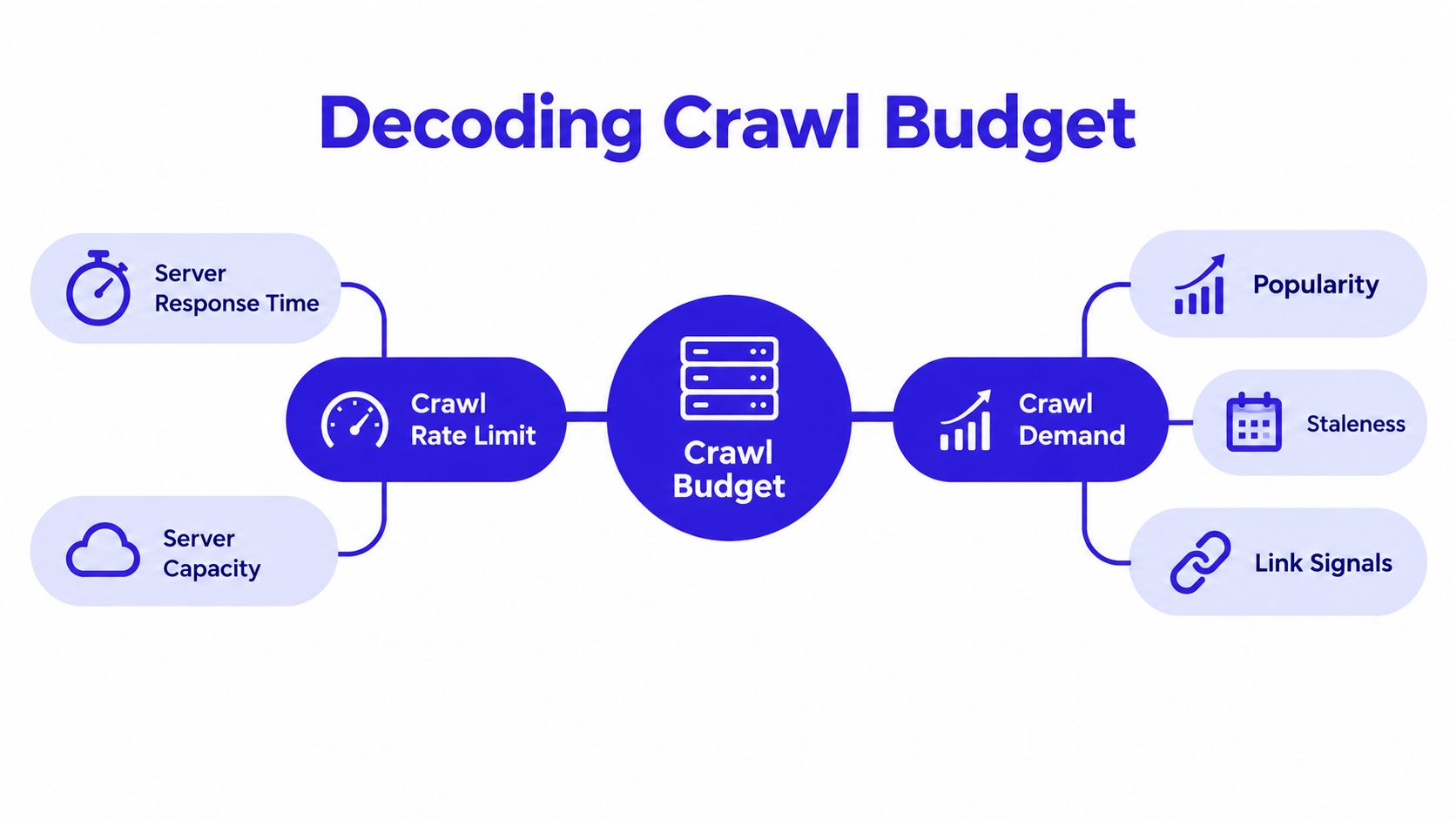
Google's crawl-budget guidance separates the problem into crawl rate limit and crawl demand. The rate limit reflects how much fetching your infrastructure can support. Demand reflects why Google should fetch your content, including popularity, staleness, link signals, uniqueness, and user value. A technical cleanup can improve the first side, but it won't make low-value pages important.
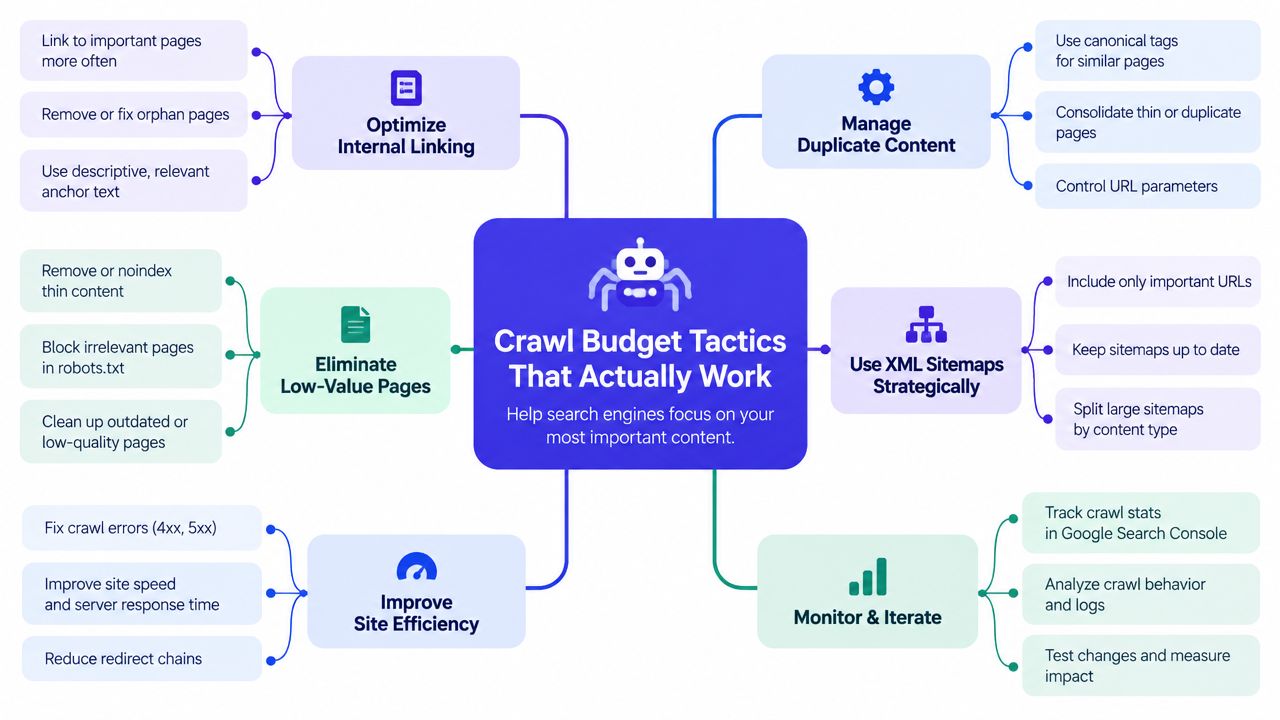
Reduce wasted fetches
Start with URLs that consume crawling without contributing a distinct search result:
- Consolidate duplicate content and conflicting canonical versions.
- Remove or redirect obsolete thin pages where appropriate.
- Fix soft 404s, which look available to crawlers but don't provide a valid resource.
- Eliminate redirect chains.
- Control faceted navigation with carefully chosen canonicalization or crawl restrictions.
- Prevent session IDs and unnecessary parameters from creating URL variations.
- Keep low-value calendar and tag archives out of the indexable inventory.
Google specifically warns against using robots.txt as a temporary way to reallocate crawl budget. A robots block can prevent crawling, but it doesn't solve every indexing or duplicate-content problem. It can also hide the page from the diagnostic evidence you need.
The useful question isn't “How do I get more crawling?” It's “Which URLs should Google stop fetching so it can spend more attention on the URLs that matter?”
Server performance belongs in the same audit. When URL Inspection reports Hostload exceeded, Google advises increasing server capacity. Reduce backend work, cache repeated responses, and investigate slow application queries. Don't promise a universal response-time threshold, because the right target depends on the site and its serving capacity.
Separate evidence from attractive noise
Repeated sitemap submission looks active but doesn't repair duplicates, soft 404s, blocked resources, or weak architecture. Manual requests also don't guarantee indexing. Google recommends requesting indexing for individual URLs and using sitemaps for larger batches, as explained in its URL Inspection documentation.
Old advice about changing a crawl-rate setting is similarly unreliable. Google's current guidance emphasizes making valuable pages discoverable and efficient to fetch, not trying to force a burst of Googlebot activity.
On a small SaaS site, the highest-return cleanup is usually concrete: remove generated URL combinations, repair broken response patterns, improve server handling, and connect priority pages to real navigation paths. The result you're looking for is not an impressive crawl chart. It's a larger share of crawling directed toward pages you want indexed.
Internal Links and Fetch Tools for Faster Discovery
Internal links and fetch requests solve different parts of the same distribution problem. A link creates a durable path through your site. URL Inspection creates a targeted request for one owned URL. The Indexing API is a specialized tool for eligible content, not a general-purpose shortcut for blog posts or product pages.
Build a crawl path before publishing
Give every priority page a home in the architecture:
- Link a new launch or guide from the homepage or a frequently updated hub.
- Add contextual links from closely related pages.
- Cross-link sibling pages when each one answers a distinct intent.
- Retire or consolidate orphans that don't deserve ongoing crawling.
Contextual links help users and crawlers understand relationships between pages. A new article buried in a CMS archive may exist technically, but it has a weak route into the crawl graph. A relevant hub gives it a clearer route and concentrates attention where you want it.
Use URL Inspection after the page is technically ready. Confirm crawlability, check the canonical, request indexing once, and leave the sitemap and internal links in place so Google can revisit through normal paths. A request isn't a guarantee, and repeating it won't correct a blocked or low-value page.
Use the right API for the right content
Google's Indexing API is intended for pages using JobPosting or BroadcastEvent structured data. It can request updates or removals for those eligible page types, but it shouldn't be treated as a universal submission endpoint. For ordinary SaaS pages, use the sitemap and URL Inspection workflow instead.
| Tool | Best use case | Daily limit |
|---|---|---|
| URL Inspection | A small number of important, owned URLs | Google rate-limits requests, and the applicable quota is shown in Search Console |
| XML sitemap | New or updated URLs at site scale | No manual per-URL request workflow |
| Google Indexing API | Eligible JobPosting and BroadcastEvent pages | Quota applies through the API project |
The limit column is deliberately operational rather than numeric. Google's quota can depend on the account and API project, so check the current interface and documentation before designing an automation around it.
Programmatic Distribution to Create More Crawl Paths
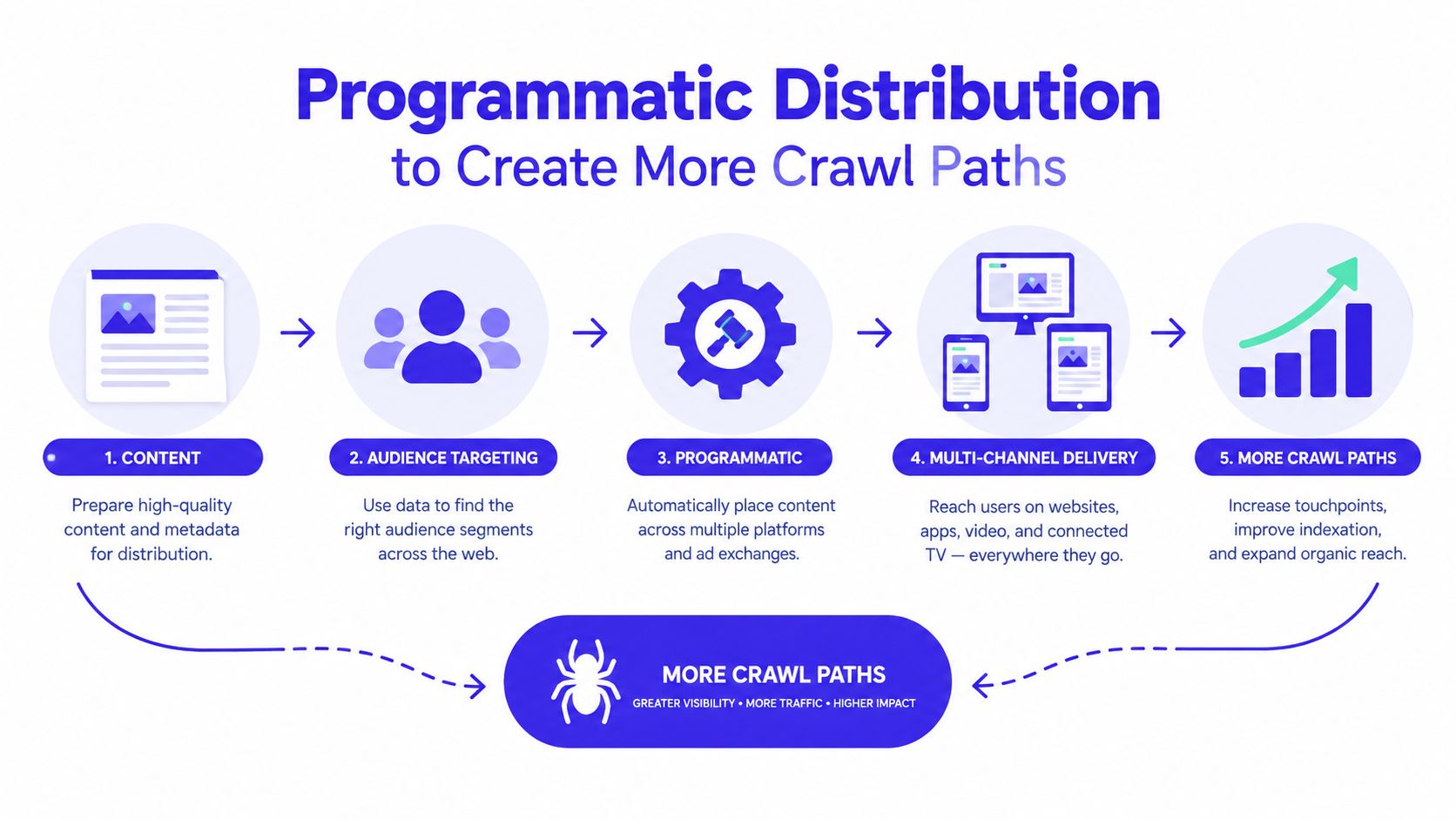
A new domain often needs more than an internal sitemap to become part of Google's active discovery graph. External pages create additional entry points, especially when those pages are themselves visible in communities, directories, product roundups, or launch discussions.
Consider a representative indie launch. The founder publishes a product page, adds it to a relevant directory, answers questions on the listing, and shares a useful launch note with a community. The resulting pages can expose the domain through listing URLs, founder replies, editorial references, and follow-up discussions. Google may encounter the root domain through several independent paths instead of relying on one sitemap fetch.
That doesn't mean every mention will be crawled or indexed. Distribution works when it's relevant, legitimate, and useful to the audience. Thin submissions scattered across unrelated sites create noise and can waste the founder's time. A curated list of niche directories and SaaS listing sites is more practical than indiscriminate volume.
Run distribution like an operating list
Use a spreadsheet with fields such as:
- Site and audience: Record the niche and whether the listing fits the product.
- Domain quality: Track the available authority metric as a comparison aid, not as the only selection criterion.
- Submission method: Note whether the site accepts a form, editorial pitch, or community post.
- Target URL: Use the most relevant product, feature, or documentation page.
- Follow-up cadence: Record when you'll verify the listing, link, and page details.
- Observed referral path: Separate real discovery channels from pages that produce no useful engagement.
A launch page that earns discussion on a relevant community can provide a stronger discovery event than another round of internal-link edits, particularly when the site has little crawl history. The external page gives Google a fresh route, while the internal links help distribute that visit once the crawler arrives.
Don't confuse this tactic with buying guaranteed indexing. No directory can force Google to crawl or index a page. The useful role of a reputable listing is to provide a relevant reference, a persistent discovery surface, and an opportunity for people to find and discuss the product.
For a practical implementation, directory link building for indie products provides a framework for selecting and managing listing opportunities rather than treating every directory as equivalent.
A Repeatable Crawl Monitoring Workflow
Crawl improvements need a feedback loop. A fix that looks correct in a code review can still create a new canonical conflict, expose a parameter pattern, or slow the server after deployment. Monitor the site as an operating system, not as a one-time launch task.
Review the technical signals regularly
Use the Crawl Stats report weekly to spot changes in request volume, response behavior, host status, file types, and crawl purpose. You're looking for directional changes that need investigation, such as more error responses, more redirects, or a sudden shift toward low-value URL types.
Inspect the five highest-value pages during each review. Check their indexed status, last crawl information, selected canonical, and live accessibility. Then compare the sitemap with the live site, and inspect the Pages report for newly recurring exclusion patterns.
A useful review sequence is:
- Check server and host status.
- Review response-code and file-type patterns.
- Inspect priority URLs.
- Reconcile sitemap entries with canonical live pages.
- Investigate new excluded-page clusters.
- Confirm that internal links still lead to priority content.
Add distribution to the same loop
Run a broader distribution review quarterly. Revisit the directories, communities, and social posts that created useful discovery paths. Update stale listings, replace broken destination URLs, and resurface important pages when there's a genuine product or content reason to do so.
Set operational triggers instead of waiting for a vague feeling that crawling has slowed. A response-time increase, recurring soft 404s, host-load warnings, or a growing group of “Discovered, currently not indexed” URLs should open an investigation. Google retains Crawl Stats data for the past 90 days, so compare recent behavior with the earlier part of that window when looking for a regression.
Google's crawl-budget guidance is the right standard for prioritization: consolidate duplicates, fix soft 404s, avoid contradictory directives, preserve server capacity, and make important content easy to discover. The strongest crawl strategy combines clean architecture with credible distribution. Neither a sitemap nor a directory listing can compensate for a site that wastes fetches or leaves its best pages orphaned.
IndieTool gives indie founders a distribution surface for product listings, permanent direct backlinks, programmatic exposure across index and category pages, and launch analytics in one dashboard. Use it alongside a clean sitemap, strong internal linking, and Search Console monitoring to create more legitimate discovery paths for a new site. Visit IndieTool to prepare and distribute your launch.