Indietool
Website Launch SEO Checklist: 10 Essential Steps
A surprising number of launch failures have nothing to do with weak content. They come from technical blocks that stop search engines from discovering or indexing pages at all. Google's guidance confirms that a noindex rule removes a page from Search, while current launch checklists prioritize robots.txt, staging noindex removal, XML sitemaps, canonical signals, and 200 status codes before release. Google also primarily uses a site's mobile version for indexing and ranking under mobile-first indexing, so mobile parity belongs in the launch plan, not in a later cleanup sprint. Google's mobile-first indexing documentation and this practical launch checklist support the same operational conclusion.
A website launch SEO checklist works best as a sequence, not a final audit. The ten checkpoints below move from research and architecture through technical implementation, promotion, analytics, and compliance. Give every checkpoint an owner, a verification method, and a clear go or no-go decision. Technical readiness makes the site crawlable, understandable, usable, and measurable. Post-launch growth then adds content, relevant links, distribution, and iteration.
For an indie product, a directory listing can complement that foundation. IndieTool can provide a relevant listing, a permanent do-follow backlink, programmatic distribution, promotional reach, and founder analytics, but it can't repair a blocked robots.txt file or replace useful pages. Treat it as a launch channel that becomes more valuable when the site is ready to receive and convert discovery.
Table of Contents
- 1. Conduct Keyword Research and Competitive Analysis
- 2. Optimize Site Architecture and URL Structure
- 3. Create an SEO-Friendly XML Sitemap and Robots.txt
- 4. Implement Technical SEO Fundamentals
- 5. Optimize Meta Tags, Headers, and On-Page Elements
- 6. Build High-Quality, Keyword-Aligned Content Before Launch
- 7. Set Up Google Search Console and Bing Webmaster Tools
- 8. Prepare a Pre-Launch Link Building and Promotion Strategy
- 9. Configure Analytics, Conversion Tracking, and UTM Parameters
- 10. Finalize Legal, Privacy, and Compliance Pages
- 10-Point Website Launch SEO Checklist Comparison
- Turn Launch Checks Into a Monitoring Habit
1. Conduct Keyword Research and Competitive Analysis
Start with the customer's problem, not a tool's keyword suggestion. List the phrases a buyer would use immediately before choosing a solution, then separate them by intent. A founder searching for “AI email assistant” may be comparing products, while someone searching for “AI email templates for remote teams” may be looking for a narrower workflow. Those queries deserve different pages and different calls to action.
Competitive analysis adds the context that raw keyword ideas miss. Review the pages ranking for each important topic, note the promises they make, identify questions they leave unanswered, and look for audiences they serve poorly. A startup studio should also map keywords separately for each product, rather than sending several products toward the same broad term and creating internal competition.
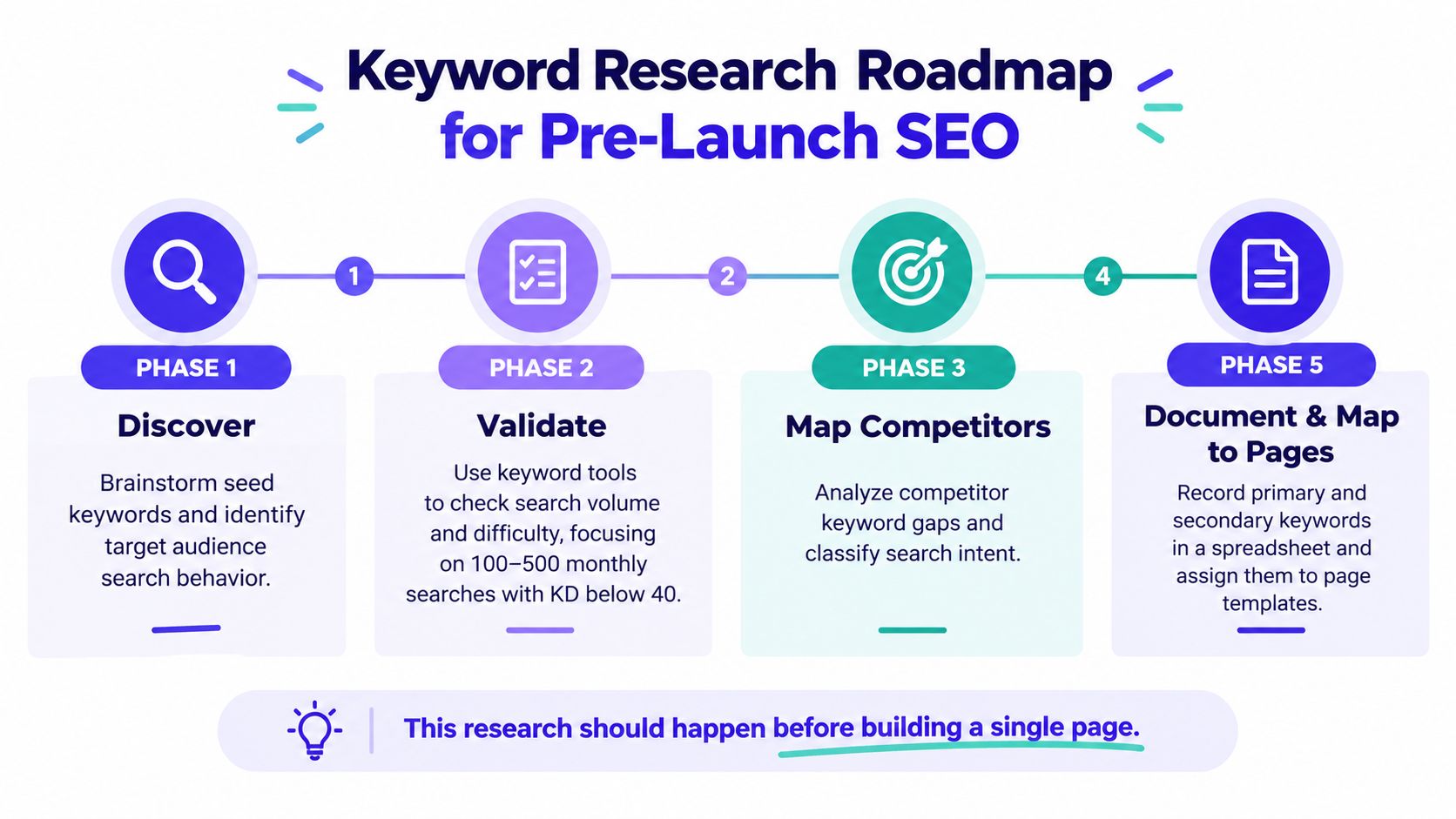
Use free research tools before paying for a large data subscription. Google Keyword Planner, Ubersuggest's free tier, and AnswerThePublic can help validate language, recurring questions, and search intent. Keep a simple spreadsheet with the target phrase, related phrases, intent, competing page types, planned URL, and content owner.
Practical rule: Choose a small group of commercially relevant topics that your product can answer better than existing pages. A large keyword list isn't a launch strategy.
For distribution, review IndieTool's directory for indie products alongside your research. Its categories and alternatives pages can help you describe the product in language buyers already recognize. Don't assume a backlink will make an irrelevant page rank. First create a page that matches the query, then use relevant distribution to help people and crawlers find it.
Include this planning visual in the pre-launch brief:
2. Optimize Site Architecture and URL Structure
A good architecture lets a visitor and a crawler answer three questions quickly: what the site offers, where related information lives, and which pages matter most. Put the homepage, core product or service pages, documentation, use cases, pricing, and contact paths into a structure that reflects how people evaluate the product. Don't bury a high-intent page beneath an arbitrary chain of folders just because the CMS makes it easy.
Plan the structure before development settles around temporary routes. A developer tool might use /docs/getting-started/ and /docs/api/authentication/, while a product site could use /use-cases/remote-teams/ and /features/email-automation/. Clear slugs are easier to share, maintain, redirect, and understand than identifiers such as /page1/ or query-heavy URLs.
Sketch the architecture in Figma, a spreadsheet, or a sitemap tool. Then test the proposed paths against the actual navigation and internal links.
- Keep URLs stable: Changing a slug after launch creates redirect work and can break external references.
- Use descriptive separators: Hyphens make multiword URLs readable. Avoid unnecessary parameters where a clean path can represent the page.
- Plan the blog taxonomy early: Decide whether articles will use a simple
/blog/title/structure or a category path, and apply it consistently. - Protect priority pages: Every important page should be reachable through navigation or contextual internal links, not left as an orphan.
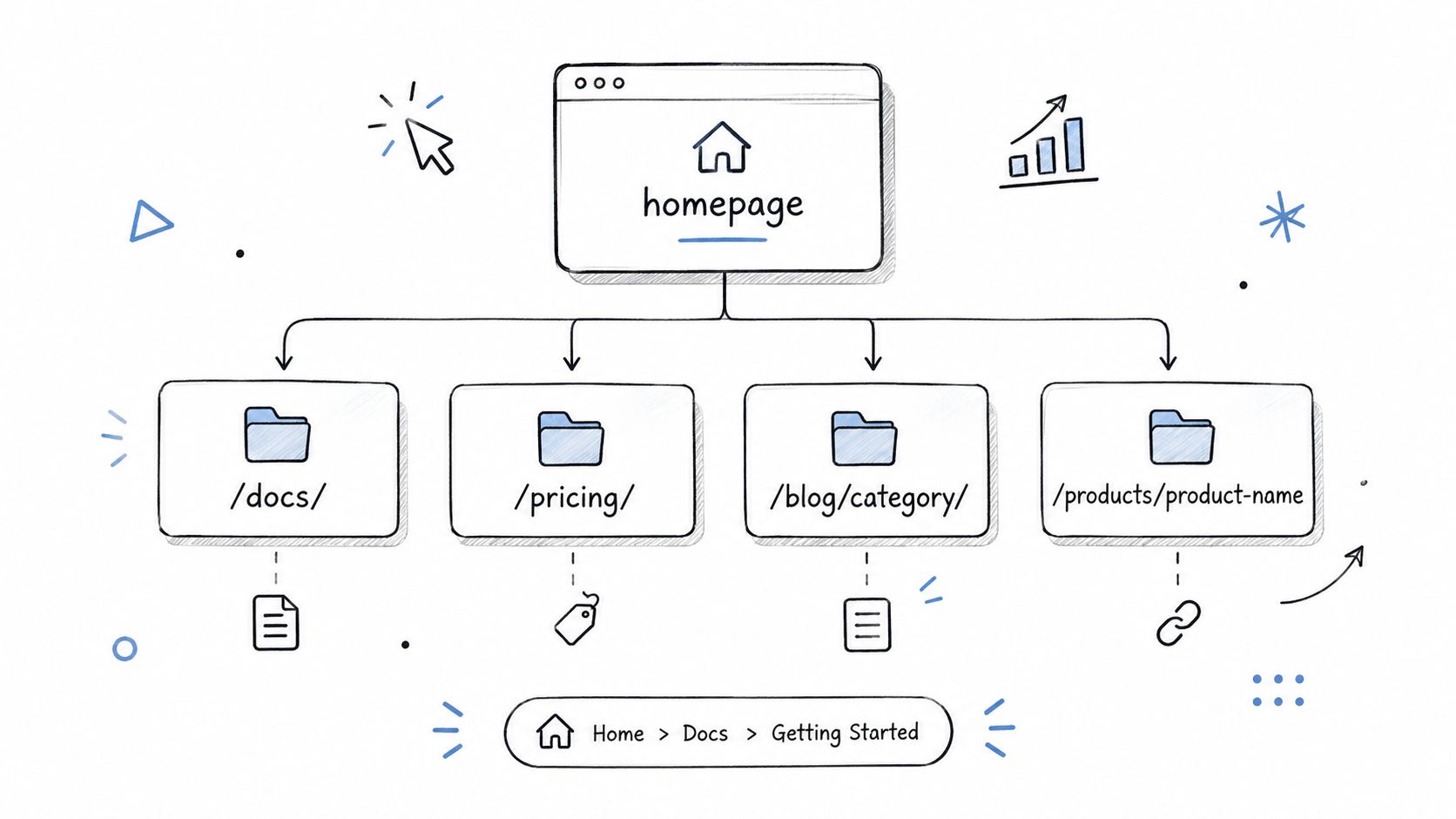
Crawl the staging site before release with Google Search Console's URL Inspection workflow or Screaming Frog. Check that links resolve, canonical URLs point to production, and important pages return successful responses. A small, coherent architecture usually beats a large collection of thin pages that have no distinct purpose.
3. Create an SEO-Friendly XML Sitemap and Robots.txt
Robots.txt and the XML sitemap have different jobs, and confusing them causes launch problems. Robots.txt controls which crawl paths search-engine bots may access. The sitemap supplies a list of URLs you want discovered. Neither file can turn weak content into a strong result, but both can prevent a technically ready page from being found or processed correctly.
The most dangerous staging artifact is a broad disallow rule. Before go-live, inspect /robots.txt on the production domain and confirm that it doesn't block the entire site. Block private or operational paths such as admin areas where appropriate, but keep the file simple. Overly aggressive rules can exclude useful documentation, public resources, or assets needed for rendering.
Build the sitemap from canonical, indexable URLs only. Exclude redirecting URLs, duplicate variants, private pages, and pages that you intentionally don't want in search. If your platform generates the file automatically, inspect the output rather than trusting the plugin or framework blindly.
Verify both files in production
Use this launch sequence:
- Inspect the live robots.txt: Confirm the file loads successfully and doesn't retain staging restrictions.
- Validate sitemap URLs: Open representative entries and check that they use the preferred HTTPS host, resolve successfully, and carry the intended canonical signal.
- Submit after cutover: Add the sitemap in Google Search Console and Bing Webmaster Tools immediately after the live domain is verified.
- Recheck after publishing changes: A template update can accidentally alter sitemap inclusion or robots directives.
The minimum control set is clear. Digital Applied's 2026 launch checklist recommends verifying robots.txt, XML sitemap, canonical tags, and Search Console before go-live, then monitoring coverage after launch. That sequence is more reliable than submitting a giant collection of URLs and hoping the search engine sorts out the architecture.
4. Implement Technical SEO Fundamentals
Technical SEO is not one score you pass once. It is the collection of conditions that lets a search engine fetch, render, understand, and serve a page, while letting a person use it on the device they brought to the site. At minimum, launch with HTTPS, responsive layouts, stable templates, sensible canonical signals, and performance testing across the pages that matter commercially.
Start with the production domain. Force one preferred HTTPS version, check that HTTP requests redirect correctly, and confirm that canonical tags, internal links, and sitemap entries use the same host and protocol. Search the codebase and response headers for staging-era noindex directives. Then test the homepage, primary landing pages, documentation, and conversion paths on mobile as well as desktop.
Performance work should focus on the experience users receive. Run Lighthouse and PageSpeed Insights on representative templates, inspect the largest above-the-fold element, compress images, defer non-critical scripts, and test on a throttled connection. A JavaScript-heavy SaaS product may need code splitting and lazy loading, while a static site may gain more from correctly sized images, caching, and a carefully loaded font.
Treat security as part of readiness
Install a valid SSL certificate with automatic renewal. Check forms, authentication, payment flows, and third-party integrations over HTTPS. Remove test credentials and environment values from the production bundle before release.
A developer may need to resolve these issues rather than the marketing owner. If you need implementation support, Hire Developers for technical SEO and web development work is one possible external resource. The trade-off is straightforward: delay a public announcement to fix a broken core path, but don't hold the entire launch for a minor visual refinement that doesn't affect crawling, usability, or conversion.
5. Optimize Meta Tags, Headers, and On-Page Elements
Search snippets and page structure should make the page's promise obvious. Write a unique title and description for every indexable page, then make sure the visible heading and opening copy deliver what those elements promise. A title such as “AI Email Assistant for Remote Teams” gives a searcher a clear subject. “Page 1” gives neither the user nor the crawler useful context.
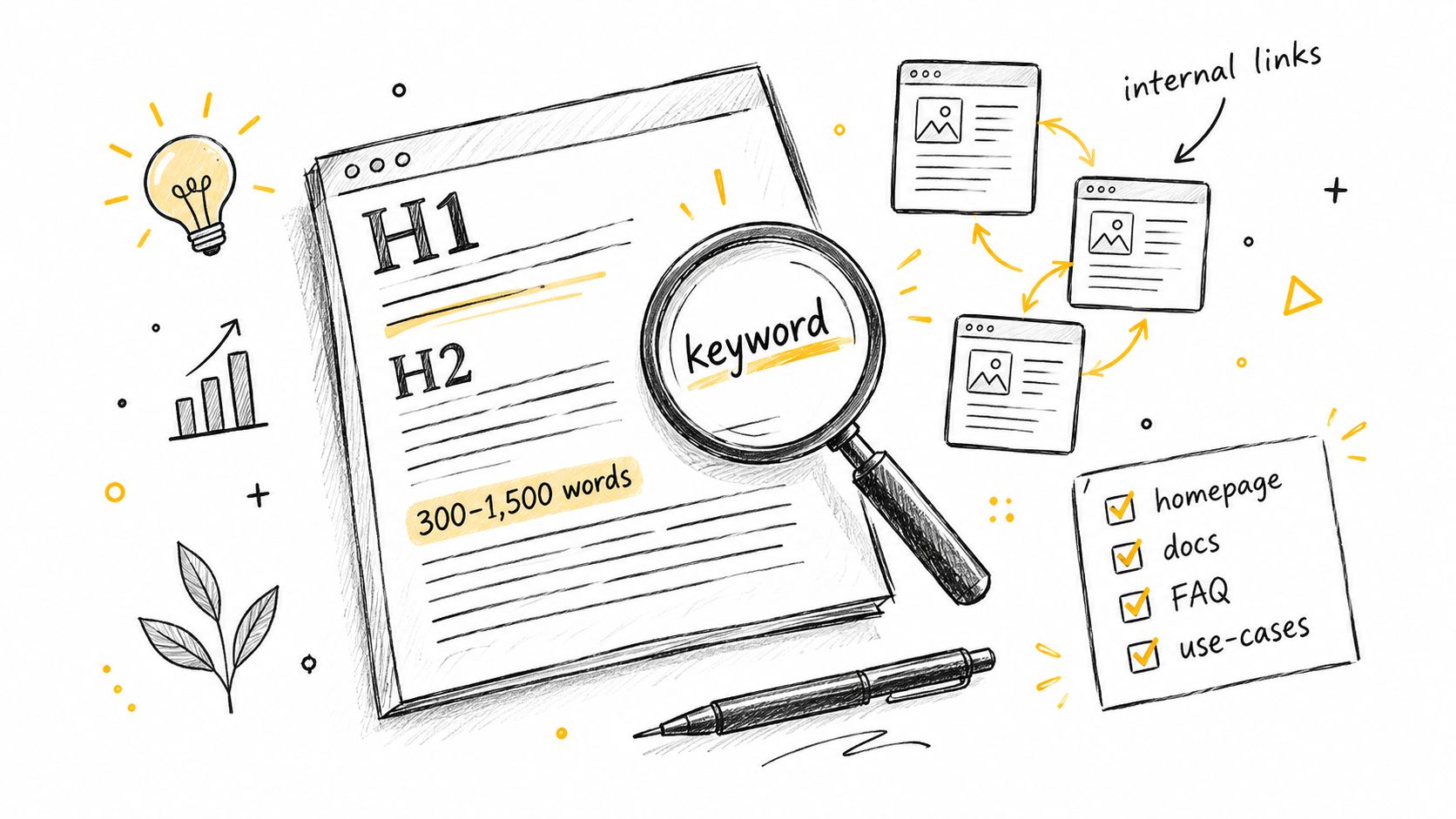
Use one clear H1 for the page's primary subject, then organize supporting points with logical H2 and H3 headings. Don't force a keyword into every heading. Explain the product in the vocabulary customers use, include relevant synonyms naturally, and add internal links where they help someone take the next step.
A working editorial sheet can include:
- Page purpose: What question or decision does this URL support?
- Primary phrase: Which search intent does the page serve?
- Title and description: Do they state a specific value proposition without sounding mechanical?
- Heading structure: Can a visitor scan the page and understand its organization?
- Internal links: Does the page connect to a related feature, use case, guide, or conversion path?
- Image alternatives: Do meaningful images have descriptive alt text, while decorative images use empty alt text?
Don't promise a fixed click-through rate or use a generic benchmark as a launch target. Search Console data will show how real users respond after the page earns impressions. For metadata QA, this collection of meta tag checkers can help identify missing fields, but human review still matters. A technically complete title can be bland, misleading, or poorly matched to the page.
6. Build High-Quality, Keyword-Aligned Content Before Launch
Launch with enough content to explain the product, prove its fit, support first use, and answer predictable objections. For an indie product, that usually means a focused homepage, feature or use-case pages, getting-started documentation, pricing, support information, and a concise FAQ. A smaller set of useful pages is easier to verify and maintain than a large library assembled at the last minute.
Page count creates a real trade-off. Near-duplicate URLs divide internal links and editorial effort, while weak pages give visitors little reason to stay or return. Combine overlapping topics when one URL can satisfy the intent clearly. Keep pages separate when they address a different audience, task, or buying question.
Before release, test each priority page against the first successful use:
- Product clarity: Can a new visitor identify the problem, intended audience, workflow, and expected outcome quickly?
- Buyer confidence: Are relevant use cases, limitations, integrations, pricing context, and implementation details clear?
- Independent setup: Can a user reach documentation, examples, setup steps, and troubleshooting without contacting the founder?
- Measurable next action: Is there one obvious route to try the product, sign up, compare options, or request help?
Screenshots, diagrams, demonstrations, and genuine examples earn their space when they clarify a workflow. Check them on mobile and confirm that the surrounding copy explains what the image contributes. After launch, watch which pages attract impressions, where users engage, and whether visitors reach the intended action. Update content based on those observations instead of publishing keyword variations on a fixed schedule.
Plan future articles around customer questions and use HumanText's guide to writing articles that rank to support the editorial process. IndieTool's free naming, content, and mission utilities can help an individual founder turn rough product ideas into a consistent publishing plan. These tools support distribution and planning, but they do not replace clear pages, accurate claims, or launch-day verification.
7. Set Up Google Search Console and Bing Webmaster Tools
Connect search-engine tools before announcing the site. Verify the production domain, assign access to the people responsible for launch, and document account ownership. DNS verification covers a domain and its subdomains, but use a method the team can maintain after handoff.
On launch day, work from a short verification queue rather than waiting for reports to fill. In Google Search Console, inspect the homepage, core product pages, pricing, documentation entry points, and announcement landing page. Confirm that each resolves correctly, uses the intended canonical URL, and remains eligible for indexing. Submit the production sitemap after cutover.
Bing Webmaster Tools adds another indexation channel and may expose crawl or rendering problems that deserve review. Neither platform promises rankings. Both provide evidence about access, indexing, and search presentation.
Record the results for each priority URL:
- Access: The page loads without server errors or redirect loops.
- Indexation: The URL is eligible for indexing and is not blocked by robots rules or
noindex. - Discovery: The sitemap contains the live address and does not include staging, duplicate, or outdated URLs.
- Visibility: Queries, impressions, clicks, and landing pages are monitored once data appears.
- Business value: Signups, demo requests, purchases, or another defined conversion are tracked alongside search activity.
A blank report immediately after release is usually a timing issue. New sites need to be crawled and processed, so early data may be limited. A blocked priority page, an accidental noindex, or incorrect sitemap URLs requires immediate action because each points to an implementation defect. Recheck after fixes, then keep both tools in the launch monitoring routine.
8. Prepare a Pre-Launch Link Building and Promotion Strategy
A backlink is useful when it helps a relevant audience discover the product and when the destination page deserves that recommendation. It isn't a substitute for indexable pages, clear positioning, or a working conversion path. Start promotion by preparing a short list of places where your potential users already pay attention, such as focused directories, industry publications, podcasts, communities, and founder networks.
Write the pitch before launch, but don't send the same generic request to everyone. Lead with a useful angle: a product lesson, a technical insight, an original workflow, a founder story, or a resource that improves an existing article. A relevant editorial mention usually makes more sense than an unrelated high-authority placement that sends no qualified visitors.
Link building is also a real budget consideration. In a 2025 survey of 518 SEO professionals, agencies allocated 32.1% of SEO budget to link building on average, while in-house teams allocated 36.03%. The same source reports that, among 800+ SEOs, 53.4% rated backlinks as having a moderate impact on rankings and 43.1% rated the impact as high. Those figures describe practitioner expectations, not a promise for an individual launch.
Use distribution as a measured channel
An IndieTool listing can give an indie product a relevant directory presence, a permanent do-follow backlink, distribution across its index, category, and alternatives pages, and founder-facing referral metrics. Pair that channel with outreach rather than treating it as the whole promotion plan. Track the destination URL, referral clicks, campaign source, and assisted conversions so you can distinguish visibility from useful traffic.
9. Configure Analytics, Conversion Tracking, and UTM Parameters
Analytics is useful only when it works on the live site. Install it on the production domain and test there. Staging checks can miss consent behavior, redirects, subdomains, payment flows, and production script errors.
Define the events that matter before writing tracking code. A SaaS product may need signup, activation, documentation interaction, and contact-request events. An ecommerce site may track product views, checkout steps, and completed purchases. Keep event names and parameters consistent so reports remain clear as the team changes.
Use UTM parameters to compare external promotion. For the relevant campaign, a stable convention could be utm_source=indietool, utm_medium=directory, and utm_campaign=launch. Apply equivalent naming to social posts, newsletters, partnerships, and outreach. Random parameters fragment reports and make channel comparisons harder.
Verify the live customer path
Run a complete test in a clean browser session:
- Page views: Open representative URLs and confirm visits appear in the live or debugging view.
- Forms: Submit valid and invalid entries. Check the intended event and the downstream notification.
- Cross-domain journeys: Test app, documentation, booking, and checkout domains when the product uses them.
- Consent behavior: Confirm analytics and marketing tools follow the configured privacy choices.
- Referral data: Follow tagged links through redirects and check that campaign parameters survive without unexpectedly overwriting the original source.
Record the expected result for each test, then repeat the checks after major tracking or site changes. This catches broken measurement before launch traffic makes the reports difficult to interpret.
IndieTool's founder dashboard can complement GA4 with listing views, visitors, and outbound clicks. Use it to assess distribution, while the primary analytics system connects acquisition with on-site behavior and business conversions. That separation helps show whether promotion creates qualified activity rather than merely more visibility.
10. Finalize Legal, Privacy, and Compliance Pages
Trust begins before a visitor enters an email address or starts a trial. Publish a readable privacy policy, terms of service, and cookie information before launch, then link them from the footer and relevant forms. The documents should describe your actual data flows, not just the default text produced by a generator.
Review every third-party service that touches visitor or customer data. Analytics, payment processing, email delivery, customer support, error monitoring, scheduling, and advertising tools may each affect your disclosures and consent design. If you change the stack after launch, update the relevant policy rather than allowing the documentation to drift.
Make consent and accessibility part of the experience
A cookie banner should let people understand the choices available to them. Don't load optional tracking before the required consent state has been established. Make the banner keyboard accessible, keep its language direct, and ensure that declining isn't hidden behind a confusing interface.
Legal and compliance review varies by jurisdiction and product category. A tool serving people in the European Union may need to address GDPR rights and processors. Products operating in regulated areas such as healthcare, finance, or legal services should get qualified legal advice instead of relying entirely on a template.
Also check the less dramatic trust signals:
- Contact details: Make sure email addresses, forms, and support routes work.
- Terms links: Keep them visible at signup, checkout, or other binding actions.
- Accessibility information: Provide a practical way to report an access issue.
- Content permissions: Confirm that testimonials, logos, screenshots, and images may be used.
- Policy ownership: Assign someone to review the documents whenever a new vendor or data use is introduced.
10-Point Website Launch SEO Checklist Comparison
| Strategy | Implementation Complexity (🔄) | Resource Requirements (⚡) | Expected Outcomes (📊⭐) | Ideal Use Cases | Key Advantages & Tips (💡) |
|---|---|---|---|---|---|
| Conduct Keyword Research and Competitive Analysis | 🔄 Medium, systematic research, periodic updates | ⚡ Tools (Ahrefs/SEMrush or free alternatives), 4–20 hrs initial | 📊 ↑Targeted visibility within 3–6 months; ⭐ high ROI when aligned with backlink | Pre-launch product-market fit and listing on directories (IndieTool) | 💡 Focus on long-tail keywords (100–500 searches, KD <40); map keywords to pages |
| Optimize Site Architecture and URL Structure | 🔄 Medium–High, planning + dev alignment | ⚡ Design time, dev effort for routing; 1–2 days planning, dev cost if complex | 📊 Faster crawlability, preserved link equity; ⭐ long-term maintainability | Sites expecting growth, e‑commerce, docs-heavy products | 💡 Keep URLs 3–4 levels deep; use hyphens; plan taxonomy before build |
| Create an SEO-Friendly XML Sitemap and Robots.txt | 🔄 Low, technical setup, careful validation | ⚡ Minimal dev effort; sitemap tools or framework features | 📊 Faster indexation (days vs weeks); ⭐ essential for discovery | New sites and launches that need rapid indexing | 💡 Auto-generate sitemaps; submit to Search Console; test robots.txt syntax |
| Implement Technical SEO Fundamentals (Core Web Vitals, Mobile, SSL) | 🔄 High, engineering work and ongoing monitoring | ⚡ Dev time, possible infra (CDN, image CDN), testing tools | 📊 Improved UX and rankings; ⭐ critical for conversion and search quality | SaaS, apps, JS-heavy sites, any site with significant traffic goals | 💡 Prioritize LCP/CLS/FID fixes; use CDN, modern image formats, Let's Encrypt |
| Optimize Meta Tags, Headers, and On-Page Elements | 🔄 Low, content/editor updates | ⚡ Low time cost; templates and QA tools (Yoast, Moz) | 📊 Higher CTR from SERPs; ⭐ high ROI for low effort | Launch pages (home, pricing, docs) and directory listings | 💡 Front-load keywords in title/H1; use unique meta templates; test CTR |
| Build High-Quality, Keyword-Aligned Content Before Launch | 🔄 Medium, writing + review cycles | ⚡ Significant time or outsourcing cost; content tools optional | 📊 Topical authority and internal linking; ⭐ sustains long-term organic growth | Products needing education, docs, or thought leadership | 💡 Write for users first; produce cornerstone pages (home, docs, FAQ) |
| Set Up Google Search Console and Bing Webmaster Tools | 🔄 Low, account setup and verification | ⚡ Minimal time; DNS access or tag manager required | 📊 Access to crawl/index data and errors; ⭐ indispensable for diagnostics | Every site at launch, required monitoring | 💡 Verify domain, submit sitemap within 24 hrs, check crawl stats weekly |
| Prepare a Pre-Launch Link Building and Promotion Strategy | 🔄 Medium, outreach planning and relationship work | ⚡ Time for outreach, PR assets; potential content creation cost | 📊 Compound ranking gains over 2–6 months; ⭐ amplifies directory backlink | Launches seeking traffic and brand awareness | 💡 Personalize outreach; prioritize niche relevance over raw DR |
| Configure Analytics, Conversion Tracking, and UTM Parameters | 🔄 Medium, tagging and QA | ⚡ GA4/GTM setup time, event instrumentation; analyst config | 📊 Measurable ROI and funnel insights from day one; ⭐ enables optimization | Any product tracking signups, trials, purchases | 💡 Use GTM for flexibility; standardize UTM naming; track 3 core goals at launch |
| Finalize Legal, Privacy, and Compliance Pages | 🔄 Low–Medium, legal review and updates | ⚡ Possible legal fees or template customization; maintenance ongoing | 📊 Trust signals and regulatory compliance; ⭐ prevents penalties and supports analytics | Sites with user data, EU/US audiences, or regulated industries | 💡 Use reputable generators for drafts; block tracking until consent; update when adding tools |
Turn Launch Checks Into a Monitoring Habit
The launch isn't complete when DNS changes or the deployment turns green. Immediately after release, verify that the live site loads over HTTPS, priority pages return successful responses, canonical URLs use the preferred host, robots.txt allows intended crawling, and the XML sitemap is submitted. Complete a real conversion path and confirm that analytics events, consent behavior, form delivery, and referral parameters work on the production domain.
During the first week, review Search Console and analytics frequently enough to catch implementation errors while they are still easy to isolate. Look for blocked pages, unexpected canonical choices, sitemap issues, server errors, missing events, broken links, and referral traffic that lands on the wrong destination. A ranking delay isn't automatically a failure, but a priority URL carrying a noindex directive is a clear defect.
After the initial launch window, move to a recurring operating rhythm. Crawl the site for broken internal links and orphaned pages, review performance and mobile usability, inspect new content before publication, and compare search landing pages with conversions. Watch backlink referrals as well as link counts. A link that sends qualified visitors can be more useful to your launch plan than a placement that only adds a row to a spreadsheet.
The depth of modern launch checklists reflects this operational reality. Public guides were organizing 43 to 150+ checks by 2026, across pre-launch, launch-day, and post-launch verification. One 2026 industry analysis stated that launches skipping key validation steps can lose 20% to 40% of baseline organic traffic in the first month when canonicals, robots directives, or schema are misconfigured. Treat that as a warning about preventable implementation risk, not as a forecast for your site.
IndieTool can support the discovery layer with a directory listing, programmatic distribution, promotional exposure, and a real-time founder dashboard. Its listing and backlink don't replace sound architecture, useful content, mobile readiness, consent controls, or reliable measurement. The strongest launch sequence combines all of them, then keeps improving the pages and channels that produce qualified visits.
Assign an owner for the next review, document the checks that failed, and schedule the next crawl before the launch excitement fades. SEO becomes a durable acquisition channel when a founder treats every release, content update, link, and conversion signal as part of the same operating system.
IndieTool gives indie founders a directory listing, permanent do-follow backlink, programmatic distribution, promotional opportunities, and real-time views, visitor, and outbound-click analytics to support a measurable launch. Submit your product through IndieTool, then connect the resulting referral activity with your own Search Console and analytics checks.