 Indietool
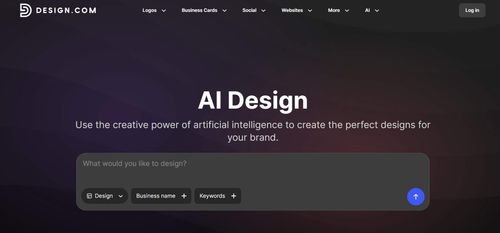
Design.com AI Logo Generator
Create Professional Logos with AI in Seconds
Design.com AI Logo Generator is an AI-powered logo maker that turns a business name or short description into customizable logo concepts, helping founders create a visual identity without starting from a blank canvas. It combines prompt-based generation, manual and AI-assisted editing, downloadable vector files, and matching brand templates so solo builders can move from an initial idea to usable business branding.
Indie hackers, solopreneurs, and early-stage startup founders who need a customizable launch logo and matching marketing assets without commissioning a full brand identity.
Design.com AI Logo Generator gives solo founders a practical path from a rough brand idea to an editable logo and coordinated launch assets. Its strongest advantage is keeping logo creation and everyday marketing design in one workflow.
Melanie Corrales
Thursday, November 19, 2026
83 / 100
Ahrefs Domain Rating measures backlink strength on a 0 to 100 scale.
- AI logo generation from a business name or short text prompt
- Manual and AI-assisted customization of colors, fonts, layouts, and styles
- PNG, JPG, SVG, EPS, and PDF logo exports
- Matching brand templates for business cards, social media, websites, and more
- Commercial usage licensing with optional exclusive and buyout licenses
- Combines prompt-based logo generation with manual and AI-assisted editing for greater control over the final design.
- Supports vector and print-ready formats, including SVG, EPS, and PDF, alongside PNG and JPG.
- Extends your logo into matching business cards, social graphics, websites, and other brand materials.
- Standard commercial usage rights do not mean exclusivity; exclusive and buyout licenses are separate options.
- Generated concepts still require careful selection and refinement to create a distinctive identity suited to your market.
Start by entering your business name and a short description of your product, audience, or preferred style, then browse the generated logo options and refine your prompt or keywords if the results feel off-brand. Choose a promising concept and use the browser or mobile editor to adjust its colors, fonts, layout, and styling through manual controls or AI-assisted edits, checking that it stays readable at small sizes. Once satisfied, review the available license and download options, export suitable web and print files, and apply your logo to matching business cards, social graphics, or website templates.
For indie founders, branding can become an expensive detour before a product even launches. What stands out to us about Design.com AI Logo Generator is the connected workflow: generate logo ideas, refine the design, and carry the same visual identity into business cards, social graphics, and a website. The browser-based editor supports changes to colors, fonts, and layouts, while SVG, EPS, and PDF exports make the result useful beyond a profile picture. Access to matching templates is particularly practical when you are handling both product development and marketing yourself. We would treat it as a fast route to a polished starting identity, rather than a substitute for bespoke brand strategy, and check the relevant license before committing to a design.
Real performance numbers in the last 30 days
Questions
Is Design.com AI Logo Generator free to use?
Design.com advertises a selection of free AI-generated logo templates with high-resolution and vector downloads. That does not establish that every generated logo, download, or license is free, so check the terms attached to your chosen design and any paid options before committing.
Can I customize my AI-generated logo and download vector files?
Yes. Design.com provides a browser-based, mobile-accessible editor for adjusting colors, fonts, layouts, and styles using manual controls and AI-assisted editing. Listed download formats include PNG, JPG, SVG, EPS, and PDF, with vector formats suited to scalable print and digital applications.
Can I use a Design.com AI-generated logo commercially, and will it be exclusive?
Design.com states that its AI-generated logos include a license for worldwide commercial use. Exclusivity is separate: optional exclusive and buyout licenses are available, including options to remove a logo icon from the library. Review the specific license terms, and do not assume that commercial usage rights or the platform's IP review guarantee trademark protection.
Best Design.com AI Logo Generator Alternatives & Similar Design Tools (2026)
View all| Tool | Category | Summary / Best For | Pricing | Profile |
|---|---|---|---|---|
| Design.com AI Logo Generator (Current) | Design | Design.com AI Logo Generator is an AI-powered logo maker that turns a business name or short description into customizable logo concepts, helping founders create a visual identity without starting from a blank canvas. It combines prompt-based generation, manual and AI-assisted editing, downloadable vector files, and matching brand templates so solo builders can move from an initial idea to usable business branding. | See site | — |
| apex protocol | Web3 | ApeX Protocol: Decentralized Perpetual Exchange and Trading Platform | See site | View |
| Viral Video AI | Ai | Viral Video AI: Viral AI Video Generator with Trend Templates | See site | View |
| talat | Productivity | The local transcription app for meetings, dictation, and recordings | See site | View |
| AI Attractiveness Test | Ai | AI Attractiveness Test – How Attractive Am I? | See site | View |
| Deskhall | Productivity | Organize your people and AI agents in any work environment | See site | View |
| Tavoa AI | Ai | Tavoa AI | Imagine Anything. Create Anything with AI | See site | View |
 apex protocolApeX Protocol: Decentralized Perpetual Exchange and Trading Platform
 Viral Video AIViral Video AI: Viral AI Video Generator with Trend Templates
 talatThe local transcription app for meetings, dictation, and recordings
 AI Attractiveness TestAI Attractiveness Test – How Attractive Am I?
 DeskhallOrganize your people and AI agents in any work environment
 Tavoa AITavoa AI | Imagine Anything. Create Anything with AI