 Indietool
talat
The local transcription app for meetings, dictation, and recordings
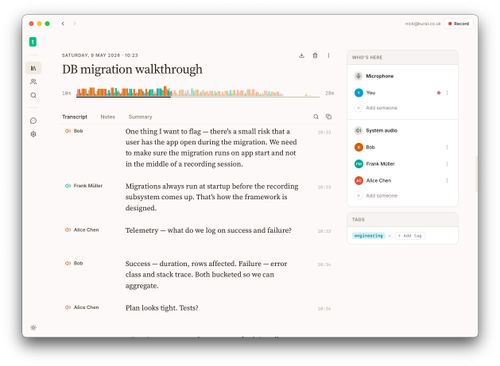
talat is a privacy-first transcription and AI meeting notes app for Mac and Windows that turns live conversations, voice dictation, and imported recordings into searchable text on your computer. Built for people who want useful meeting records without sending audio to external servers, it combines on-device speech recognition, speaker identification, and summaries through a built-in local model or optional cloud AI providers.
Solo founders, indie builders, and consultants who need private transcripts and actionable notes from customer interviews, client calls, and everyday voice dictation.
talat brings meeting transcription, dictation, and recording imports into one local-first desktop app. It is a strong fit for founders who want searchable notes and useful summaries without making cloud processing the default.
Mike Franklin
Wednesday, November 18, 2026
- Real-time, on-device meeting transcription with dual-stream audio capture and speaker identification.
- Global-hotkey dictation with automatic text insertion, local history, and optional AI cleanup.
- Audio and video imports with transcription, custom vocabulary, and AI-generated notes.
- Built-in local AI model for summaries, action items, and chapters, with optional external model connections.
- Calendar integration, automatic call detection, and exports to Markdown, Obsidian, PDF, webhooks, and MCP-aware assistants.
- On-device transcription and a built-in local AI model support a workflow that keeps audio and processing on your computer.
- Combines meeting recording, system-wide dictation, and audio or video imports in one app.
- Offers practical exports, MCP connectivity, and monthly, yearly, or one-time payment options.
- Outlook calendar integration is currently experimental.
- Using optional cloud AI providers means that part of the workflow is no longer entirely local.
Download talat for Mac or Windows and start with the 10 free hours, then connect your calendar if you want scheduled meetings ready to record and configure automatic recording for supported calls. Capture a meeting with live transcription and speaker identification, use the global hotkey to dictate into a focused app, or import an existing audio or video file for transcription. Choose the built-in local model for AI notes when you want processing to stay on your computer, review the transcript, summary, and action items, then export your results to Markdown, Obsidian, PDF, or a connected workflow.
What stands out to us about talat is that local processing is the foundation, not an optional privacy setting. For founders handling customer interviews, product discussions, or sensitive client calls, keeping transcription on their own computer offers a practical alternative to cloud-based meeting assistants. It also covers more of the working day than a dedicated meeting recorder: you can dictate into other apps, import existing recordings, and export notes to Markdown, Obsidian, or PDF. Calendar integration and automatic call detection reduce manual setup, while speaker identification helps make transcripts easier to follow. We particularly like the choice between a built-in local AI model and external providers, plus monthly, yearly, or one-time payment options. Just remember that choosing cloud AI changes where that part of your workflow runs.
Real performance numbers in the last 30 days
Questions
Does talat keep my meeting recordings and transcripts private?
talat transcribes audio directly on your computer and stores recordings and transcripts locally rather than sending audio to its servers. It also includes a built-in local model for AI notes. If you choose an optional cloud AI provider, that AI processing happens outside your device, so use the local model when you need an entirely on-device workflow.
Can I try talat for free, and is there a one-time purchase option?
Yes. talat offers 10 hours free with no account required. After the trial, you can choose monthly, yearly, or one-time payment options; check the current pricing for the cost and terms of each.
Can talat transcribe existing recordings and work with my meeting apps?
Yes. talat can record meetings from Zoom, Google Meet, Microsoft Teams, FaceTime, and other conferencing apps, with automatic call detection listed for Zoom, Teams, and Meet. You can also import existing audio or video files in WAV, MP3, M4A, MP4, FLAC, OGG, and AAC formats, then generate transcripts, speaker labels, summaries, and action items.
Best talat Alternatives & Similar Productivity Tools (2026)
View all| Tool | Category | Summary / Best For | Pricing | Profile |
|---|---|---|---|---|
| talat (Current) | Productivity | talat is a privacy-first transcription and AI meeting notes app for Mac and Windows that turns live conversations, voice dictation, and imported recordings into searchable text on your computer. Built for people who want useful meeting records without sending audio to external servers, it combines on-device speech recognition, speaker identification, and summaries through a built-in local model or optional cloud AI providers. | See site | — |
| Viral Video AI | Ai | Viral Video AI: Viral AI Video Generator with Trend Templates | See site | View |
| AI Attractiveness Test | Ai | AI Attractiveness Test – How Attractive Am I? | See site | View |
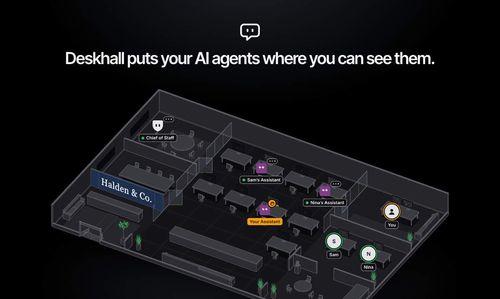
| Deskhall | Productivity | Organize your people and AI agents in any work environment | See site | View |
| Tavoa AI | Ai | Tavoa AI | Imagine Anything. Create Anything with AI | See site | View |
| aSERP | Ai | Brand visibility, competitive intelligence and MCP-powered insights for AI search. | See site | View |
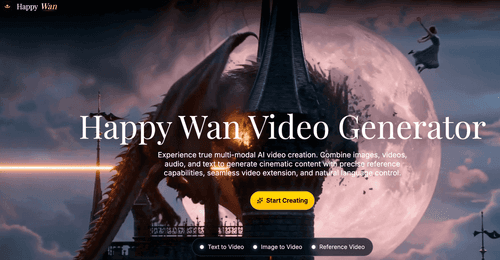
| Happy Wan | Ai | Happy Wan — Multimodal AI Video Generation | See site | View |
 Viral Video AIViral Video AI: Viral AI Video Generator with Trend Templates
 AI Attractiveness TestAI Attractiveness Test – How Attractive Am I?
 DeskhallOrganize your people and AI agents in any work environment
 Tavoa AITavoa AI | Imagine Anything. Create Anything with AI
 aSERPBrand visibility, competitive intelligence and MCP-powered insights for AI search.
 Happy WanHappy Wan — Multimodal AI Video Generation