Indietool
10 Quick Email Generator Tools and Templates for 2026
A founder can lose an afternoon to one blank draft. The follow-up is already overdue, the recipient is waiting, and the message needs to sound personal without becoming a five-paragraph essay. A quick email generator removes that blank-page problem. It can turn a few notes into a usable subject line, opening, request, and close before momentum disappears.
That doesn't make the first draft ready to send. The tool won't know which customer detail is accurate, whether the timing is right, or how direct your relationship allows you to be. Human review still matters for facts, privacy, tone, and the small details that make an email sound like it came from you.
This list compares ten tools by their place in a real sending workflow. Some generate replies inside the inbox. Others connect drafting to a CRM, sequence, mail merge, campaign, or low-cost browser workflow. Each entry includes a practical customization routine and a sample email for a common use case. For broader outreach structures, compare these B2B email outreach templates before choosing a generator.
Table of Contents
- 1. AI Email Generator by IndieTool
- 2. Superhuman Mail
- 3. Shortwave
- 4. HubSpot AI Email Writer
- 5. Lavender
- 6. WriteMail.ai
- 7. GMass with AI
- 8. Hoppy Copy
- 9. Copy.ai
- 10. Rytr
- Top 10 Quick Email Generators, Feature Snapshot
- Choose the Generator That Fits Your Sending Workflow
1. AI Email Generator by IndieTool
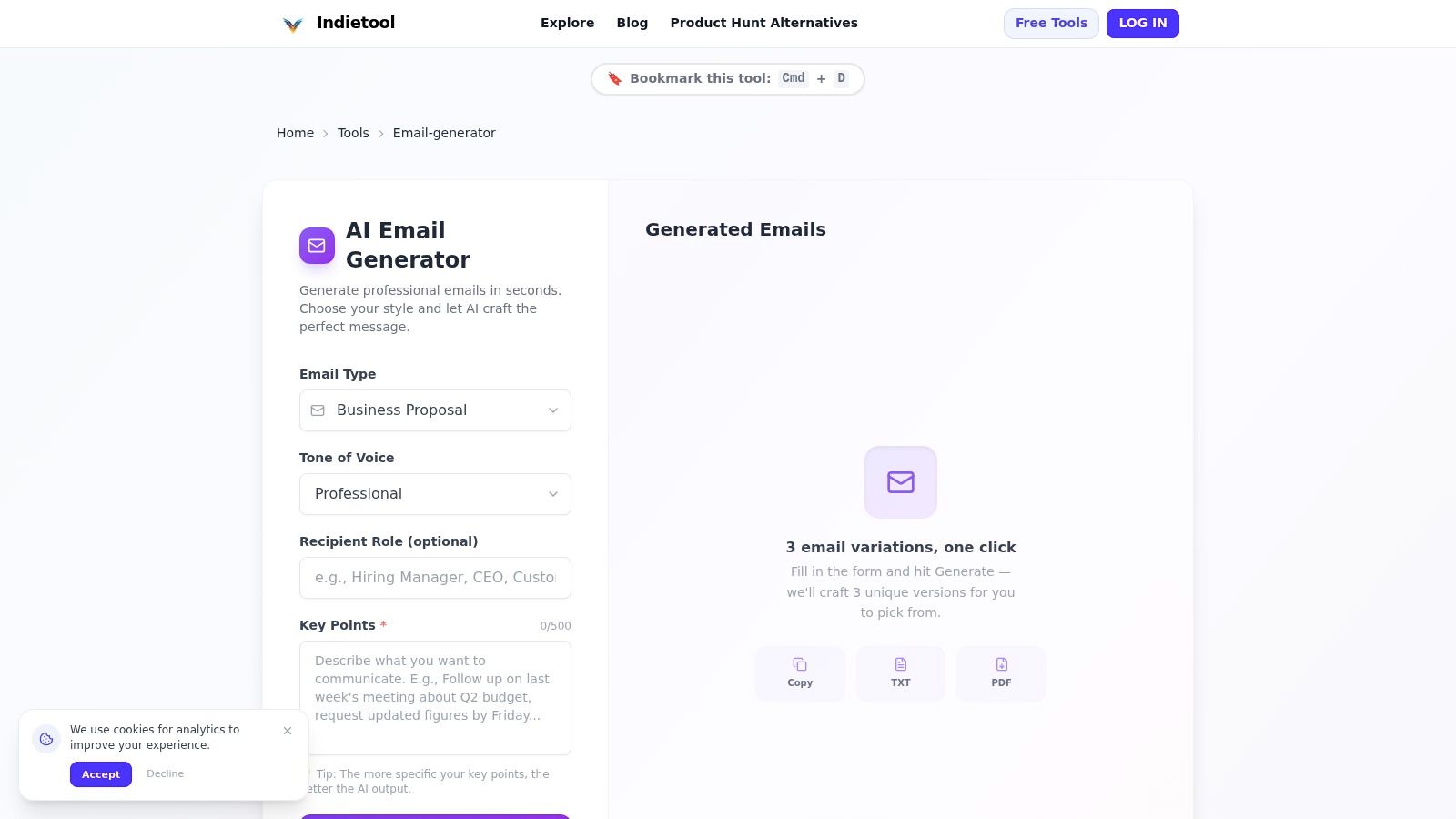
AI Email Generator by IndieTool is the best fit for a founder who wants a fast, separate drafting workspace rather than another inbox extension. Add the key details, choose an email type such as cold outreach, follow-up, introduction, or meeting request, select a tone, and the tool returns three draft variations. You can copy a version or download it as TXT or PDF.
That three-option approach is useful when the problem isn't only writing. It lets you compare a direct version with a warmer or more formal one, then keep the structure that sounds closest to your business. The trade-off is manual transfer. There isn't a built-in CRM or email-client handoff, so you'll still paste, edit, and send from your normal system.
A short customization routine
Before generating, add the recipient's role, your reason for contacting them, one relevant detail, the desired next step, and anything the tool must not claim. Then compare all three drafts. Remove generic praise, replace broad statements with a specific observation, and check every factual sentence before copying the final version.
The workflow suits indie founders and small teams that need consistency without setting up a full sales stack. It also works well for follow-ups, where the hard part is finding a concise reason to restart a conversation.
Practical rule: Use the generator for structure and alternatives. Use your own judgment for relevance, factual accuracy, and the final line.
Sample meeting request
Subject: A short conversation about [specific project]
Hi [Name],
I noticed that [specific observation]. We're building [brief description], which may help with [relevant problem]. Would you be open to a short conversation next week to see whether it fits your current priorities?
Best,
[Name]
For more guidance on turning a generated draft into credible B2B email copy, pay attention to the recipient's situation rather than adding more adjectives. IndieTool also explains the workflow in its guide to an email generator for business.
2. Superhuman Mail
Superhuman Mail is designed for people who want generation to happen where the conversation already lives. You can prompt a reply inside the inbox, use AI to summarize a thread, and set follow-up reminders without moving text between a web tool and your mail client. Its voice-oriented drafting is more useful for replies than for totally cold messages because the surrounding thread supplies context.
The main advantage is reduced friction. You read the message, decide what you want to say, and generate a draft in the same workspace. Keyboard workflows, search, prioritization, and thread summaries support the triage problem around writing, not just the writing itself.
The limitation is scope. If you only need an occasional email draft, the broader suite may be more than you need. The public page displays pricing in EUR, so confirm current billing for your location before committing. Business-tier value and current plan differences should also be checked directly on the product page.
Customization routine and sample
Give the draft a clear instruction such as “accept the proposed time, keep it warm, and ask for the agenda.” Then edit the opening so it responds to the actual thread instead of repeating the sender's words.
Sample reply
Subject: Re: Product walkthrough
Hi [Name],
Thanks for sending this over. The proposed time works for me. I'd like to focus on the onboarding flow and how the team handles account handoffs.
Best,
[Name]
Superhuman is strongest when inbox speed matters more than campaign management. It won't replace a CRM or sequence platform, but it can make everyday replies much easier to finish.
3. Shortwave
Shortwave fits a Gmail-compatible workflow where context-aware replies matter. Its AI can produce quick responses, summarize conversations, autocomplete text, search the mailbox, and analyze attachments. That makes it a practical option for someone who spends more time responding to existing mail than composing outbound campaigns.
The tool also includes read receipts, link tracking, snippets, reminders, and CRM auto-BCC. Those features matter because a quick email generator is only useful if the message moves cleanly from draft to follow-up. Shortwave works best when you adopt it as your primary email client. Keeping it as a side tool limits the context it can use and creates another place to manage work.
Higher-tier plans carry the heavier AI capabilities, so review the current plan details and AI usage guidance before choosing. The product is more than a writing assistant, which is a strength for an active inbox and unnecessary complexity for a simple one-off message.
Customize for context, not just tone
Paste or reference the relevant thread, state the decision you want from the recipient, and specify what should remain unchanged. For an attachment-based reply, verify that the generated summary reflects the actual document before accepting it.
Sample project update
Subject: Re: Homepage review
Hi [Name],
Thanks for the notes. I've incorporated the changes to the headline and navigation. I'm reviewing the remaining comments now and will send an updated version for approval.
Best,
[Name]
Shortwave is a good choice when the inbox is the workflow. It is less compelling if you want a standalone generator that creates drafts without changing how you read email.
4. HubSpot AI Email Writer
HubSpot AI Email Writer is the logical choice when contacts, sending, segmentation, and measurement already happen in HubSpot. It can draft sales outreach and marketing messages, suggest subject lines, adjust tone and length, and work with templates and CRM context.
The important distinction is workflow continuity. A marketer can write, personalize with CRM information, send, and measure without exporting a draft to another platform. That connection is more valuable than a clever paragraph when a team needs repeatable campaigns and contact history in one place.
The trade-off is dependence on the HubSpot environment. If your contacts and sending process live elsewhere, much of the advantage disappears. Some capabilities are labeled beta, and the product changes frequently, so check what is available in your specific Hub and plan.
Customization routine and sample
Start with the contact's lifecycle stage, the offer, and the single action you want. Review every personalization token, especially company names, roles, and previous interactions. Then compare the generated email against the contact record before sending.
Sample sales follow-up
Subject: Next step for [Company]’s [project]
Hi [First name],
Thanks for discussing [specific challenge]. Based on what you shared, [product or service] could help with [relevant outcome]. Would a short follow-up next week be useful to review the next step?
Best,
[Name]
HubSpot is strongest for CRM-bound teams. It isn't the best reason to adopt HubSpot by itself, but it is a practical writing layer once the rest of the workflow is already there.
5. Lavender
Lavender combines drafting with sales coaching. You can start with bullets, receive suggestions about personalization and structure, and review a score based on patterns in sales emails. That makes it more suitable for cold outreach than a generic writing assistant that only returns polished prose.
The coaching layer is the point. A generator might produce a professional paragraph that says very little. Lavender pushes the user to clarify the relevance, reduce unnecessary wording, and make the requested action easier to understand. That adds an editing step, but the step is useful when the email needs to earn a response rather than merely sound finished.
Pricing and plan tiers change, so confirm current details on the product site. The tool also makes more sense for prospecting teams than for personal replies, internal updates, or simple scheduling notes.
A practical prospecting routine
Write the prospect's problem in one sentence, add one verified reason your message is relevant, and define a low-friction next step. Generate the draft, review the coaching, and rewrite any line that sounds like a claim about the prospect's business without evidence.
Sample cold email
Subject: Question about [specific workflow]
Hi [Name],
I saw that [specific observation]. Teams managing [relevant workflow] often need a simpler way to [problem]. We help with [plain description]. Is improving this area on your agenda this quarter?
Best,
[Name]
Lavender is a better fit for a sales rep who wants feedback than for a founder who only needs a quick sentence. Its value comes from the review loop, not from one-click generation alone.
6. WriteMail.ai
WriteMail.ai keeps the drafting process close to Gmail and Outlook. Browser extensions and an Outlook add-in provide controls for mood, formality, length, and style, while quick replies, name verification, history, reuse, and sending support a compact inbox routine. An API is available for automation, but the product is not built as a bulk campaign system.
The direct workflow is the main advantage. A founder can open a message, set the desired tone and length, generate a draft, preview it, verify the recipient name, and hand it back to the mail client. That is faster than switching tabs when the message is routine but still needs a little care.
The free plan is limited to 5 AI emails per month, according to the product plan information. Treat that as a small trial allowance rather than a campaign workflow. Paid tiers use monthly email caps, so occasional users should compare the cap with their real sending habits.
Customize with controls, then edit manually
Set the length before generating. Use a specific instruction for the action, such as “ask for approval by Friday,” rather than relying on a broad “professional” setting.
Sample internal request
Subject: Approval needed for [asset]
Hi [Name],
Could you review the attached [asset] and confirm whether it's ready to publish? The main points to check are [point one] and [point two]. If everything looks good, I'll move it to the next step.
Thanks,
[Name]
WriteMail.ai suits individuals who want minimal setup and controlled drafts inside an existing inbox. It won't handle sequencing, bulk sending, or CRM reporting by design.
7. GMass with AI
GMass is built around Gmail, Google Sheets, mail merge, and outreach operations. Its AI can help create email bodies, subject lines, and opening lines from spreadsheet data, while the platform handles automated follow-ups and tracking. That makes it a sequence-oriented tool rather than a personal reply assistant.
The workflow is straightforward for a team already using Gmail and Sheets. Keep recipient information and personalization fields in the spreadsheet, generate or refine the message, and send from the Gmail environment. Built-in deliverability helpers, tracking, and follow-up features extend the tool beyond drafting.
The limitation is that GMass isn't a CRM. It won't give you unified multi-inbox relationship management, and your spreadsheet can become the operational center unless another system owns the contact record. Warm-up features and pricing have changed over time, so verify current details before building a process around them.
Customization routine and sample
Keep the generic body short. Put the recipient-specific observation, role, and problem in separate spreadsheet fields. Generate a first draft, inspect several populated versions, and check that the personalization fields don't create awkward grammar.
Sample outreach message
Subject: [Company] and [specific opportunity]
Hi [First name],
I noticed [personalized observation]. We help [type of company] with [specific problem]. Would it be useful to compare how you're handling this today?
Best,
[Name]
GMass is a strong match for Gmail plus Sheets. It is less suitable when the team needs a complete CRM, complex account history, or shared reply ownership.
8. Hoppy Copy
Hoppy Copy is an email-marketing-first writer for newsletters, promotions, subject lines, and drip sequences. Its templates help a founder move from campaign idea to usable copy without starting with a blank document. Brand voice memory and competitor email monitoring add context for teams that publish regularly.
This is a campaign workspace, not an inbox reply tool. The advantage is that the interface is organized around marketing formats, so a newsletter, launch announcement, and sequence can follow different structures. Subject-line tools and spam-check style aids also support the editing process, although the final review still belongs with the sender and the email service provider.
Pricing and tiers have shifted, so verify live details at checkout. Hoppy Copy also isn't a CRM. Pair it with the platform that stores subscribers, sends campaigns, and reports results.
Customize the campaign before the copy
Define the audience, offer, promise, proof, and one call to action. Add the words your brand uses and the phrases it avoids. Generate the campaign, then cut repeated benefits and check that the subject line matches the actual content.
Sample launch email
Subject: A simpler way to manage [problem]
Hi [First name],
We've launched [product], a tool for [audience] that helps with [specific problem]. You can use it to [primary action] without [common frustration]. Try it here and tell us what you think.
Best,
[Name]
For founders building a repeatable marketing operation, Hoppy Copy can reduce campaign drafting time. For one personal follow-up, it may feel heavier than necessary. IndieTool's guide to startup marketing tools is useful when the writing tool is only one part of the launch stack.
9. Copy.ai
Copy.ai works well when email generation needs to become a repeatable team process. Its workflows and templates can standardize steps, preserve brand voice, create multiple outputs, and connect with Gmail, CRMs, Zapier, Make, and other systems. That gives it a different role from an in-inbox assistant.
The platform is most useful when someone designs the workflow first. For example, a team can define the inputs needed for a prospect email, generate subject lines and bodies, route the result for review, and push approved content into the next system. Ad-hoc drafting may be faster elsewhere because workflow setup adds structure before it saves time.
Seat-based plans and workflow credits can make the model harder to understand at first. Run a small real job before estimating usage. The credit system matters most when you generate at team scale, not when you write one occasional message.
Customization routine and sample
Create required fields for audience, objective, offer, proof, objection, and call to action. Add a brand voice example, then review the first batch for repeated wording before allowing the workflow to run more broadly.
Sample partner introduction
Subject: Introduction to [Company] and [partner]
Hi [Name],
I'd like to introduce you to [partner], who works with teams on [relevant problem]. I thought the connection could be useful because [specific reason]. I'll leave you both to continue from here.
Best,
[Name]
Copy.ai is a good choice when multiple people need the same quality-control process. It is not automatically the fastest option for a single founder writing an isolated reply.
10. Rytr
Rytr is a lightweight option for founders who want a low-friction email use case, browser extension, and tone controls without adopting a sales or campaign platform. It can support everyday drafting, multilingual generation, and additional writing tasks in one simple interface. Paid plans also include plagiarism checks.
The appeal is simplicity. Open the tool, choose the email use case and tone, add the basic context, and edit the result. That works for thank-you notes, scheduling messages, introductions, and internal communication where advanced analytics aren't required.
Rytr offers an always-free tier, but check the current limits before depending on it for regular use. It has less domain-specific coaching than a sales tool such as Lavender, and it doesn't provide the sending analytics of a CRM or email service. You'll need your own email platform for delivery, tracking, and contact management.
Customize for a natural first draft
Give Rytr the recipient relationship, the desired result, and one concrete detail. Ask for a short version first. Then rewrite the first sentence and closing yourself, since those lines carry much of the personal voice.
Sample thank-you email
Subject: Thank you for [specific help]
Hi [Name],
Thank you for taking the time to [specific action]. Your advice on [detail] gave me a clearer next step, and I'm going to apply it as we work on [project].
Best,
[Name]
Rytr is a practical budget-first choice for everyday messages. It won't coach a complex sales motion or replace the measurement layer in your email stack, but it can get a usable draft on the screen quickly.
Top 10 Quick Email Generators, Feature Snapshot
| Product | ✨ Core features | ★ Quality & UX | 💰 Pricing & value | 👥 Target audience | 🏆 Standout / USP |
|---|---|---|---|---|---|
| AI Email Generator – Write Professional Emails in Seconds (IndieTool) | 3 instant draft variations; selectable types & tones; TXT/PDF export | ★★★★, web-based, fast; manual copy/paste | 💰 Free, part of IndieTool toolkit | 👥 Indie founders, makers, small teams | 🏆 Free, instant 3-variant drafts inside IndieTool suite |
| Superhuman Mail | In-inbox AI drafts in your voice; summaries; split inbox; apps & extension | ★★★★★, ultra-fast, low-friction inbox UX | 💰 Premium (higher-cost; EUR billing) | 👥 Power users & professionals | 🏆 Best in-inbox voice-matched drafting & workflows |
| Shortwave | One-click AI replies; predictive autocomplete; AI search & attachment analysis | ★★★★, Gmail-compatible, productivity-first | 💰 Mid, heavier AI on Premier/Max tiers | 👥 Gmail adopters, productivity seekers | 🏆 Strong productivity features + attachment analysis |
| HubSpot AI Email Writer | AI drafts with CRM tokens; subject ideas; campaign send & analytics | ★★★, integrated but platform-dependent | 💰 Variable, included in HubSpot tiers | 👥 Sales & marketing teams using HubSpot | 🏆 End-to-end write → send → measure inside CRM |
| Lavender | Bullet-to-draft; real-time scoring; tone & structure coaching | ★★★★, coaching-focused for conversion | 💰 Mid, tiered; pricing changes often | 👥 Sales teams & cold outreach specialists | 🏆 Email scoring + coaching to boost reply rates |
| WriteMail.ai | Gmail/Outlook extension; tone/length sliders; one-click send; history | ★★★, fast inbox control; limited free use | 💰 Low-cost; free plan (5 AI emails/mo) | 👥 Founders & individuals wanting direct-inbox drafting | 🏆 Simple tone controls and one-click send in inbox |
| GMass (with AI) | Mail-merge from Sheets; auto follow-ups; tracking; built-in AI drafts | ★★★★, scale-focused in Gmail | 💰 Affordable for Gmail users; pay-as-you-go | 👥 Teams using Gmail + Google Sheets for outreach | 🏆 Scalable mail-merge with integrated AI drafting |
| Hoppy Copy | Templates for campaigns/newsletters; subject testing; competitor tracking | ★★★, campaign-first UX | 💰 Mid, tiered; verify live pricing | 👥 Founders doing newsletters & marketing campaigns | 🏆 Email-marketing-first writer with competitor monitoring |
| Copy.ai | Email workflows & templates; integrations; bulk workflow credits | ★★★★, good for teams & repeatable workflows | 💰 Seat/credit-based; scalable plans | 👥 Teams needing repeatable bulk generation | 🏆 Workflow-driven bulk generation + integrations |
| Rytr | Email template use-case; Chrome extension; multilingual support | ★★★, lightweight, quick to draft | 💰 Very affordable; always-free tier available | 👥 Budget-conscious founders & solo users | 🏆 Low-cost, pragmatic drafting with in-context extension |
Choose the Generator That Fits Your Sending Workflow
The right quick email generator depends less on the quality of its landing page and more on where the message begins and ends. If you read and answer everything in one inbox, Superhuman, Shortwave, and WriteMail.ai reduce copy and paste. If your contacts already live in a CRM, HubSpot keeps drafting close to personalization, sending, and reporting. If you send sequences from Gmail and Sheets, GMass is the more natural fit.
Campaign writers solve a different problem. Hoppy Copy helps shape newsletters and sequences. Copy.ai is better suited to repeatable team workflows and connected automations. Lavender is useful when outbound sales quality needs coaching, not just faster wording. Rytr and IndieTool are simpler choices when a founder wants a draft without committing to a larger operating system.
Your customization burden should decide the next cut. A tool that creates a polished but generic message can cost more time than a plain draft that preserves the right facts. Microsoft's controlled workplace research found that Copilot-assisted emails were rated 18% clearer, 19% more concise, and 25% higher on “couldn't have said it better myself” than comparison emails, based on a study involving 31,000 knowledge workers across 31 countries. The benchmark is useful because it points toward editorial outcomes, not generation speed alone. Read the Microsoft workplace research for the methodology and context.
Trust also limits how far automation should go. One industry survey found that 64% of email-marketing respondents use AI somewhere in their workflow, while only 1.1% use it to start a new email from scratch. Respondents ranked confidence that output is accurate and safe to send above better integration, which supports a constrained, editable workflow rather than blind generation. The email marketing AI survey gives that adoption gap useful product context.
Before choosing, ask three questions:
- Where is the email sent? Inside Gmail, Outlook, a dedicated client, a CRM, or an email service provider?
- How much context exists already? A thread, CRM record, spreadsheet row, or only a few bullet points?
- How much editing is acceptable? A short reply may need one pass. A cold campaign needs verification, personalization, and review across multiple recipients.
Run a short trial with one real outreach email and one real follow-up. Measure the time from blank page to approved draft, not the time to generate the first version. Keep the tool that removes the most editing without flattening your voice or weakening the recipient-specific detail. If it produces fast copy that you still have to rebuild, it isn't saving time.
Privacy belongs in that trial as well. Before pasting customer names, confidential plans, or sensitive business information, check retention, deletion, training use, third-party sharing, and access controls. A 2025 survey of 1,000 U.S. consumers found that 58% considered transparency about data collection important, 54% valued no third-party sharing, and 52% wanted control over access to personal information according to Litmus. Redact sensitive details or use placeholders when the tool's data handling isn't clear.
The best generator is the one that fits the message's path. Choose the inbox tool for replies, the CRM tool for managed contacts, the sequence tool for outbound volume, and the standalone or budget option for occasional drafting. Then keep a human in the approval loop. That is where speed becomes useful instead of risky.
IndieTool combines free utilities such as an AI email generator with launch and distribution tools for indie founders, makers, and small teams. Use the generator to create three draft variations, then explore the directory and launch toolkit at IndieTool to give your product more discoverability.