Indietool
Packaging Design AI: A Practical Guide for Creators
You've got the product, the name, and perhaps even a first batch waiting in a warehouse. Then the printer sends over a dieline, you open it in Illustrator, and the launch suddenly feels much more complicated. Which panel should carry the product story? Will the colours remain readable under retail lighting? Where should the barcode go, and can the box protect what's inside without looking oversized?
Packaging design AI can help at exactly that point. It won't turn an untested concept into a production-ready pack by itself, but it can give you visual directions, layout options, structural ideas, and practical questions to answer. Used well, it acts less like an autonomous designer and more like a fast co-pilot for creative and operational decisions.
Table of Contents
- The Moment Every Creator Hits a Blank Dieline
- What Packaging Design AI Actually Means
- The Four-Stage AI Packaging Workflow
- Where AI Helps and Where It Still Falls Short
- The Main Types of Packaging AI Tools
- Why Hybrid Human-AI Designs Win on the Shelf
- Running Your First AI-Assisted Packaging Project
- Where Packaging Design AI Is Headed Next
The Moment Every Creator Hits a Blank Dieline
The dieline is open on your laptop. It has cut lines, fold lines, glue tabs, and several panels that look almost identical until you try to place real content on them. Your product is a small-batch chilli oil, a cosmetic serum, or a subscription-box accessory, but the blank template gives you no clue how the finished pack should feel in someone's hand.
You start with colour. A warm orange feels energetic, but may compete with other products on a crowded shelf. A pale neutral looks premium, but could disappear online or under harsh shop lighting. Then comes the copy. Your front panel needs a name, a reason to believe, and enough product information to make the purchase feel safe, all within a limited space.
The structural choice creates another layer of uncertainty. A folding carton may look elegant, but a mailer could survive fulfilment better. A sleeve may reduce printed surface area, yet leave the inner product exposed. A first-time founder can spend days making decisions that an experienced packaging team handles almost instinctively.
That's where an online design resource for indie creators can sit alongside packaging-specific AI tools. You can ask an image model to explore visual territories, use a layout system to test panel hierarchy, and bring structural questions to a packaging specialist before committing to print.
Practical rule: Use AI to replace the blank page, not the person responsible for the final pack.
A useful first prompt might describe the product, audience, shelf position, pack dimensions, substrate, and brand personality. The output doesn't need to be correct. It needs to be specific enough for you to react to. “This feels too clinical.” “The logo is getting lost.” “That format won't protect the bottle.” Those reactions are valuable design inputs.
The strongest process begins with a founder who owns the decisions. AI expands the range of possible answers, while human judgement decides which answers deserve further work.
What Packaging Design AI Actually Means
Packaging design AI is not one tool or one output. It's a layer of software that can support visual ideation, artwork layout, structural exploration, and operational checking. The easiest way to understand it is to separate the work into three practical jobs.
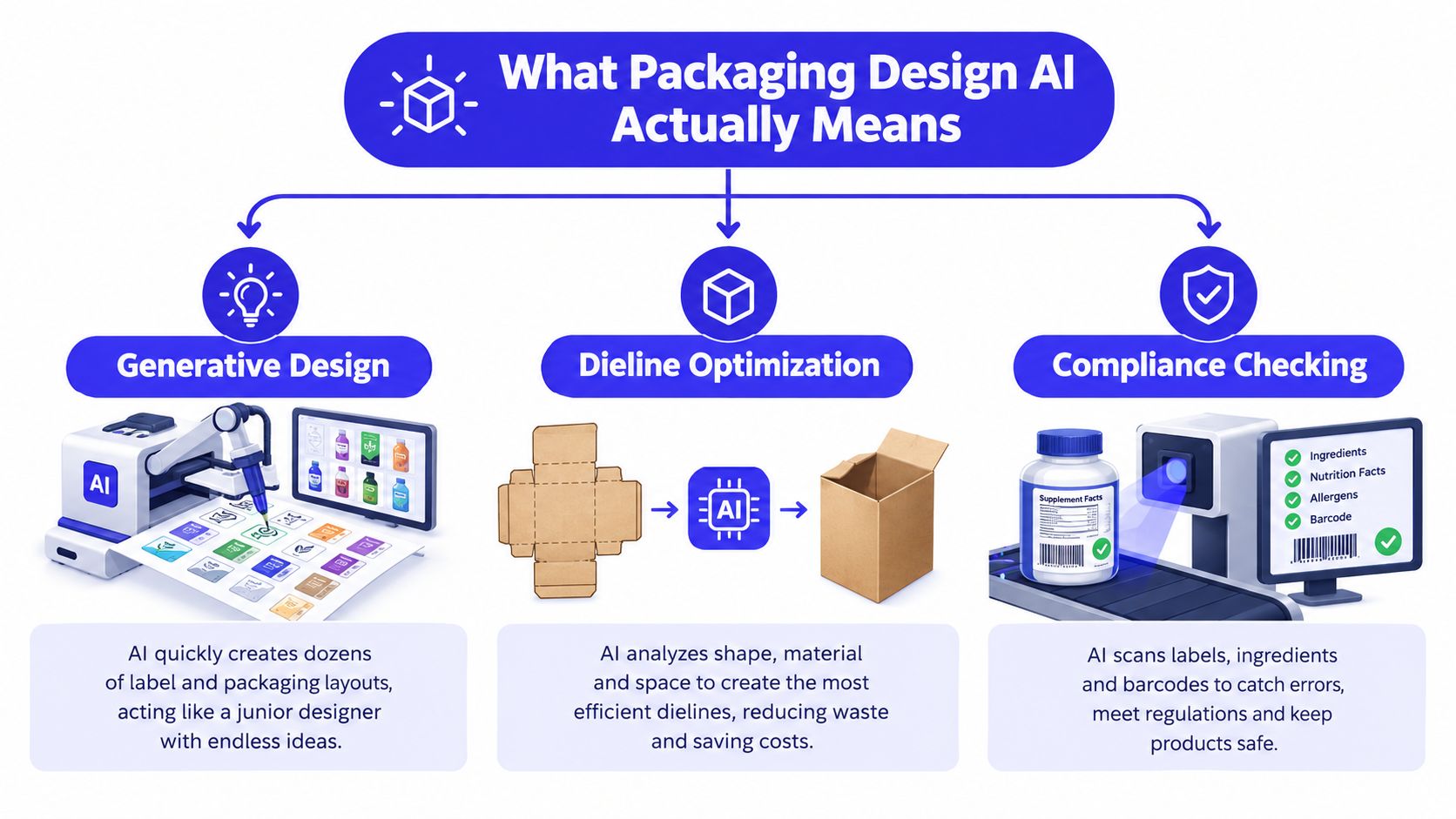
Generative design creates the first conversation
Generative design is the machine sketching possible packs from your brief. You might ask for a restrained folding carton for a botanical skincare product, with a clear front panel, a quiet colour system, and a visual cue that signals refillability. The system can produce several directions that vary the illustration style, typography mood, image treatment, or information hierarchy.
Those images are concept material, not automatically printable artwork. Text can be wrong, logos can distort, and visual elements may sit across folds or glue areas. The value comes from seeing alternatives quickly enough to compare them.
Dieline automation works with the flat template
A dieline automation tool treats the package as an object that must fold, close, and fit. It can help flatten a three-dimensional box into a two-dimensional pattern, resize artwork across related pack formats, and show how panels connect when folded.
The key question is not whether the render looks polished. It's whether the artwork respects the actual panel structure. A beautiful front panel that crosses a fold or hides a glue tab is still a failed production idea.
Structural optimisation connects design to operations
Structural optimisation focuses on the physical package. AI can suggest formats or fit options based on product dimensions and constraints, but complex structures still require technical judgement. A package that saves material on screen may create problems during filling, stacking, shipping, or opening.
This is why packaging AI should be treated as a workflow layer, not a magic application. One tool may help with concept images, another with dielines, another with text checks, and a human designer or packaging engineer may own the final production file.
The founder's decisions remain straightforward even when the software is advanced. What should the pack say? How should it hold together? How should it survive handling? What information must appear for the intended market? AI is useful when it helps answer those questions in a more disciplined way.
The Four-Stage AI Packaging Workflow
A reliable AI-assisted project has four stages. Each stage gives the software a different job, and each stage gives the founder a different responsibility.
Stage one is the brief
Start with the product story and the constraints. Include the product dimensions, target customer, selling environment, shelf position, packaging format, substrate, required panels, and any brand rules that already exist.
A weak prompt says, “Design a premium box.” A useful brief says that the pack is for a compact glass bottle, must feel approachable rather than clinical, needs a clear benefit statement on the front, and has limited space for ingredients and usage instructions. The more concrete the input, the less time you'll spend correcting irrelevant output.
Your role is to provide accurate inputs. AI can't infer a production constraint you never mention.
Stage two is generation
Generate visual directions, copy variants, and structural references as related but separate outputs. Ask for a small set of creative territories first, such as editorial, botanical, energetic, or technical, then narrow the direction before requesting detailed artwork.
You can also use AI to explore short front-of-pack statements, supporting icons, and panel hierarchy. Keep these as working drafts. Packaging copy has legal, factual, and brand implications that require review.
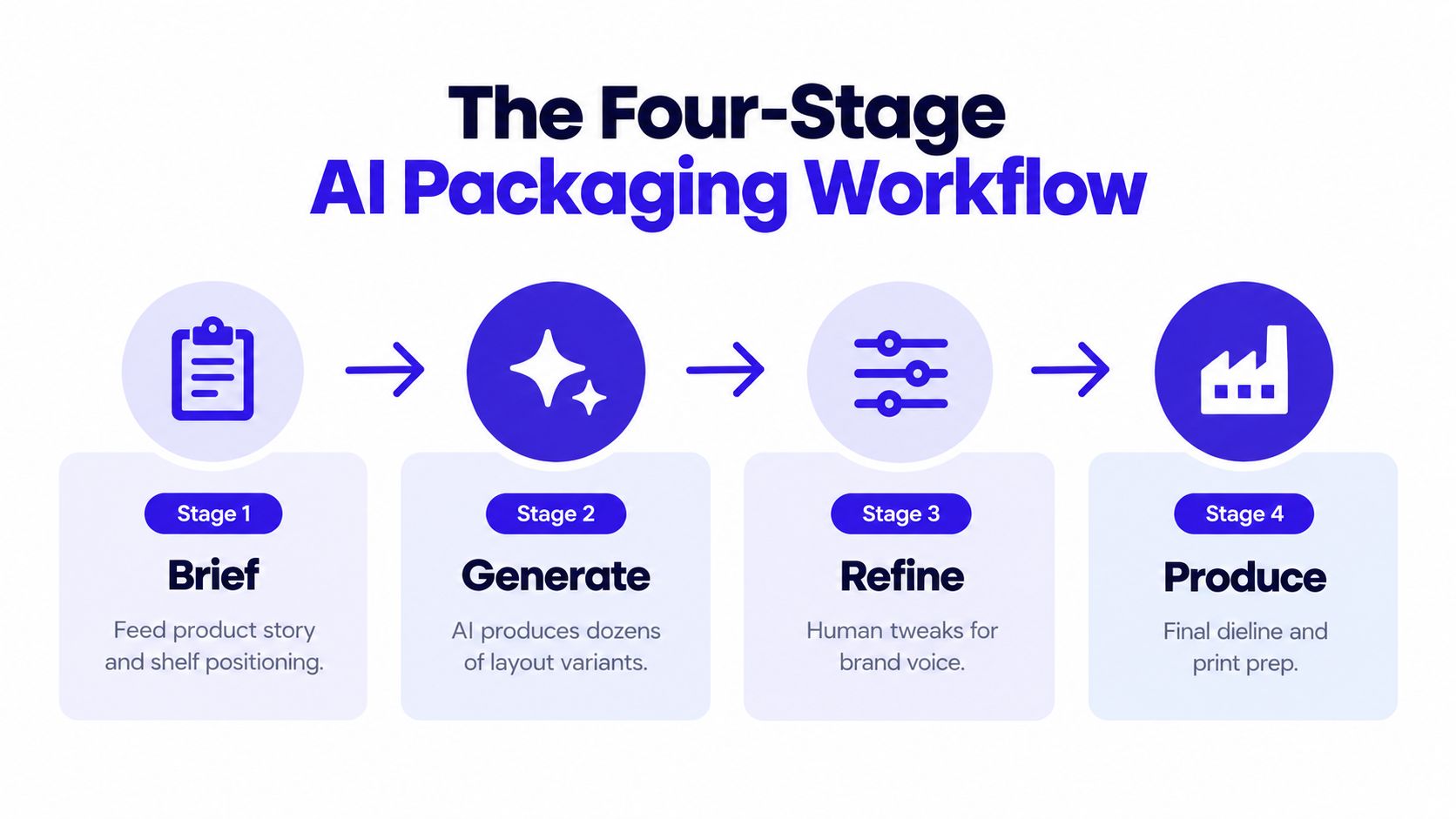
Stage three is refinement
Choose the strongest direction using criteria, not excitement alone. Check whether the product name is visible, whether the pack communicates its category quickly, and whether the visual language can extend to other SKUs.
Human judgement matters most in the creative phase. Adjust typography, spacing, colour relationships, illustration style, and tone. Ask a tool to explore options, but don't let it quietly redefine the brand.
Stage four is validation
Test the selected direction as a flat layout, a three-dimensional mockup, and a physical sample when possible. Check required information, barcode placement, readability, contrast, folds, closures, and the production vendor's specifications.
The founder owns final sign-off. AI can flag potential issues, but the person approving the file is accountable for what reaches the printer and the customer.
A short walkthrough can help teams visualise how the stages connect:
Where AI Helps and Where It Still Falls Short
AI is strongest at the front of a packaging project, where the team needs options. It can turn a written brief into visual territories, compare alternate information hierarchies, create mood-board material, and adapt a general direction for different product variants. For a small team without an in-house designer, that reduces the cost of exploring ideas before hiring specialist support.
The technology also helps teams ask better questions. A generated carton may reveal that the chosen illustration becomes muddy at small scale. A mockup may show that a key message sits on a side panel that shoppers rarely see. An alternate structure may prompt a conversation with the printer about material, closure, or shipping protection.
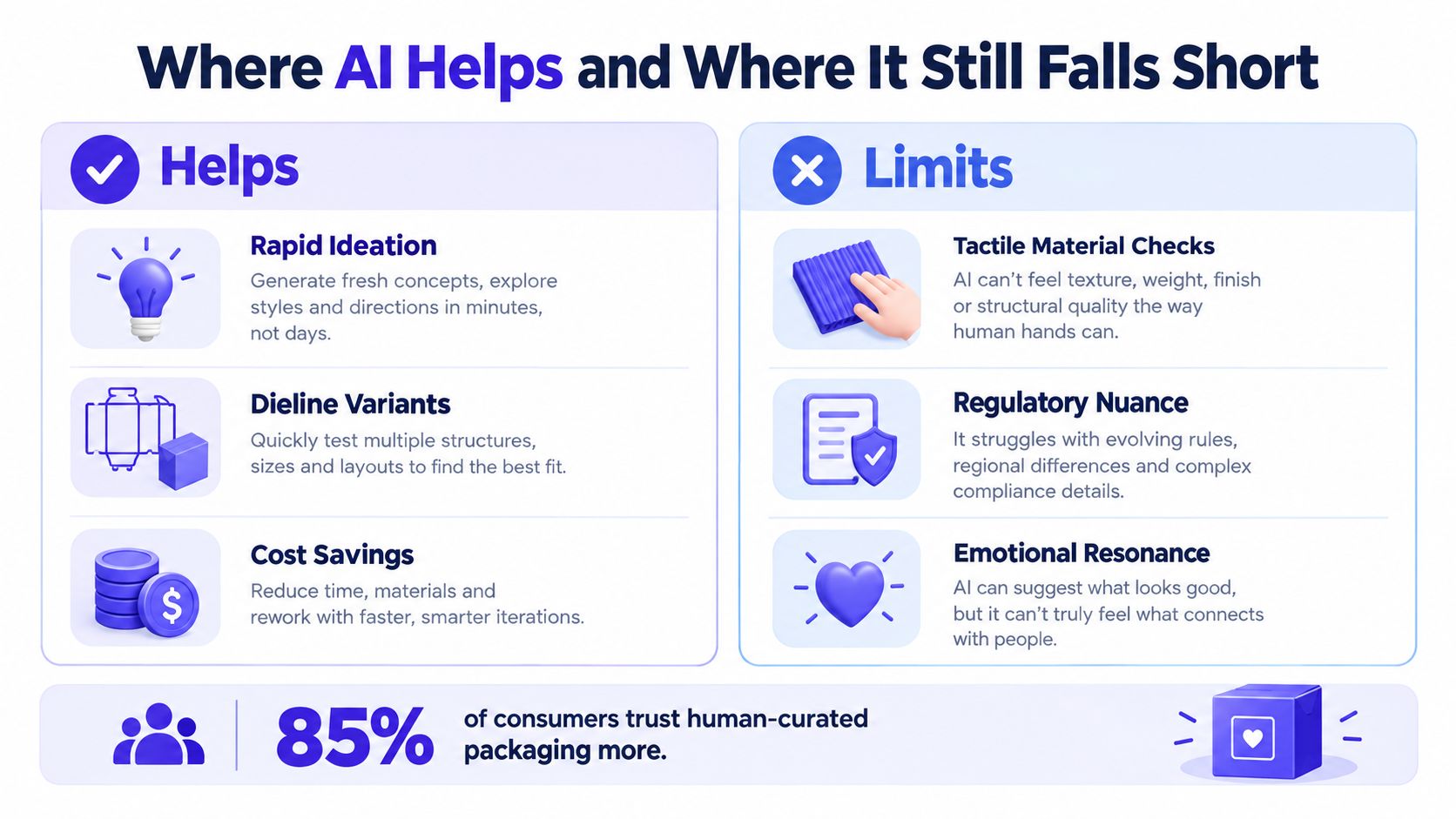
The limits become serious when a concept moves toward production. An image generator can place convincing text on a label without understanding whether the wording is legally accurate. A structural render can look plausible while failing to account for board behaviour, tolerances, filling equipment, or the way a package is handled during transport.
What consumer research tells you
A comparative milk-packaging study found that AI-generated concepts were not significantly different from human-designed cartons across averaged consumer-perception dimensions. The finding supports AI as a capable front-end ideation tool, while still leaving final selection to people who can judge fit, shelf impact, and brand consistency. The packaging design study provides useful context for that distinction.
Consumer trust adds another reason to keep a person involved. Research across 3,600 verified buyers in the United States and five European markets found that hybrid human-AI packaging scored higher for appeal than human-only and AI-only designs, with scores of 5.36, 4.85, and 4.42 on a seven-point scale, respectively. The same research measured purchase intent at 3.78, 3.41, and 3.12 on a five-point scale. The consumer research summary also reports that human-designed packaging retained an advantage in trust, while AI-only packs performed worst on trust and product clarity.
That pattern gives founders a practical operating principle:
AI can increase the number of options. Human review protects the meaning of the final option.
Use AI to accelerate exploration, but require human approval for copy, product claims, accessibility, structural fit, regulatory information, and the final relationship between the pack and the brand.
The Main Types of Packaging AI Tools
Choosing a packaging AI tool becomes easier when you start with the bottleneck rather than the feature list. A solo founder who can't visualise a product direction has a different need from a CPG team managing many language variants or a manufacturer testing carton structures.
| Tool category | Best for | Typical use stage |
|---|---|---|
| Image generators | Front-panel concepts, mood boards, lifestyle renders, and early visual exploration | Brief and generation |
| Dieline and structural tools | Flat patterns, panel layouts, folding references, and three-dimensional package previews | Generation and refinement |
| Copy and compliance platforms | Ingredient lists, allergen statements, warnings, and required information checks | Refinement and validation |
| Localization and variant tools | Language changes, SKU adaptations, and market-specific artwork versions | Refinement and production |
Image generators suit founders who need to see possibilities before they invest in detailed artwork. They're good at colour, composition, atmosphere, and broad visual direction. They're poor at dependable typography, exact legal copy, and manufacturable geometry, so treat the output as a reference rather than a file for the printer.
Dieline and structural tools are more useful once the packaging format is known. They can help you understand how a flat sheet becomes a carton, where panels sit, and how a design behaves in three dimensions. Simple formats are easier to validate than unusual structures. A thesis on generative AI for corrugated packaging found that simpler FEFCO-style forms were handled more effectively than complex ones, with the strongest use cases in technical understanding and early concepting. The structural packaging research explains why engineering review remains necessary.
Copy and compliance platforms help teams manage the information layer. They can compare text against rules or internal requirements, but they shouldn't be treated as the legal owner of a label. Human reviewers still need to confirm the market, product category, claims, translations, and source documents.
Localization tools are useful when one approved design needs to serve multiple markets or SKUs. They can save repetitive layout work, but every language version needs a native-language and regulatory check.
For a wider view of adjacent workflows, this collection of AI product design tools can help you compare where generative software fits beyond packaging. The decision prompt is simple: which stage is slowing you down, and which category addresses that specific delay?
Why Hybrid Human-AI Designs Win on the Shelf
Shoppers don't experience packaging as a design file. They see it as evidence. The label tells them what the product is, who made it, how to use it, and whether the brand understands the category. A visually impressive pack that feels confusing or synthetic can weaken confidence even when the composition is attractive.
AI handles the mechanical parts of creative exploration well. It can produce variations, rearrange visual elements, suggest alternate directions, and help a team compare possibilities without commissioning every rough idea. That gives designers more material to edit and gives founders a clearer basis for decisions.
Humans handle the parts that depend on context. A designer can recognise when a colour feels fashionable but wrong for the brand, when a benefit statement overpromises, or when an illustration resembles a competitor. A founder can explain why a pack needs to feel reassuring to a cautious buyer rather than merely distinctive in a presentation.
The consumer research cited earlier makes the difference concrete. Hybrid designs scored 5.36 for appeal, compared with 4.85 for human-only designs and 4.42 for AI-only designs on a seven-point scale. Purchase intent also favoured the hybrid approach at 3.78, compared with 3.41 for human-only and 3.12 for AI-only designs on a five-point scale. The underlying consumer findings also show that trust and product clarity remain weaker for AI-only packaging.
The operational meaning of hybrid
Hybrid doesn't mean asking a designer to approve an image at the very end. It means assigning the right work to each participant throughout the project.
- AI expands the search space: It creates visual and structural alternatives for a human to compare.
- The designer sets the system: They establish typography, spacing, colour use, hierarchy, and rules that can survive across SKUs.
- The founder protects the promise: They confirm that the pack represents the product, price, audience, and business accurately.
- Specialists verify production: Printers, engineers, and compliance reviewers check what a screen cannot prove.
You can also support the launch side of the project with practical guidance on improving brand visibility in AI search engines. That work is separate from packaging design, but it reflects the same principle: automated systems can extend reach, while human clarity determines what people understand.
Running Your First AI-Assisted Packaging Project
Treat your first project as a controlled production exercise, not a prompt-writing experiment. The aim is a repeatable path from product information to a reviewed file.
Start with a compact brief
Write down the SKU, product dimensions, audience, sales environment, packaging format, material constraints, printer requirements, and mandatory information. Add references for the brand voice, visual identity, competitors, and packaging you admire.
Collect brand guidelines before generating concepts. If you have approved colours, fonts, logos, photography, icons, or claims, give the team and the tool a clear source of truth. Otherwise, the generated options may drift into styles you can't maintain.
Run focused creative rounds
Begin with broad directions, then narrow the prompt based on what you learn. Ask why a concept is working or failing. Is the category obvious? Does the product feel appropriate for its price? Can a customer find the main benefit without turning the pack around?
Keep a decision log. Record which direction you selected, which elements came from AI, which changes a human made, and why the team rejected alternatives. This makes later revisions much easier.
Move from image to layout
Once the direction is stable, place the artwork on the actual dieline. Check panel hierarchy, fold locations, glue areas, barcode clearance, image resolution, and the space available for ingredients, instructions, and warnings.
Review type manually. AI-generated lettering may look attractive in a render but fail at small sizes or contain errors. Check contrast, reading order, and whether the design remains understandable without colour alone.
Validate before sending files
Route the pack through a compliance review and a print preflight. Ask the printer or packaging specialist to check dimensions, bleeds, colour settings, spot treatments, tolerances, and the suitability of the selected material.
Create a physical sample or a trustworthy three-dimensional mockup. Screens hide awkward openings, cramped panels, weak contrast, and proportions that feel wrong in the hand. A print-export utility such as Print for Figma can support the final document stage, but it doesn't replace a production review.
Finish by locking the approved file, naming versions clearly, and saving the supporting decisions. Time-box each stage so exploration doesn't consume the launch schedule. The best result isn't a miraculous first generation. It's a process you can use again for the next SKU.
Where Packaging Design AI Is Headed Next
Much of today's packaging AI still begins with surface graphics. The next useful step is dieline-aware generation, where the system respects panel boundaries, fold rules, dimensions, and structural constraints from the start instead of producing a beautiful image that needs extensive manual cleanup.
Compliance is another important direction. AI systems can increasingly support regulatory text, ingredient disclosure, recycling instructions, localization, and structural or material optimisation, but the quality of those workflows depends on current source data and disciplined review. A tool that updates a warning across several markets could save repetitive work, yet a wrong update could spread the same mistake across every SKU.
Sustainability work will also move closer to the design interface. Instead of treating material reduction as a late-stage engineering exercise, teams will be able to compare right-sized formats, material yield, recyclability, and shipping implications while they explore the creative direction. AI won't settle those trade-offs automatically. It can make them visible earlier.
Market estimates show why software companies are investing in this wider workflow. One estimate places the AI in packaging design market at USD 3.2 billion in 2025, with North America accounting for 34.8% of global revenue that year and generative design AI holding 37.2% share in 2024. The same estimate projects USD 6.4 billion by 2032, at an 11.9% compound annual growth rate. Food and beverage represented the largest vertical at 37.9% in 2024. The market estimate from Grand View Research provides the underlying figures and methodology.
Generative packaging is being tracked as its own expanding category too. Grand View Research estimated that market at USD 636.2 million in 2024 and projected USD 6.26 billion by 2033, with a 29.4% CAGR. Its generative AI packaging market report illustrates how quickly the category is moving beyond isolated experiments.
For a broader look at how these systems connect with manufacturing, compliance, and production workflows, this guide to food and beverage AI solutions offers useful adjacent context. The strategic question for founders is no longer whether AI can create a compelling mockup. It's whether the entire workflow has enough controls to make that mockup safe, legible, manufacturable, and defensible.
As AI takes on more operational work, human review, version control, and an audit trail become part of packaging quality. Build those practices into the next launch rather than adding them after a problem appears.
IndieTool helps indie founders distribute and improve visibility for products such as design and AI tools, with directory exposure, launch support, and practical utilities for early-stage marketing. If you're building a packaging-related product or using AI to support a wider product workflow, visit IndieTool to explore its submission and launch options.