Ready SVG
AI SVG maker from text or images for laser, cut, and everyday design
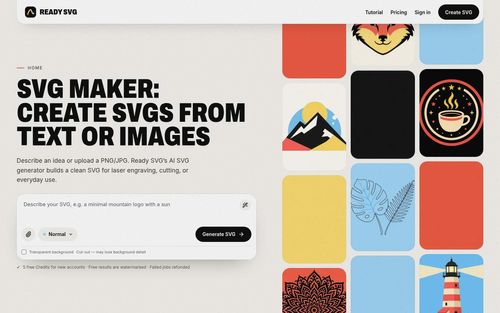
Ready SVG is an AI SVG maker that converts text prompts, PNG uploads, and JPG images into scalable vector graphics for laser engraving, laser cutting, websites, and print projects. It helps founders and independent makers move from an idea or reference image to downloadable SVG artwork, with dedicated output modes that address different design requirements rather than treating every vector file the same.
Indie founders, solo makers, and small creative businesses generating SVG assets for websites, print materials, laser-engraved products, signs, and ornaments.
Ready SVG is a practical starting point for founders who need vector artwork for both digital assets and maker projects. Its purpose-specific modes and cut checks are useful, but review the exported paths at your intended size before production.
Kevin Wu
Tuesday, November 10, 2026
- AI text-to-SVG generation and PNG/JPG-to-SVG conversion with optional prompt guidance.
- Three output modes: Laser Engrave, Cut, and full-color Normal.
- Cut connectivity checks with auto-bridge and separate-piece export options.
- SVG preview and export width control in millimeters with proportional height.
- Free prompt optimization and private History with free re-export.
- Dedicated Normal, Laser Engrave, and Cut modes tailor vector output to different uses.
- Cut mode flags disconnected parts and thin bridges, with options to auto-bridge or export separate pieces.
- Free prompt optimization, automatic credit refunds for failed jobs, and private History with free re-export support iteration.
- Uploaded images are generally redrawn by AI rather than traced exactly, so reference details may change.
- Free results are watermarked, and manufacturing designs still require inspection at the intended size before equipment use.
Choose Laser Engrave for black-filled artwork, Cut for red cutting outlines, or Normal for full-color web and print graphics, then describe your design, upload a PNG/JPG up to 10 MB, or combine both inputs. Use the free Optimize prompt option if helpful, review its changes, and sign in with Google before generating; new accounts receive five free credits, and each successful SVG uses one credit. Inspect the actual SVG, address any flagged cut connections using auto-bridge or separate-piece export where offered, set the width in millimeters, and download; height scales proportionally, and successful results remain in private History for free re-export.
What we find compelling about Ready SVG is its practical distinction between artwork that looks good on screen and paths intended for physical production. Founders creating product mockups, branded graphics, signs, or ornaments can start with a prompt or reference image, then choose Normal, Laser Engrave, or Cut before generating. Cut mode checks for disconnected pieces and thin bridges, while export sizing in millimeters gives makers useful control over dimensions. Free prompt optimization, private generation history, and free re-export also make iteration more convenient. The important caveat: image uploads are generally redrawn by AI, not reproduced as exact traces. For indie builders comfortable reviewing the final vectors, it offers a focused route from concept to usable SVG assets.
Real performance numbers in the last 30 days
Questions
Can Ready SVG convert PNG or JPG images into SVG files?
Yes. You can upload a PNG or JPG up to 10 MB and optionally add a text prompt. By default, Ready SVG redraws the reference with AI before vectorizing it, so it is not an exact tracing tool. In Normal mode, a PNG that already has a transparent background goes directly to vectorization when the Transparent background switch is off.
Does Ready SVG create files for laser cutting and engraving?
Yes. Laser Engrave produces black-filled artwork without an outer cut line, while Cut produces red cutting outlines and works best with one connected design. Cut mode flags disconnected parts or thin bridges so you can auto-bridge or export pieces separately. Inspect the exported SVG at your intended dimensions before using it with your equipment.
Is Ready SVG free to try, and how do credits work?
New accounts receive five free credits, and free results are watermarked. Each successful SVG costs one credit; failed jobs are automatically refunded. Prompt optimization is free, and successful results are stored in private History for free re-export.
Related Design
View all Panel FontManga Translator - Translate Manga Image Free & No Sign Up
 FusilladeAI-powered firearm evidence management for law enforcement.
 VidsemblyTurn Presentations and Documents Into Professional AI Videos
 Morph3DAI 3D model generator that turns text or images into downloadable 3D models
 Ascendant FinancialInfinite Banking advisors for families and business owners
 Cambodia TemplesCambodia Temples