Morph3D
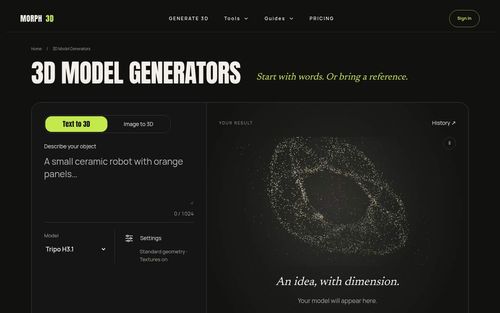
AI 3D model generator that turns text or images into downloadable 3D models
Morph3D is an AI 3D model generator that converts text prompts and reference images into downloadable 3D assets through a web app or Chrome extension, helping indie builders explore ideas without starting every model from scratch. It brings generator selection, upfront credit quotes, supported model previews, and saved results into one workflow, making early asset creation more accessible for games, prototypes, and visual concepts.
Indie game developers, solo founders, and small creative teams looking to generate and evaluate 3D props, characters, and visual prototypes from text or reference images.
Morph3D gives indie builders a practical route from an idea or reference image to a downloadable 3D asset, with upfront costs and saved results. It is worth exploring for early asset creation, provided you inspect each output before using it in a finished project.
Kevin Wu
Monday, November 9, 2026
- Text-to-3D generation with free prompt optimization
- Image-to-3D generation with automatic image preparation
- Selectable AI generators with upfront credit quotes
- Supported interactive 3D previews, file downloads, and private History
- Chrome extension for generating models from selected webpage images
- Combines text-to-3D and image-to-3D generation with generator selection, supported previews, downloads, and private History.
- Shows the exact credit quote before generation and releases reserved Credits when a task fails.
- Offers 40 free Credits on the web and a Chrome extension for starting from selected webpage images.
- Supported inputs, settings, and additional reference options vary by generator.
- Generated models still need inspection for project suitability; the supplied website content does not establish production-ready topology or universal export compatibility.
Start in the Morph3D web app with the advertised 40 free Credits, choose a generator, and either describe your object with its materials and visual style or upload a photo, sketch, or concept image. Use free prompt optimization for text, add extra views or material references where the selected generator supports them, adjust the available settings, and review the exact credit quote before starting generation. Follow the task through preparation, generation, and saving, then rotate and zoom a supported model, download its files, and revisit it in History; alternatively, use the Chrome extension to start from an image you select on a webpage.
What catches our attention about Morph3D is its focus on the workflow around AI 3D generation, not just the initial output. For a solo founder testing a game concept or exploring a product idea, moving from a written description or reference image to a model worth inspecting can shorten the first creative loop. You can choose between generators, review the credit cost before committing, and revisit successful results in a private History. Free prompt optimization and automatic image preparation also help with getting inputs ready. We particularly appreciate the charging policy: tasks reserve Credits, successful file saving completes the charge, and failed tasks release that reservation. The Chrome extension adds a convenient starting point from images online. Treat it as a tool for generating and evaluating assets, rather than assuming every output is production-ready.
Real performance numbers in the last 30 days
Questions
Can Morph3D generate 3D models from both text and images?
Yes. You can describe an object in a text prompt or upload a reference image, such as a photo, sketch, or concept. Choose a generator that supports your input type; extra views and material references are available where supported. Morph3D also offers free text prompt optimization and prepares images before generation.
Is Morph3D free to try, and what happens if generation fails?
Morph3D advertises 40 free Credits to start on the web. Before generation, it displays the exact credit quote for your selected task. Credits are reserved when the task starts, and successful file saving completes the charge. Failed tasks release the reservation, so failed jobs cost zero Credits. The number of models you can create depends on the quoted cost of each task.
How does the Morph3D Chrome extension use images and browsing content?
The extension lets you hover over an image and click the Morph3D badge, or right-click and select “Generate 3D with Morph3D,” to open a panel with that image ready. According to Morph3D, it does not read or submit your chats or page text and downloads only the image you explicitly choose after clicking. You can also start from text in the panel.
Related Ai
View all Ascendant FinancialInfinite Banking advisors for families and business owners
 Cambodia TemplesCambodia Temples
 Southern Maryland Minority ChamberBuilding a culture of entrepreneurship in southern Maryland
 Remove AI TracesFind and remove every hidden AI trace in your text.
 KeebyeKeebye — Voice Dictation for Parallel Builders
 PavleurPavleur — Your AI Copilot for Every Meeting