Indietool
Video Transcription API Guide
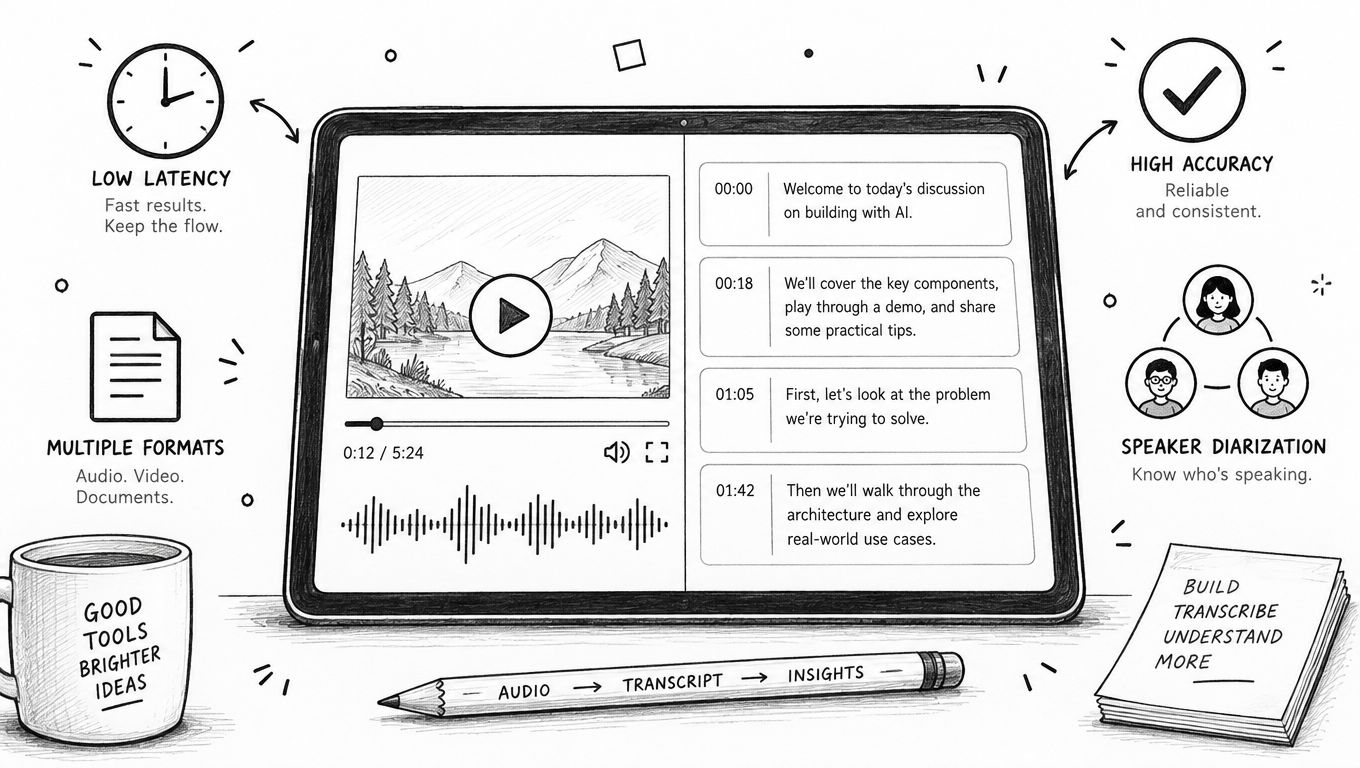
A video transcription API converts spoken audio from video files or live streams into structured text. Your software can then search that text, generate captions, build summaries, or run analysis on it. For developers, it means adding transcription capability without having to build and maintain speech-recognition infrastructure from scratch.
Table of Contents
- Defining Video Transcription APIs for Developers
- What Developers Build With It
- Market Context
- Measure Accuracy with WER
- Compare Latency and Model Fit
- Run a Repeatable Evaluation
- Choose Streaming for Immediate Feedback
- Use Batch for Durable Records
- Combine Both Modes
- Separate Speakers Reliably
- Choose Useful Timestamp Granularity
- Export Standard and Structured Formats
- Extract Context from Every Frame
- Connect Agents and Protect Media
- Validate Claims with a Pilot
- Control Retention and Encryption
- Match Compliance to Your Industry
- Govern Access and Consent
Defining Video Transcription APIs for Developers
A video transcription API is a programmatic interface. You send it a video source, it handles the audio extraction or receives audio directly, and it returns machine-generated text. That source might be an uploaded MP4 file, a public media URL, or live audio delivered continuously during a meeting or broadcast.
The output comes in several forms: plain text, timestamped segments, subtitle files, or structured JSON. Developers plug that output into video players, learning platforms, podcast archives, accessibility tools, and search systems powered by AI.
Quick answer: A video transcription API turns spoken audio in video into searchable, timestamped, and machine-readable text. Integration happens over HTTP, WebSocket, or through an SDK.
What Developers Build With It
Transcription is almost never the end product. It's a layer that feeds text and metadata into other workflows downstream.
Captions and subtitles make recorded or live content accessible to a wider audience, including viewers who are deaf or hard of hearing.
Search indexes let viewers type a phrase and jump straight to the moment it was spoken.
Summaries and chapters help users scan through long interviews, lessons, or webinars without watching everything.
Content repurposing turns recordings into written articles, pull quotes, newsletters, or social media posts.
Conversation analytics supports sentiment analysis and quality review. Zoom's developer guidance offers a practical look at how live transcriptions can feed into sentiment-analysis workflows.
Think of the API as a pipeline component — similar to how you'd treat storage or a payment gateway. Your application sends media, receives text, validates the result, and stores only what your product actually needs.
Market Context
The commercial case for these APIs is solid, but market figures shift depending on how vendors define their scope, which regions they cover, and whether adjacent speech-recognition services get bundled in. Treat the table below as directional guidance, not as fixed benchmarks.
| Indicator | Reported market view | Practical meaning |
|---|---|---|
| Global speech-to-text market | Estimates differ by report | Demand extends well beyond video alone |
| Annual growth | Frequently projected as double-digit | Adoption is expanding across software verticals |
| Enterprise revenue share | Often reported as the largest segment | Compliance requirements and scale drive spending |
| SMB adoption | Growing steadily through hosted APIs | Startups can buy infrastructure without owning it |
For indie founders and small teams, this maturity reshapes the build-versus-buy calculation. Hosted providers handle model training, GPU operations, language maintenance, and scaling. A team of two or three can focus on workflow design and user experience instead of managing ML infrastructure.
When you're evaluating vendors, prioritize accuracy on your own recordings, available output formats, data retention policies, and total cost of integration. Those factors will tell you far more than market-size headlines when you're choosing a production video transcription API.
Choosing a video transcription API is about proving it works on your material, not trusting a slick demo. The real test boils down to five things: Word Error Rate (WER), latency, speaker separation, timestamp precision, and how the model behaves on recordings pulled directly from your stack.
Measure Accuracy with WER
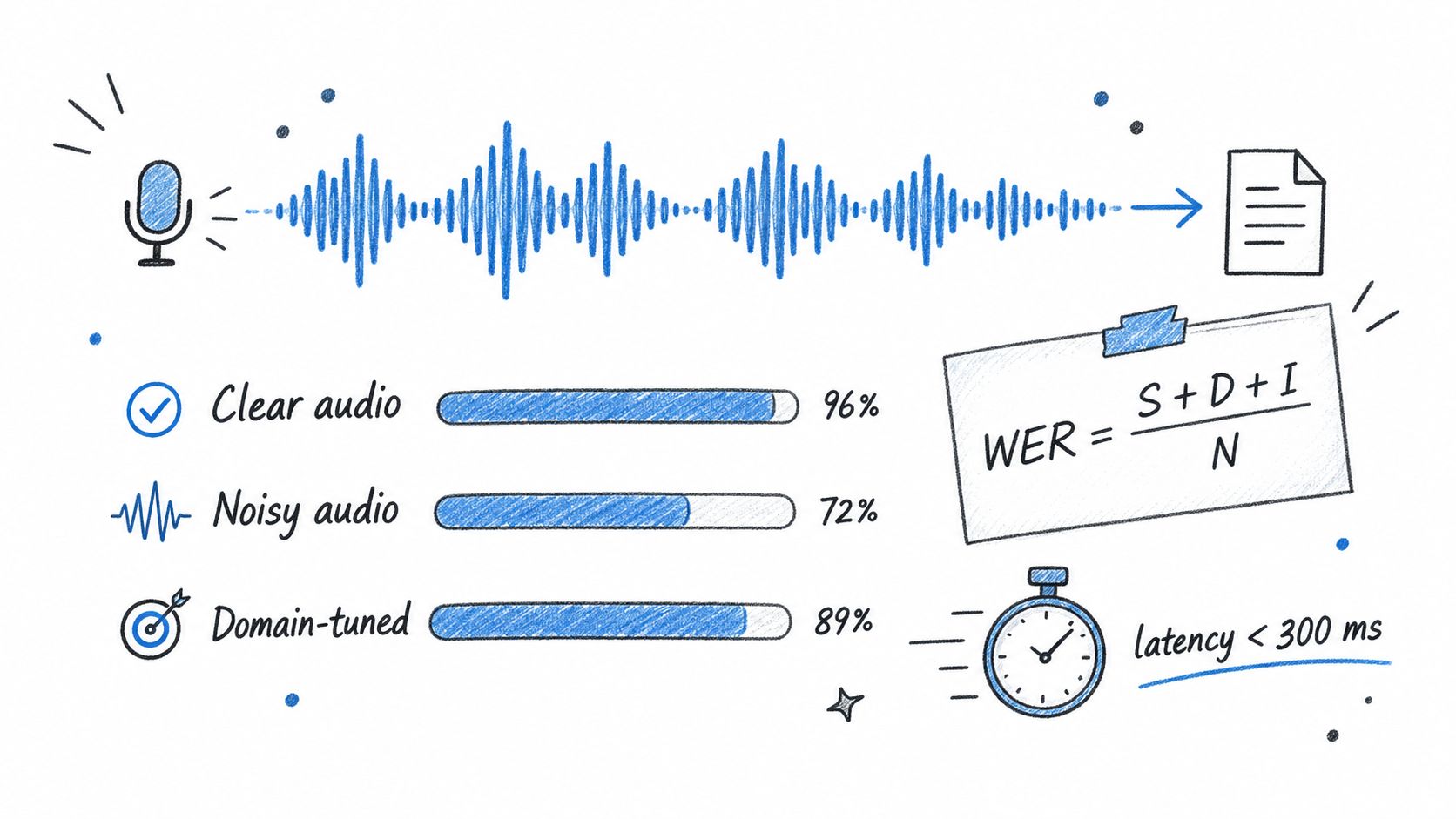
WER compares the machine-generated transcript against a human-verified reference and counts every mistake. The formula is:
WER = (substitutions + deletions + insertions) ÷ total reference words
A substitution is a wrong word, a deletion is a missing word, and an insertion is an extra one. If a 100-word reference has five substitutions, three deletions, and two insertions, your WER lands at 10%. Lower is always better, though some providers score punctuation and capitalization separately — worth checking if those matter to your use case.
Don't lump clean and noisy audio together. A vendor might ace a studio-recorded interview but crumble on recordings with accents, crosstalk, background music, heavy compression, or specialist vocabulary.
| Test condition | What to inspect |
|---|---|
| Clear single-speaker | Baseline WER and punctuation quality |
| Noisy recording | Recognition under real-world background sound |
| Multiple speakers | Diarization accuracy and overlapping speech |
| Domain content | Proper handling of names, acronyms, and technical terms |
Compare Latency and Model Fit
For live captions and voice agents, measure the window from audio capture to a usable partial result. Sub-300ms latency is the practical target — it keeps captions feeling synced and lets conversational systems respond without awkward gaps. Batch jobs shift the priority to completion time, throughput, and price.
Generic models routinely stumble on medical, legal, and engineering terminology. Domain-tuned models, custom vocabulary lists, and phrase hints can lift results from "acceptable" to "actually usable in production" — but verify that improvement against a labeled sample rather than taking the vendor's word for it.
| Metric | Practical benchmark question |
|---|---|
| Streaming latency | Are partial words returned under 300ms? |
| Finalization delay | How long until the text stops changing? |
| WER | Does accuracy hold across your real content? |
| Vocabulary accuracy | Do product names and jargon come through correctly? |
Run a Repeatable Evaluation
Build a small ground-truth dataset that mirrors your actual speakers, file formats, languages, and noise conditions. Send identical audio to each provider, then calculate WER and manually inspect timestamp quality.
- Record representative samples that cover your real use cases.
- Create human-corrected reference transcripts.
- Compare WER, latency, and error categories side by side.
- Price each option against the same monthly audio volume.
- Re-run the test whenever a provider updates their model or API.
Pay attention to whether you're getting word-level timestamps or just segment-level timing. Word timing enables karaoke-style captions and precise search, while segment timing is usually enough for chapter navigation. Keep raw outputs so you can audit changes later, and plan how transcription connects to downstream analysis — Zoom's live transcription workflow is a solid reference for that kind of integration.
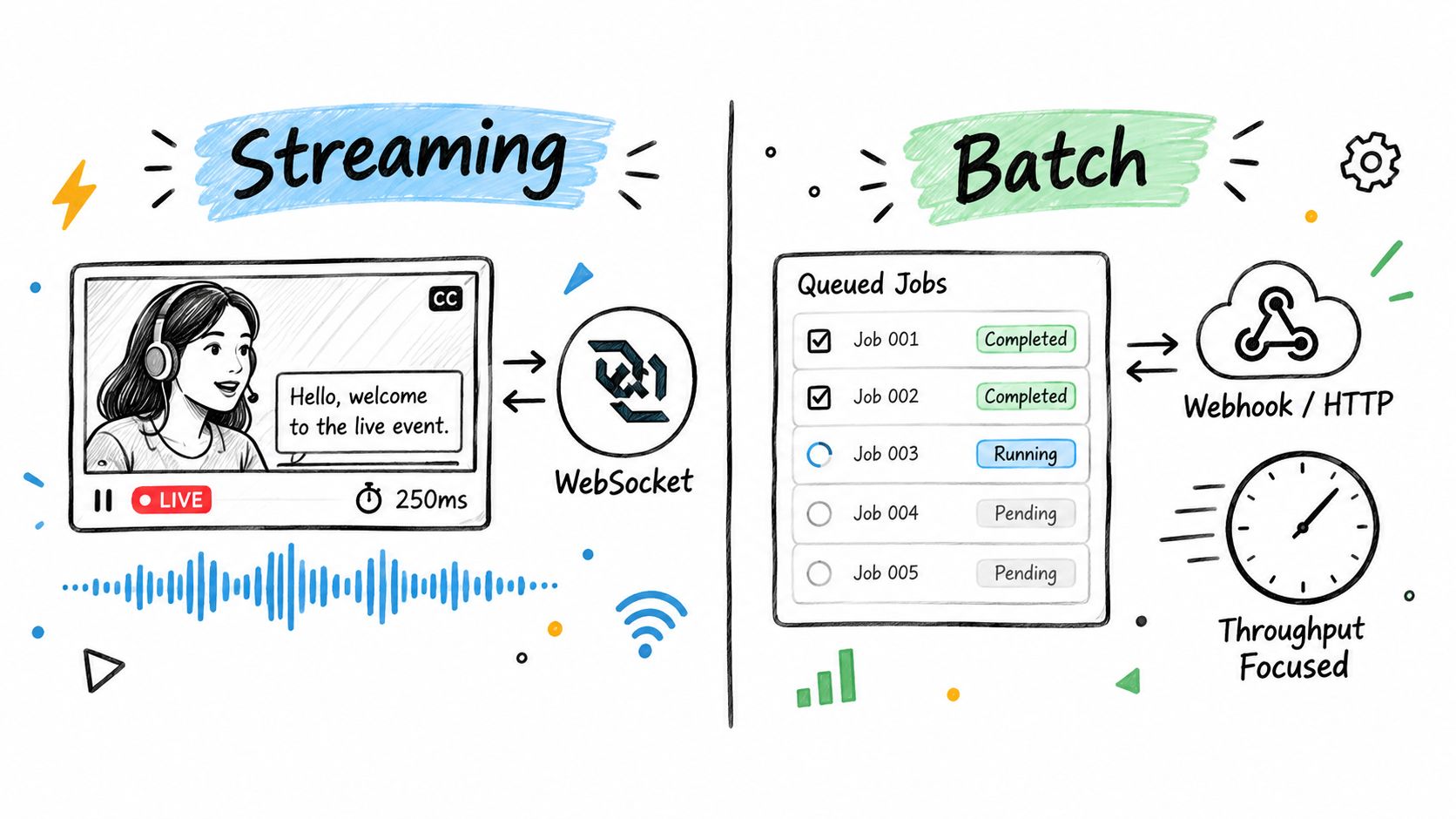
A streaming video transcription API works on the fly, pushing out partial results as audio comes through, while the media is still in progress. A batch API takes a full file or media source, queues a job, and hands back the finished transcript once it's ready.
Choose Streaming for Immediate Feedback
Streaming makes the most sense when there's a live audience waiting—think real-time meeting captions, broadcast subtitles, or voice agents where users expect to see words forming as people talk. The typical setup runs over a WebSocket: your client sends small audio chunks and renders interim text, then swaps it out once finalized segments arrive.
Go with streaming when keeping up with the conversation matters more than waiting for one polished output.
The tradeoff is more state management on your side. You'll need to track session IDs, sequence numbers, partial transcripts, reconnection logic, and the exact boundary between provisional and committed words. If the connection drops, decide whether to resend only audio that wasn't acknowledged or restart the whole session with deduplication in place.
Use Batch for Durable Records
Batch processing is the right call for post-production captioning, podcast search indexes, or archived media that nobody's watching in real time. Since the provider gets the complete file upfront, it can invest more compute in segmentation, punctuation, speaker labeling, and timestamp accuracy—and you can optimize purely around throughput and cost.
The workflow tends to follow a familiar pattern:
- Submit a file URL or direct upload and get a job ID back.
- Poll an HTTP endpoint or register a webhook.
- Pull down the result in JSON, SRT, or VTT once it's done.
- Store the transcript and tie it to the original asset.
Retries are straightforward, but you still need idempotency. Hold onto the job ID, avoid re-submitting the same media, and apply exponential backoff on transient failures. If you're using webhooks, verify signatures upfront, handle duplicate notifications gracefully, and acknowledge quickly before doing heavier processing on the result.
| Requirement | Streaming | Batch |
|---|---|---|
| Best fit | Live captions and conversational agents | Archives and finished media |
| Transport | WebSocket | HTTP jobs and webhooks |
| Priority | Low latency | Accuracy, throughput, cost |
| Main risk | Disconnects and state loss | Delayed jobs and duplicate retries |
Combine Both Modes
A lot of production systems blend the two. Picture a live webinar: streaming captions keep the audience engaged, while the recorded file heads to a batch queue for a cleaner permanent transcript later. You only replace the provisional captions once the batch output clears a quality check, so the live experience stays smooth without compromising archival accuracy.
For workflows that go beyond transcription and pull broader context from video, check out this video automation tool to run alongside your API pipeline. Pick the architecture based on what your users actually expect, then measure latency, completion times, retry rates, and how often you're correcting transcripts on real recordings.
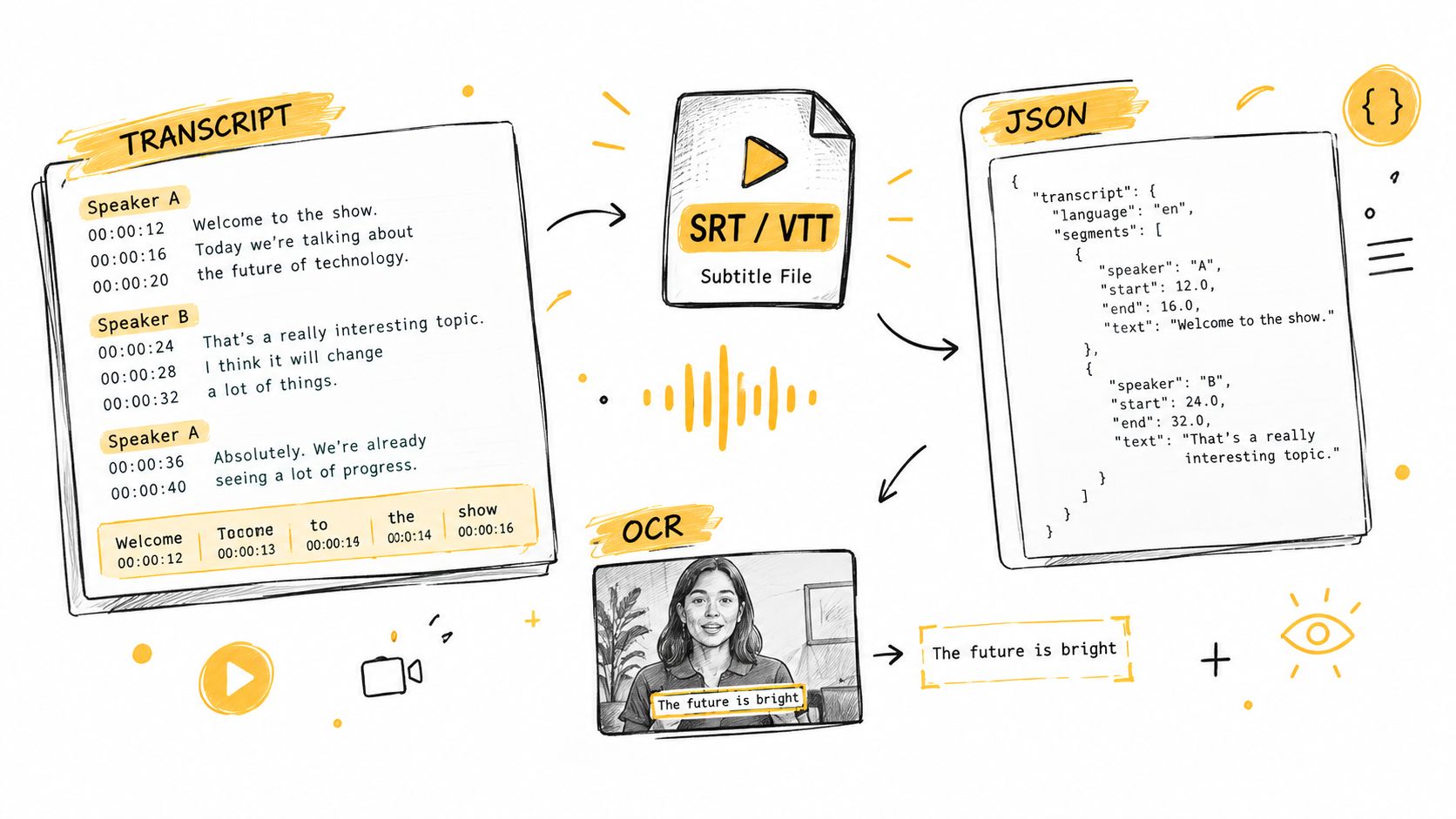
A production-grade video transcription API returns far more than a flat block of text. The metadata it produces should feed directly into captions, search indexing, analytics pipelines, summarization models, and downstream AI workflows without requiring a separate processing step.
Separate Speakers Reliably
Speaker diarization figures out who is talking at any given moment and tags each segment with labels like Speaker 1 or Speaker 2. This matters enormously for interviews, team meetings, podcasts, and support calls, where a wall of undifferentiated text is genuinely hard to parse. Attribution makes the output immediately readable.
Two-person conversations are typically the easiest scenario for most providers. Once you move into larger panels, cross-talk, regional accents, or interruptions, quality varies widely. Always test diarization against recordings that match your actual content profile rather than relying on vendor benchmarks.
- Two speakers: Handles most interviews and customer call scenarios well.
- Multiple speakers: Necessary for panel discussions, classrooms, and team meetings.
- Overlapping speech: Verify that words get assigned to the correct speaker rather than dropped entirely.
Choose Useful Timestamp Granularity
Timestamps dictate how tightly your application can link text back to the video timeline. Phrase-level timestamps work fine for subtitles and chapter markers, but word-level timestamps unlock click-to-seek search, karaoke-style captions, and real-time transcript highlighting during playback.
Consider a search query for "pricing model." With word-level data, the player can jump straight to that exact utterance. With segment-level output alone, the viewer might land several seconds off target, which feels sluggish.
| Output | Best Use |
|---|---|
| Word timestamps | Search, highlight sync, frame-accurate navigation |
| Phrase timestamps | Captions, chapter breaks, readable transcript display |
| No timestamps | Bulk text analysis where timing is irrelevant |
Export Standard and Structured Formats
A solid API should deliver SRT and VTT for video players alongside a JSON payload for application logic. That JSON payload typically bundles the transcript text, per-word or per-segment timestamps, confidence scores, speaker labels, detected language codes, and segment IDs.
Automatic language detection is worth paying attention to when source files arrive without reliable metadata. If your content mixes languages mid-file, check whether a single API call handles intra-file language switching or whether you need to split the job manually. Profanity filtering deserves the same scrutiny, since the requirements for a moderated community clip differ significantly from those of a legal deposition transcript.
Key takeaway: Store the full JSON response as your source of truth, then derive SRT or VTT files when you are ready to publish captions.
On-screen text recognition, commonly called OCR, captures information that the audio stream never touches. Presentation slides, terminal windows, infographics, and product demos often carry the most contextually important content in a video. A timestamped OCR layer lets you fold visible text into search results and summaries alongside the spoken words.
That structured combination of audio transcription, speaker labels, and on-screen text feeds automatic chapter generation, content summaries, and semantic search indexes with minimal extra work. Read through practical subtitle generation workflows before committing to a specific output schema for your project.
A standard video transcription API captures speech, but technical and educational videos also communicate through slides, code, diagrams, and interface text. Scribiz adds that visual context, attaching on-screen findings to timestamps so an AI workflow can understand more than the audio track.
Take a closer look at Scribiz video transcription API for transcripts, summaries, chapters, subtitle files, and agent-oriented outputs. It accepts YouTube links, direct media uploads, TikTok, and Instagram Reels, and can transcribe videos even when native captions are missing by listening directly to audio.
Extract Context from Every Frame
Scribiz identifies spoken words, speakers, slides, code, and other visible text. This makes it useful for several practical scenarios:
- Study notes: capture explanations and slide content together.
- Searchable archives: index speech and timestamped screen text.
- LLM pipelines: send structured video context to an agent without manual copying.
It exports SRT, VTT, TXT, Markdown, and JSON, while summaries and chapter lists retain clickable timing. Its two-speaker optimization also suits interviews, calls, and podcasts.
The screenshot below shows Scribiz's transcript-generation interface for turning video into structured, timestamped context.
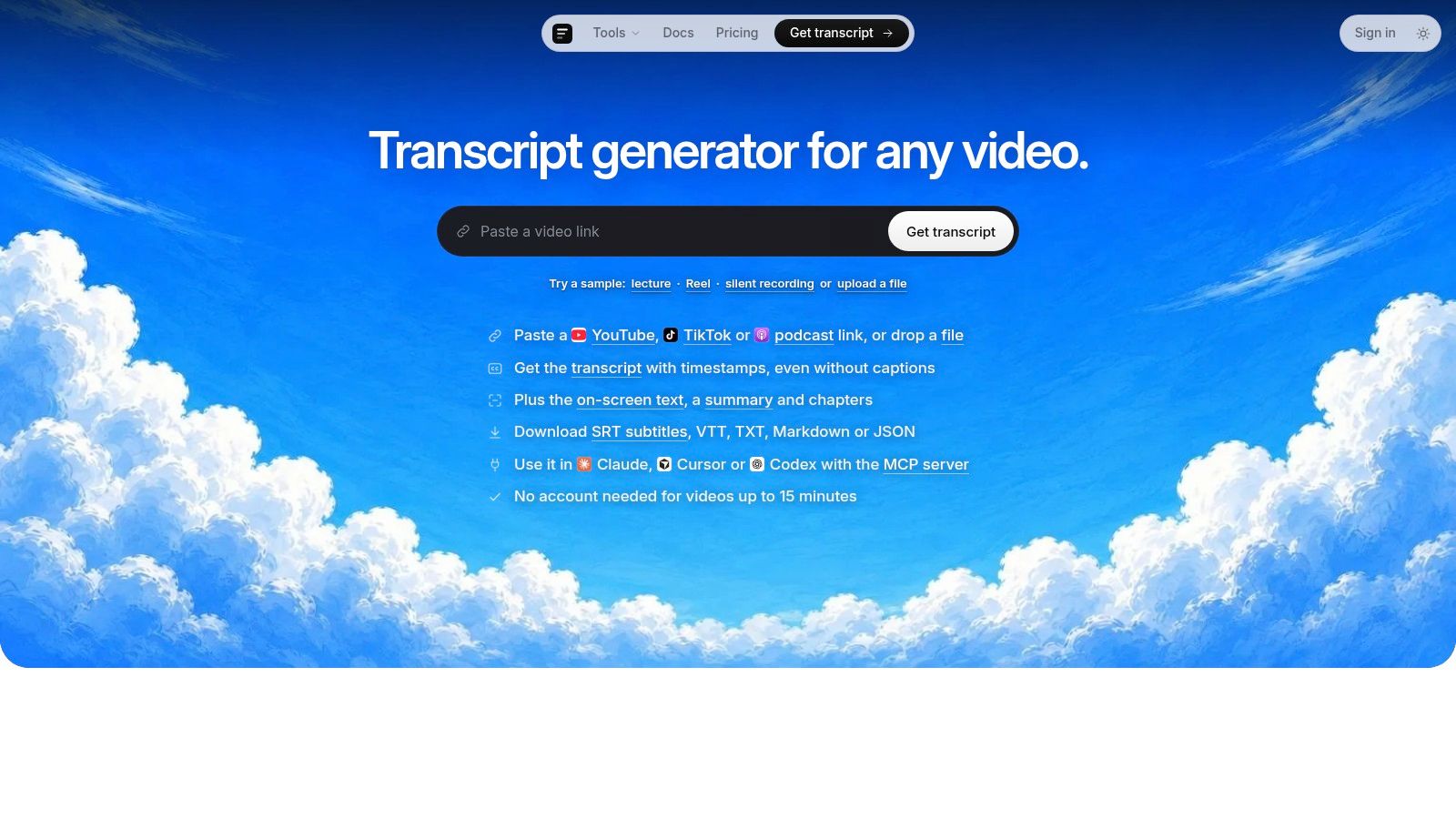
The interface brings together a practical workflow, source selection, transcription, and downstream outputs in one place, reducing separate extraction steps.
Connect Agents and Protect Media
Developers can connect workflows through API, CLI, or MCP server endpoints. An indie founder might fetch a lecture, generate notes, store JSON in a search index, and ask an agent follow-up questions automatically.
Privacy also matters. Scribiz deletes media after job completion, results expire after 24 hours without an account or 30 days with one, and its Mac app sends only audio, or a small low-resolution copy in Watch mode, beyond the device.
{
"type": "transcript",
"sequence": 18,
"text": "Welcome to the",
"final": false,
"start": 12.1,
"end": 12.8
}
Pick a video transcription API by testing it against your actual workflow, not just the numbers on a pricing page. Work through a checklist that mirrors your production environment:
- Accuracy: Measure word-error rate (WER) across clean speech, accents, background noise, overlapping speakers, and domain-specific vocabulary.
- Latency: Pin down streaming targets, how long finalization takes, batch completion windows, and any uptime SLAs.
- Coverage: Check language and dialect support, code-switching, profanity filtering, and custom vocabulary options.
- Compliance: Review data retention, encryption standards, GDPR and HIPAA support, SOC 2 status, processing agreements, and sub-processor lists.
- Developer experience: Evaluate the documentation, available SDKs, webhooks, rate limits, error messages, and whether you can access a sandbox.
- Portability: Stick with providers that return JSON containing timestamps and speaker labels, with the option to export to SRT or VTT. This makes migration far less painful.
Most pricing falls into one of four models:
- Pay-as-you-go bills you for each processed minute, which works well for prototypes and unpredictable demand.
- Tiered volume pricing drops the per-minute rate once you cross monthly thresholds.
- Committed-use contracts trade monthly or annual spend commitments for negotiated rates and a steadier budget.
- Minimum-spend plans can make sense at high volume but create risk when traffic swings.
The headline rate rarely tells the whole story. Dig into charges for storage, media retrieval, output delivery, premium diarization, custom models, translation, OCR, enhanced punctuation, and minimum-duration rounding. Ask whether failed jobs, retries, and reprocessed files still count against your bill.
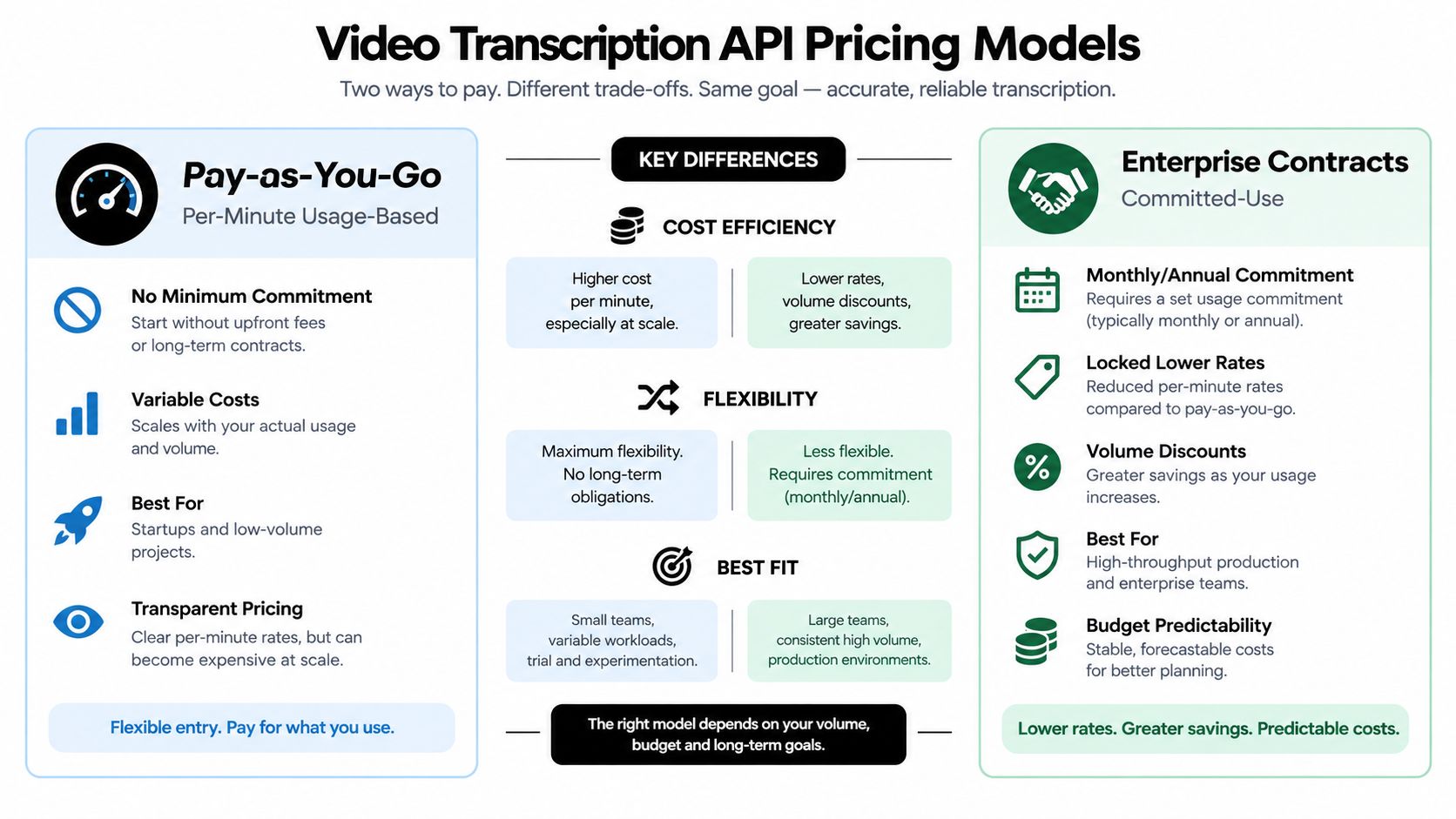
The trade-off is straightforward: usage-based pricing keeps commitments low, while a committed contract usually lowers the effective cost for steady, high-throughput workloads.
Validate Claims with a Pilot
Build a ground-truth dataset from your actual recordings, then submit the identical files to each finalist. Include interviews, meetings, accented speech, background music, crosstalk, specialist names, and recordings made on cheap microphones.
| Criterion | Vendor A | Vendor B | Required result |
|---|---|---|---|
| WER | Measure | Measure | Set your own threshold |
| Streaming latency | Measure | Measure | Define an SLA |
| Diarization | Test | Test | Correct speaker attribution |
| Export formats | List | List | JSON, SRT, VTT |
| Total cost | Calculate | Calculate | Include every add-on fee |
Keep the corrected transcripts and compare the types of errors, not just the overall score. Re-run the tests whenever the vendor updates their model.
Minimize lock-in by storing transcripts in a provider-neutral JSON format, preserving your source media identifiers, and wrapping vendor calls behind an adapter layer. If you process at scale, explore this bulk transcript processing resource. Select the vendor that wins on measured quality, predictable cost, and an exit path you control, then negotiate using the documented results from your pilot.
Security begins before the first upload. A video transcription API may process names, health details, financial information, or confidential conversations, so define what happens to media, intermediate files, and transcripts.
Control Retention and Encryption
Choose vendors with configurable retention and automatic deletion. Confirm whether source videos, extracted audio, transcripts, backups, and logs follow the same schedule.
- Retention: Set the shortest period your workflow needs.
- Deletion: Request documented automatic deletion and verify it during testing.
- Encryption: Require TLS for data in transit and encryption at rest.
- Key management: Ask whether customer-managed keys are available for stricter control.
Treat transcript storage as sensitive data, not as disposable API output.
Match Compliance to Your Industry
Compliance depends on your users, location, and content. Healthcare workflows may require HIPAA support and a business associate agreement. European processing may trigger GDPR duties, including lawful basis, data minimization, deletion rights, and cross-border transfer review.
For enterprise SaaS, inspect the vendor's SOC 2 report, security controls, incident procedures, and subprocessor list. A certification does not automatically make your implementation compliant, because access settings and retention choices remain your responsibility.
Automated PII redaction can remove detected names, addresses, or account numbers, but it is not perfect. Test accents, spelling variations, overlapping speech, and domain-specific identifiers, then add human review before publishing sensitive transcripts.
Govern Access and Consent
Obtain consent before recording or transcribing user-generated content, especially in meetings, interviews, support calls, and customer communities. Store consent status with the media record and provide a clear withdrawal process where required.
Use role-based permissions, separate production and support access, and encrypt exported files. Maintain audit logs showing who submitted media, viewed results, downloaded files, or changed retention settings.
Highly regulated organizations may prefer on-premise deployment or a private environment, while cloud-only APIs can suit lower-risk workloads. Before signing, review the data processing agreement, breach-notification terms, deletion commitments, subprocessors, training-use policy, and regional hosting options.
Run a privacy review with real sample files, document your decisions, and make security checks part of vendor evaluation rather than an afterthought.
Can One Video Contain Multiple Languages?
Yes, provided the provider supports automatic language detection or code-switching. You can send the full file in a single request and let the API identify which language is spoken at each point. Splitting the audio into separate calls only becomes necessary if the service can't switch language models mid-stream or if it enforces a one-language-per-job rule.
For more predictable results, some providers let you pass an ordered list of expected languages—English and Spanish, for instance—which narrows down detection and reduces errors. Still, it's worth reviewing each segment's detected language, especially in bilingual conversations where speakers switch back and forth. Uncertain sections are easy to miss without a second pass.
How Does Audio Quality Affect Accuracy?
Low-quality audio directly degrades accuracy. Expect more substitutions, deletions, and insertions when the source is noisy. The fix starts before you submit anything: normalize loudness, cut out persistent hum or rumble, trim long silences, separate background music from speech, and export a clean mono track at whatever sample rate the provider recommends.
Preprocessing cleans up the signal, but it can't reliably reconstruct clipped speech or heavily overlapped dialogue. Temper expectations accordingly.
The best approach is to run a comparison—send both a cleaned version and the original through the same pipeline, then measure the difference in WER and diarization quality. If the improvement justifies the extra step, bake it into your workflow. If it doesn't, skip it.
How Can High-Volume Teams Reduce Cost?
Think of transcription as a cacheable transformation. Generate a hash from the media bytes, language settings, model, and feature flags, then reuse the stored result whenever those inputs match. This alone can cut redundant spend significantly.
Beyond caching, look for other easy wins:
- Deduplicate uploads — identical media files shouldn't trigger a second transcription.
- Avoid retranscribing failed downstream tasks — the source audio hasn't changed, so the transcription shouldn't need to be regenerated either.
- Transcribe only relevant intervals — if a user requests a clip or chapter, transcribe that slice instead of the full file.
Batch processing tends to make sense for archives. The latency pressure is lower, and queue-based scheduling lets you run jobs during off-peak hours when pricing may be cheaper. Store JSON as the canonical output format, track provider job IDs and media hashes in your system, and only reprocess when settings or model versions actually change.
How Do You Validate Quality Automatically?
Confidence scores—at the segment level and the word level—are useful as review signals, not as guarantees of correctness. Use them to flag suspicious passages: low-confidence words, unusual vocabulary, missing timestamps, unusually frequent speaker changes, and segments likely to contain names or numbers (where errors are most damaging).
A workable workflow looks like this: surface flagged passages to a human reviewer, store their corrections, and calculate WER against approved reference transcripts. Set thresholds per content type, but also sample some high-confidence segments—providers calibrate confidence differently, so a 95% score from one vendor may not mean the same as 95% from another. Feed recurring corrections into custom vocabulary lists, and always rerun pilot tests before pushing changes into production.