Indietool
E Link Internet: What It Means and Who Offers It
When you type "e link internet" into a search box, are you trying to open a link, check whether a link is safe, or buy an internet connection? Most pages pick one of those answers and run with it, which is why the results feel like they're answering somebody else's question. The phrase isn't a single product. It's a name shared by a consumer internet provider, a wholesale business service, a wireless radio system, and the everyday clickable link in your inbox.
Those four things have almost nothing in common except spelling. Sorting them takes about ten seconds once you know what you're looking at, and it saves you from reading a carrier product sheet when all you wanted was to open a receipt.
Table of Contents
- Which E Link Internet Meaning Fits Your Search
- Diagnosing Links That Fail or Look Unsafe
- Judging Whether an Internet Link Is Good Enough
- EarthLink as a Consumer Internet Option
- Optus E-Link as a Wholesale Ethernet Service
- Wireless E-Link Radio for Sites Without Fibre
- Alternatives to Compare and Your Next Step
Which E Link Internet Meaning Fits Your Search
Start with the page or message that sent you searching. If you were comparing home internet plans, you're almost certainly looking for EarthLink, a US internet service provider. If a work email or a network diagram mentioned E-Link, you're likely looking at Optus E-Link, a wholesale Ethernet leased line sold to carriers and ISPs rather than households.
A third meaning sits in the infrastructure world: an E-Link millimetre-wave radio that carries Gigabit Ethernet between buildings without digging a trench. And the fourth meaning isn't a company at all. People type "e link" when they mean an electronic link, a URL, or a "safe link" that an email security service has rewritten and scanned.
Most readers want the first or the fourth. Say a teacher gets a message about a shared worksheet and searches the phrase because the link won't open. That teacher needs a browser fix, not a wholesale carrier contract.
| Meaning | What It Refers To | Typical Need | Where to Look |
|---|---|---|---|
| Internet service provider | EarthLink, a US consumer and business ISP | Compare or sign up for internet access | The provider's own plan and coverage pages |
| Wholesale Ethernet service | Optus E-Link leased line for carriers and ISPs | Business backhaul or inter-site links | The provider's wholesale product sheet and SLA |
| Wireless backhaul radio | E-Link 71–86 GHz millimetre-wave Gigabit Ethernet system | Connect sites where fibre is slow or costly | Vendor specification and a feasibility study |
| Hyperlink or safe link | Any clickable URL, including links rewritten by email security | Open a link or check whether it is safe | The destination domain and browser or email warnings |
Find the row that matches where you came from, then read that part of the guide. If two rows seem plausible, the deciding question is who pays: households buy access, carriers buy capacity, and nobody buys a hyperlink.
Diagnosing Links That Fail or Look Unsafe
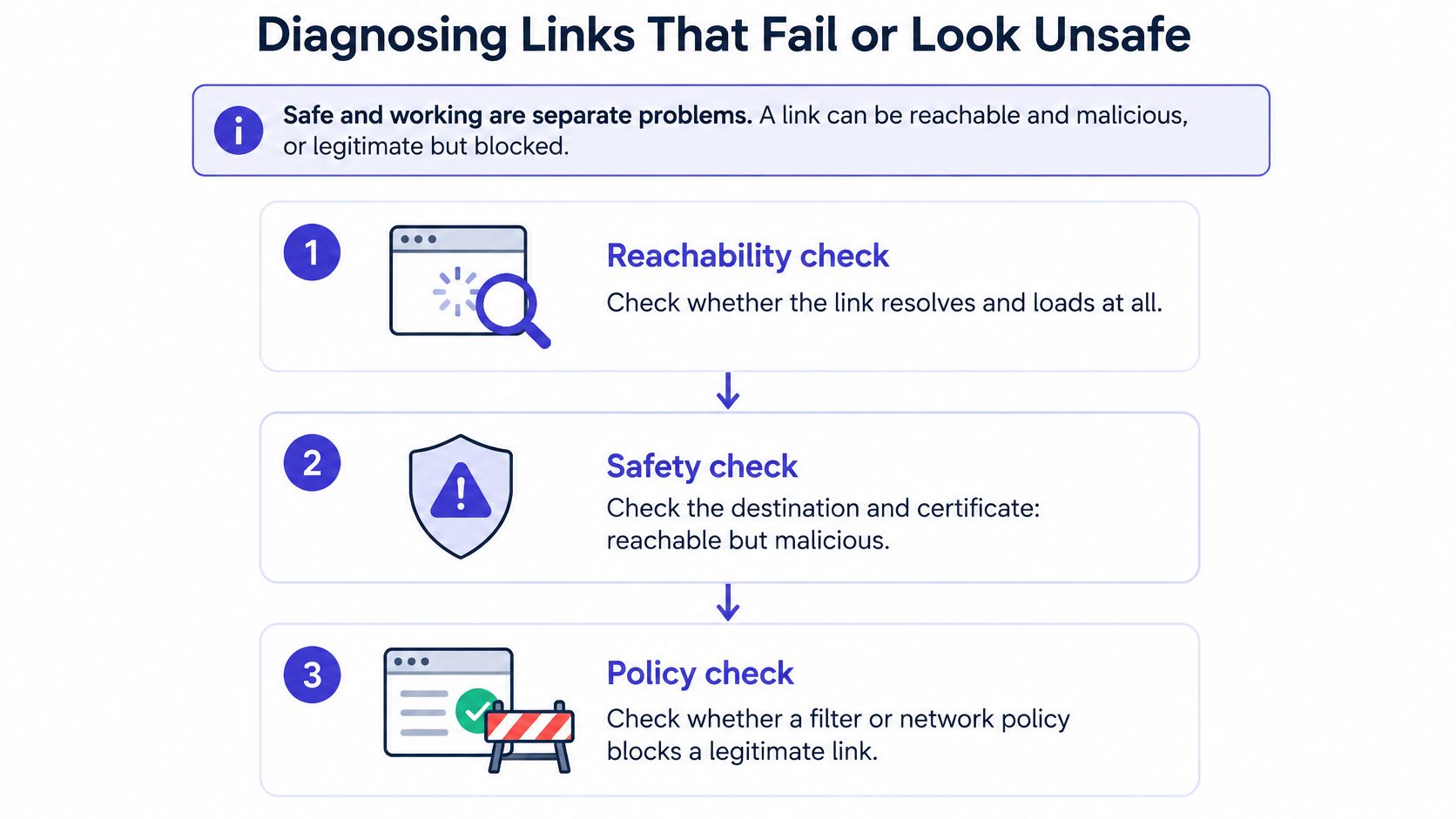
Safe and working are separate problems. A link can load perfectly and still steal your password. A perfectly honest link can fail because your office network blocks it. Treating those as one question is how people end up either trusting a phishing page or blaming their internet for a broken redirect.
Work through the checks in this order, because each one rules out a different cause.
- Was the message expected? An invoice you never asked for is a different situation from a file a colleague said they'd send. Check the sender's actual domain, not the display name.
- Read the destination domain before clicking. Hover or long-press to reveal it. The padlock and HTTPS mean the traffic is encrypted, not that the site is honest, which is exactly why the university IT guidance on suspicious links tells users to inspect the destination and avoid unexpected messages rather than trust one signal.
- Try another network or device. If it opens on mobile data but not on office wifi, the link is fine and the network policy isn't.
- Look for a private-network restriction, an expired redirect or a blocked script. These three cause most "legitimate but dead" links.
- If email security rewrote the link, compare the rewritten address with the one published on the sender's known website.
Matching the symptom to the fix
| Symptom | Likely Cause | Fix |
|---|---|---|
| Link times out only on one network | Private-network or firewall restriction | Open it on another network or ask IT to allow the domain |
| Redirect ends in an error | Expired or moved redirect | Request the current address from the sender |
| Page loads blank | Blocked script or content | Allow scripts for the site or try another browser |
| Email security warning | Rewritten or tracked link | Check the destination domain before opening |
| Link flagged as unsafe | Malicious or spoofed destination | Do not open it; report the message |
Shortened URLs hide the destination by design, so use the shortener's preview option or a link scanner to see where it points before you commit. Tracking parameters are different: they add campaign tags to the address without changing the site you land on, so a long ugly URL isn't automatically a hostile one.
Never enter credentials on a page you reached from an unexpected message. Reach the site through an address you already know, then log in there.
Judging Whether an Internet Link Is Good Enough
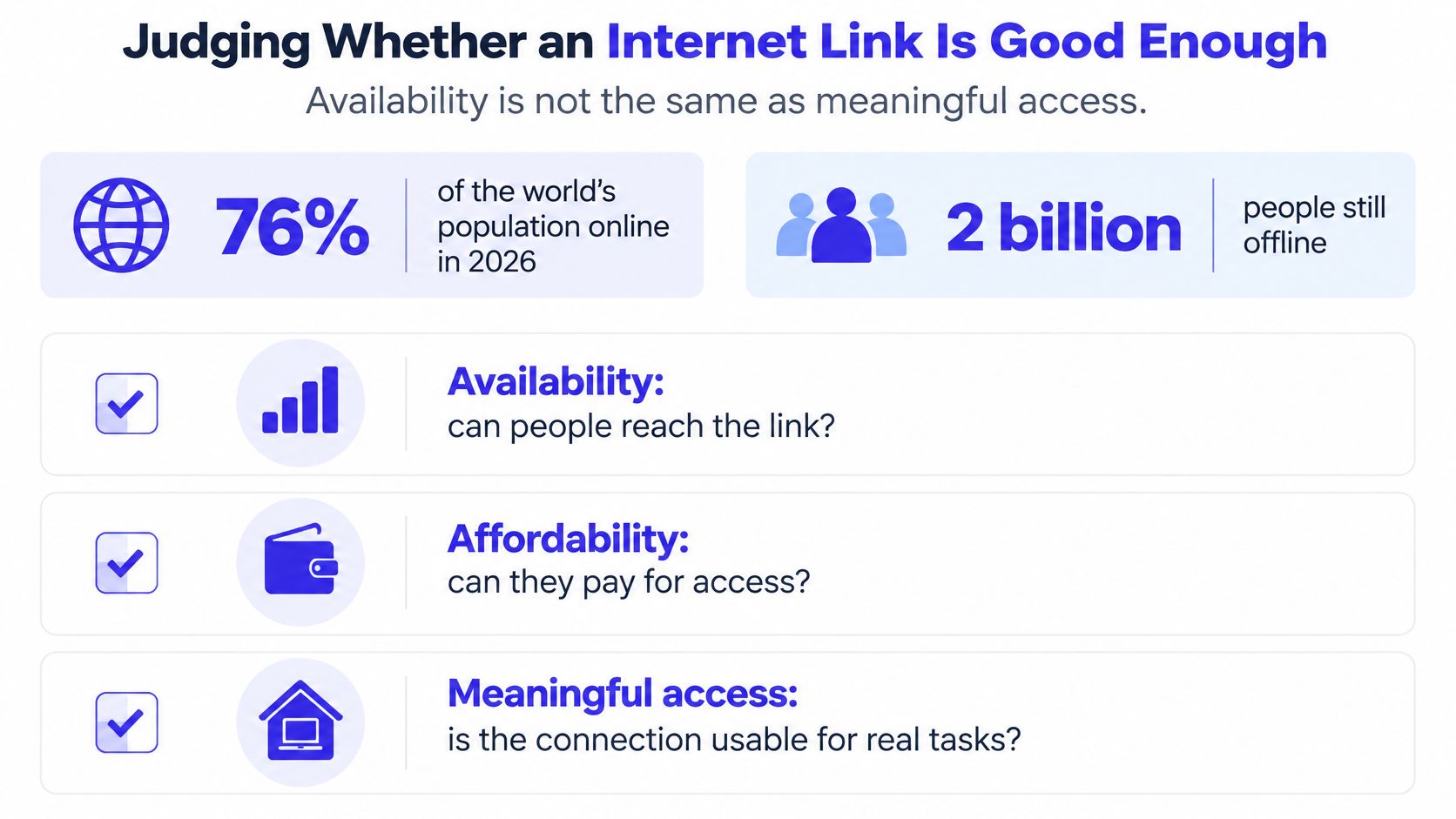
Availability and usable access aren't the same thing. The gap is measurable. ITU's 2026 internet-use estimates put 76% of the world's population online while 2 billion people remain offline, and the same release cites OECD data showing median fixed broadband speed reached 207.5 Mbps in Q2 2026, with urban users averaging speeds 42% higher than rural users. Least-developed and landlocked developing countries sit behind both figures. A coverage map that marks your street as "served" therefore says little about the video call you are trying to hold at eight in the evening.
Six criteria that matter more than the headline number
| Criterion | What to Check | Why It Matters |
|---|---|---|
| Download speed | Sustained rate at peak hours | Streaming and large downloads |
| Upload speed | Sustained upload rate | Video calls, cloud backups and development |
| Latency | Round-trip time to the services you use | Interactive work and real-time calls |
| Reliability | Number of outages over a month | Business continuity |
| Affordability | Monthly cost relative to income | Whether the connection stays in use |
| Access type | Fixed or mobile; urban or rural | Whether service reaches your address at full quality |
Download speed is the number people notice first. Upload is the one people skip. A plan can advertise a generous download figure and still make you sound like a robot on calls, because your outgoing video is squeezed into a thin upstream channel. Latency behaves in a similar way. It rarely appears in a speed headline, but it decides whether screen sharing feels live or laggy. Reliability answers a different question: does the connection hold steady across a working month, or only when nobody nearby is using it? Affordability asks whether the household can keep paying for the service. Access type asks whether the promise applies to your address, not just to the wider region.
Think of the connection as a road. Download speed is how many cars can arrive, upload is how many can leave, latency is how long each trip takes, and reliability is whether the road closes at busy times. A wide road still fails if the bridge is out.
Coverage isn't adoption
Households stay offline where infrastructure already exists, for reasons a signal map cannot show: the monthly cost, no suitable device, missing digital skills, content in the wrong language, or distrust of the provider. Judging a connection therefore means asking whether someone can keep using it, not whether a cable passes the door.
Run your own test this week. Check download, upload and latency at peak hours on three separate days, write the numbers down, then compare them with the task you need done. A video call needs steady upload and low latency. Streaming leans harder on download. Cloud backups care about both upload and reliability. If you publish pages yourself, remember that a heavy page can feel broken on a modest connection. Compare the measurements with the task before blaming the network.
EarthLink as a Consumer Internet Option
EarthLink's story explains why the name still surfaces in searches. According to the company's history on Wikipedia, Sky Dayton founded it in July 1994 in Los Angeles after struggling to configure his own computer for internet access. By 1995 it offered dial-up in 98 US cities and was among the first ISPs to sell unlimited access for a flat monthly fee. In 1999 it became the first US ISP to offer nationwide DSL, and on 4 February 2000 it merged with Atlanta-based MindSpring.
Those dates describe the company's past, not its current catalogue. Before you sign anything, work through four checks:
- Confirm the address: run the provider's own coverage check for the exact unit, not just the postcode.
- Compare two local alternatives: cable, fibre or fixed wireless, on price, contract length and access type.
- Measure against your tasks: upload, latency and evening reliability, not the advertised maximum.
- Get terms in writing: promotional pricing, expiry date, equipment fees and cancellation rules.
Optus E-Link as a Wholesale Ethernet Service
This is the meaning that confuses household readers most, because it isn't sold to households. The Optus E-Link product brochure describes an Ethernet-over-SDH (EoSDH) leased line built for Layer 2 carrier and ISP connectivity, not shared internet access.
Think of it as a private pipe rather than a public road. Its point-to-multipoint design gathers many subscriber services and VLANs into a single Gigabit Ethernet interface at an exchange or hub, so the operator handles one handoff instead of a rack full of individual circuits. Provisioned access rates run from roughly 2 Mb/s to 1 Gb/s and can be changed as requirements evolve, and full-duplex operation means the subscribed capacity carries traffic in both directions at once.
The practical payoff is predictable bidirectional bandwidth for backhaul, inter-site links and wholesale access, with far less exposure to the congestion that makes shared broadband slow at busy hours.
What to verify before you sign
- Service-level agreement: what's compensated, and how faults are measured and reported.
- Ethernet handoff: connector type, speed and whether it matches your switch port.
- VLAN model: how customer traffic is tagged and separated end to end.
- Contention policy: whether any part of the path is shared with other customers.
- Bandwidth changes: whether an upgrade is a remote configuration or a site visit with new hardware.
Ask for measurements, not adjectives. A nominal access rate doesn't establish end-to-end throughput or latency, so request tested figures between your two actual sites.
Say a regional ISP aggregates dozens of subscriber circuits at one hub. The single handoff simplifies the rack, but the ISP still needs to know how the provider handles a fault at the exchange, because that's where all the traffic converges.
Wireless E-Link Radio for Sites Without Fibre
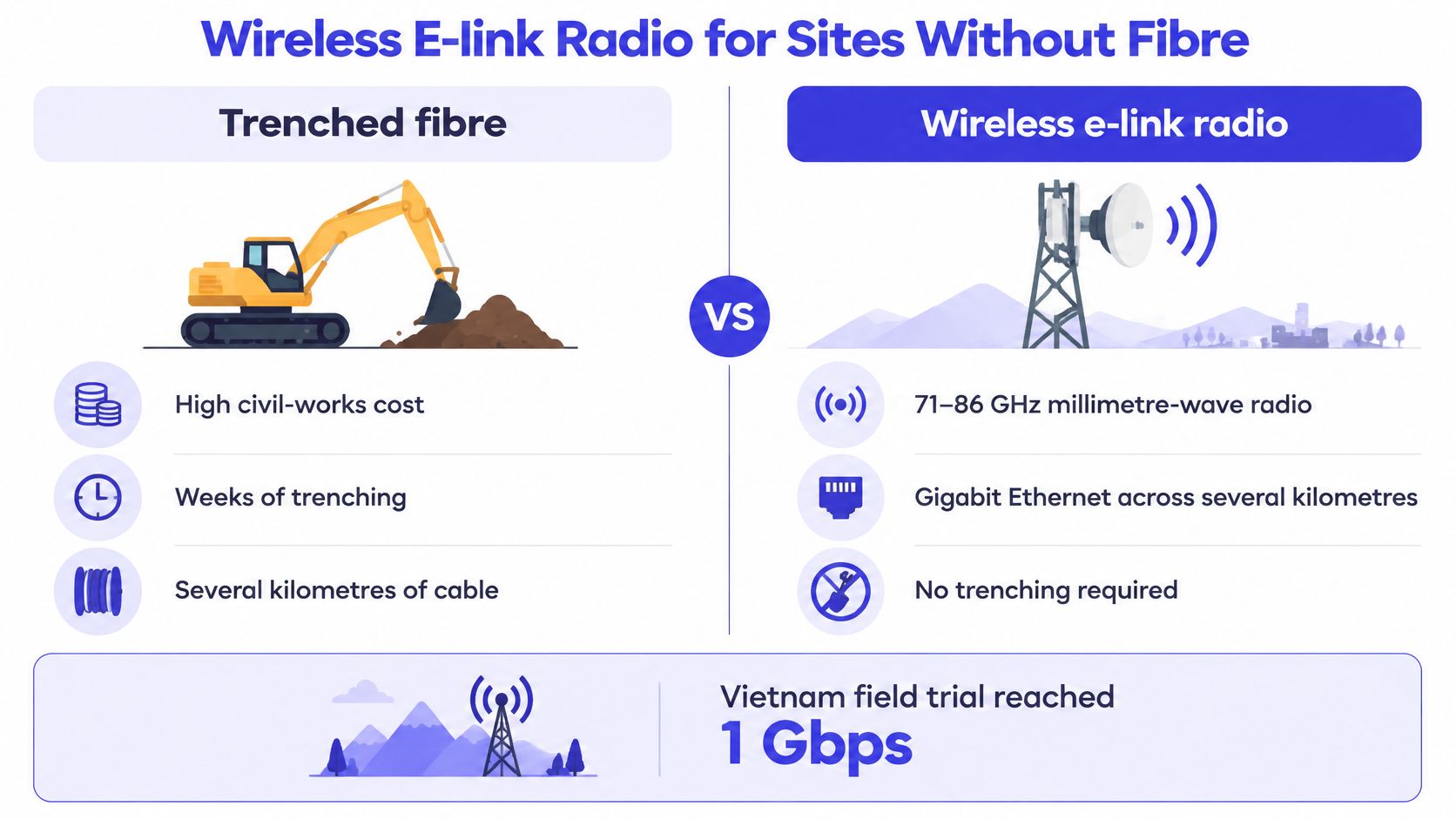
A separate E-Link implementation skips cables entirely. The vendor system specification filed with the SEC describes 71–86 GHz millimetre-wave radio delivering Gigabit Ethernet across several kilometres, with 1–3 Gb/s capacity, a stated path toward 10 Gb/s, and availability targets up to 99.999%. A reported Vietnam field trial reached 1 Gb/s-class connectivity under tropical conditions.
Do the arithmetic on that availability figure before you repeat it in a business case. At 99.999% annual availability, the theoretical outage budget is about 5.26 minutes per year. That's an engineering target, not a contractual promise, and real results shift with link distance, antenna alignment, rain attenuation, regulatory power limits and atmospheric conditions.
Two ways to reach a site
| Consideration | Wired leased-line path | Wireless E-Link radio |
|---|---|---|
| Physical work | Fibre route and exchange handoff | Two aligned radios with clear line of sight |
| Weather exposure | Not rain-dependent | Rain fade at millimetre-wave frequencies |
| Capacity growth | Provisioned rate change with the carrier | Vendor roadmap toward higher throughput |
| Power and protection | Exchange power and carrier protection | Protected site power plus a redundant path |
| Best fit | Sites already near existing fibre | Remote sites where trenching is slow or costly |
The honest summary: radio wins on time and civil works, fibre wins on predictability. Where a link carries critical traffic, plan for the weather rather than hoping through it.
A feasibility checklist keeps the decision grounded. Model worst-case rain fade for your region, not average rainfall. Confirm line of sight with a physical survey, including tree growth and future construction. Specify protected power at both ends and a redundant path for anything that can't drop. Then validate that the radio's Ethernet interface and service throughput match your VLAN design, latency budget and failover behaviour, because a fast radio feeding a mismatched handoff solves nothing.
Alternatives to Compare and Your Next Step
Three paths, three sets of alternatives. For home or small-office access, compare other fixed providers in your area (cable, fibre, DSL) against fixed wireless and mobile plans, using the evening measurements rather than the brochure. For business backhaul, weigh the wholesale Ethernet service against a standard leased line, a new fibre build, or the wireless radio option. For a suspicious message, the alternative to clicking is contacting the sender through a number or address you already hold.
Then follow four steps in order:
- Confirm which meaning of "e link internet" applies to your situation.
- Check coverage at the exact address for every option on your shortlist.
- Measure two alternatives against the criteria that match your real tasks.
- Request written plan details or a service-level agreement before you commit.
Prices and coverage change, so treat any comparison as a starting point and confirm current offers on the provider's own pages.
If your reason for reading was a link that looked wrong, our free Scan-link utility gives you a second opinion on a URL before you open it, alongside other free tools for naming, pricing and launch prep. Builders can also list a product in our directory and get a permanent do-follow backlink from a DR 47 domain, with no badge or reciprocal link on the Standard plan. Visit IndieTool to check a link or submit your app.