Video Compressor — VidPackit
Video Compressor — Compress Video Free Online
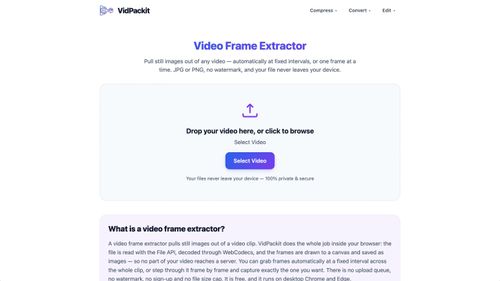
VidPackit is a free, client-side video compressor that allows users to compress and convert video files directly in their browser. It solves the problem of large file sizes while ensuring complete data privacy and security.
Indie founders and content creators looking for a hassle-free video compression solution that prioritizes privacy.
VidPackit stands out with its browser-based functionality and commitment to user privacy, making video compression straightforward and secure. It's an essential tool for anyone needing quick and efficient video handling without complications.
Video Compressor — VidPackit
Thursday, October 1, 2026
12 / 100
Ahrefs Domain Rating measures backlink strength on a 0 to 100 scale.
- Client-side video processing for enhanced privacy
- Supports multiple video and audio formats
- No watermarks or sign-ups required
- Easy drag-and-drop interface
- Adjustable compression levels for tailored results
- 100% client-side processing ensures data privacy.
- No watermarks or sign-ups required.
- Supports multiple video and audio formats.
- Browser compatibility may vary, with best performance on desktop Chrome or Edge.
- Limited to the capabilities of your browser's WebCodecs.
To use VidPackit, simply drag and drop your video file into the designated area or select it from your device. Choose your desired compression level and format, then click the convert button. The tool processes the file locally, allowing you to download the compressed version once completed.
VidPackit is an innovative video compression tool that empowers users to reduce video file sizes without sacrificing quality or privacy. With its fully client-side processing, your files never leave your device, ensuring secure handling of sensitive data. Founders and indie builders will appreciate its versatility in supporting multiple formats and resolutions, making it a must-have tool for efficient video management.
Real performance numbers in the last 30 days
Questions
Is VidPackit free to use?
Yes, VidPackit is completely free to use with no hidden fees or subscriptions.
What formats does VidPackit support for compression?
VidPackit supports various formats including MP4, WebM, MOV, MKV, and audio formats like MP3 and AAC.
How does VidPackit ensure my privacy?
VidPackit processes all video files locally in your browser, meaning no data is uploaded to any server, ensuring maximum privacy.
Best Video Compressor — VidPackit Alternatives & Similar Productivity Tools (2026)
View all| Tool | Category | Summary / Best For | Pricing | Profile |
|---|---|---|---|---|
| Video Compressor — VidPackit (Current) | Productivity | VidPackit is a free, client-side video compressor that allows users to compress and convert video files directly in their browser. It solves the problem of large file sizes while ensuring complete data privacy and security. | See site | — |
| Happy Wan | Ai | Happy Wan — Multimodal AI Video Generation | See site | View |
| VisiTralai.lt | Business | Need vehicle recovery in Lithuania? Book a recovery truck online 24/7. Check prices before | See site | View |
| Substack Explorer | Productivity | Find top Substack newsletters and creators in any niche | See site | View |
| Quick Viral Notes | Marketing | Turn your long-form articles into Notes and social posts | See site | View |
| Build to Launch MCP | Agent | Connect your AI agent to 300+ methods and 100+ live tools | See site | View |
| Vibe Coding Builders | Ai | Find someone one stage ahead of you, building with AI | See site | View |
 Happy WanHappy Wan — Multimodal AI Video Generation
 VisiTralai.ltNeed vehicle recovery in Lithuania? Book a recovery truck online 24/7. Check prices before
 Substack ExplorerFind top Substack newsletters and creators in any niche
 Quick Viral NotesTurn your long-form articles into Notes and social posts
 Build to Launch MCPConnect your AI agent to 300+ methods and 100+ live tools
 Vibe Coding BuildersFind someone one stage ahead of you, building with AI