 Indietool
qtrl.ai
The QA platform for test management and automation
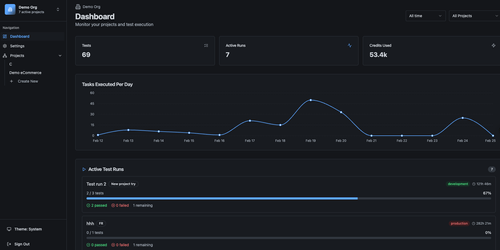
qtrl.ai is a cutting-edge QA platform that seamlessly integrates structured test management with AI-powered test automation. Designed for engineering and product teams, it streamlines the testing process, ensuring high-quality software delivery while reducing manual effort and time spent on testing.
Engineering and product teams aiming to modernize QA workflows with a mix of manual and automated testing capabilities.
qtrl.ai effectively combines structured test management with AI-driven test automation to enhance software quality while reducing manual testing effort. It is particularly useful for teams looking to balance control and scalability in their QA processes.
qtrl.ai
Friday, February 27, 2026
23 / 100
Ahrefs Domain Rating measures backlink strength on a 0 to 100 scale.
- AI-driven test management
- Autonomous QA agents
- Progressive automation
- Multi-environment executions
- Enterprise-grade security
- Integrates structured test management with AI-powered automation
- Supports multi-environment testing with secure handling of secrets
- Offers progressive automation with manual oversight
- May require initial setup for seamless CI/CD integration
- Primarily focused on QA rather than a comprehensive development suite
Getting started with qtrl.ai is simple. First, sign up for an account on their website. Once logged in, you can create your project and define your testing requirements. The intuitive interface allows you to organize test cases and manage your testing workflows effortlessly. To leverage AI automation, integrate your code repository, and let qtrl.ai generate automated tests for you. Finally, monitor your test results in real-time and collaborate with your team to ensure a seamless quality assurance process.
qtrl.ai is an exciting addition to the toolkit of any startup founder looking to elevate their product quality. This platform tackles the common pain points of test management by unifying traditional methods with advanced AI capabilities, making it easier to automate testing processes and manage test cases efficiently. For founders, this means quicker releases, fewer bugs, and ultimately, happier users. With qtrl.ai, you can focus more on innovation and less on the tedious aspects of quality assurance, empowering your team to achieve faster and more reliable results.
Real performance numbers in the last 30 days
Questions
What types of testing does qtrl.ai support?
qtrl.ai supports both manual and automated testing, enabling teams to manage test cases and execution across various environments.
How does qtrl.ai ensure test quality?
qtrl.ai ensures test quality by providing full traceability, allowing teams to approve tests before execution, and suggesting new tests based on coverage.
Can qtrl.ai integrate with existing tools?
Yes, qtrl.ai is designed to work with your existing tools and supports CI/CD pipeline integration for seamless workflows.
Best qtrl.ai Alternatives & Similar Productivity Tools (2026)
View all| Tool | Category | Summary / Best For | Pricing | Profile |
|---|---|---|---|---|
| qtrl.ai (Current) | Productivity | qtrl.ai is a cutting-edge QA platform that seamlessly integrates structured test management with AI-powered test automation. Designed for engineering and product teams, it streamlines the testing process, ensuring high-quality software delivery while reducing manual effort and time spent on testing. | See site | — |
| MAGI-2 | Ai | MAGI-2 brings text-to-video, image-to-video, and omni-reference workflows with native audio sync and up to 30s 1080p output. | See site | View |
| Palingo | Ai | Palingo: Bilingual Reading, YouTube & Podcast Study | See site | View |
| Wer ist der Beste.com? | Ai | ranking, platform | See site | View |
| Companypedia | Fintech | pedia, plattform | See site | View |
| MailMergeOnline | Productivity | Private Excel-to-PDF mail merge, entirely in your browser. | See site | View |
| screendimensions.com | Productivity | What Is My Screen Size? Screen Dimensions & Resolution | See site | View |
 MAGI-2MAGI-2 brings text-to-video, image-to-video, and omni-reference workflows with native audio sync and up to 30s 1080p output.
 PalingoPalingo: Bilingual Reading, YouTube & Podcast Study
 Wer ist der Beste.com?ranking, platform
 Companypediapedia, plattform
 MailMergeOnlinePrivate Excel-to-PDF mail merge, entirely in your browser.
 screendimensions.comWhat Is My Screen Size? Screen Dimensions & Resolution