 Indietool
LALAL.AI
Your AI-powered Swiss Army knife for all things audio.
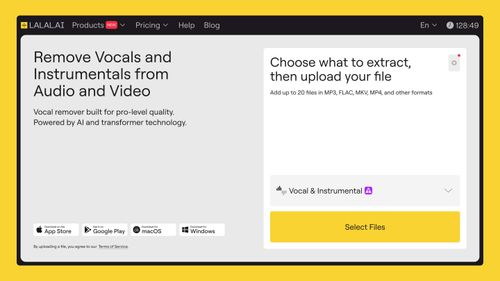
LALAL.AI is an AI-powered audio processing platform that separates vocals and instruments from songs, cleans voice recordings, and supports creative workflows with voice changing and cloning tools. Built for audio and video files, it helps creators and founders recover usable sound from noisy recordings, extract individual musical stems, and prepare clearer audio for podcasts, product videos, voiceovers, and remixes without manually isolating every element.
Solo founders, podcasters, video creators, and music makers who need to clean recordings, isolate vocals or instruments, and prepare audio for content production.
LALAL.AI is a useful audio toolkit for founders who need cleaner recordings or separated stems without painstaking manual editing. Its previews help you judge the result before committing to full processing, but source quality still sets the ceiling.
Maria Fedoseeva
Friday, November 27, 2026
72 / 100
Ahrefs Domain Rating measures backlink strength on a 0 to 100 scale.
- AI vocal removal and stem separation for drums, bass, guitars, piano, and other instruments.
- Lead and backing vocal separation with four downloadable output options.
- Voice cleanup plus dedicated echo and reverb reduction tools.
- Voice changing and voice cloning for creative audio production.
- Enterprise API integrations for secure bulk audio processing.
- Combines stem separation, voice cleanup, echo reduction, and creative voice tools in one platform.
- Supports popular audio and video formats, with previews available for evaluating stem separation.
- Offers individual instrument isolation and separate lead and backing vocal outputs.
- Dense mixes, distortion, compression artifacts, and overlapping sounds can reduce separation quality.
- Separated tracks may still need further editing; cleaner input recordings generally produce better results.
Start by choosing the LALAL.AI tool that matches your task, such as Vocal Remover, Voice Cleaner, or Echo & Reverb Remover, then upload a supported audio or video file using the highest-quality source you have. For stem separation, select the voice or instrument you want to isolate, enable lead/back separation if needed, and listen to the available previews to judge whether the result fits your project. When satisfied, process the full file and download the available outputs; for lead/back separation, these include Lead Vocal, Backing Vocal, Instrumental, and Back Vocal + Instrumental, ready for further editing in your preferred production software.
What stands out to us about LALAL.AI is how it brings several useful audio tasks into one platform: extracting vocals, isolating instruments, cleaning speech, and reducing room echo. For indie founders producing their own demos, podcasts, or launch videos, that means fewer technical distractions between recording an idea and publishing something polished. Its stem splitter supports drums, bass, guitars, piano, and other instruments, while separate lead and backing vocal extraction gives music-focused creators more editing flexibility. We also appreciate the preview-first workflow, which lets you evaluate separation before processing the complete track. Developers building audio features can explore enterprise API integrations for bulk processing. The important caveat: results depend on the source recording, so treat it as a practical production assistant rather than a guaranteed fix for every difficult mix.
Real performance numbers in the last 30 days
Questions
Can LALAL.AI remove vocals from both songs and videos?
Yes. LALAL.AI accepts audio and video uploads and can separate the vocal and instrumental components of a track. Supported audio formats include MP3, OGG, WAV, FLAC, AIFF, AAC, and M4A; supported video formats include AVI, MP4, MKV, MOV, and M4V. Preview the separation, then process the full file and download the output you need.
Can LALAL.AI separate lead vocals from backing vocals?
Yes. Enable Lead/back separation in the upload widget settings before uploading your file. You can preview the Lead Vocal, Backing Vocal, and Instrumental outputs. After full processing, a fourth output, Back Vocal + Instrumental, is also available, which is useful when you want an accompaniment that retains backing vocals.
Can LALAL.AI clean noisy podcast recordings and reduce room echo?
Yes. Voice Cleaner targets background noise and unwanted sounds in voice recordings, while Echo & Reverb Remover reduces room reflections to improve clarity. Choose the tool that matches your recording problem and evaluate the result carefully: heavily distorted or poor-quality source audio may still require additional editing or a new recording.
Best LALAL.AI Alternatives & Similar Ai Tools (2026)
View all| Tool | Category | Summary / Best For | Pricing | Profile |
|---|---|---|---|---|
| LALAL.AI (Current) | Ai | LALAL.AI is an AI-powered audio processing platform that separates vocals and instruments from songs, cleans voice recordings, and supports creative workflows with voice changing and cloning tools. Built for audio and video files, it helps creators and founders recover usable sound from noisy recordings, extract individual musical stems, and prepare clearer audio for podcasts, product videos, voiceovers, and remixes without manually isolating every element. | See site | — |
| Ignelis LLC | Web3 | Ignite you're token to the top with ignelis.app | See site | View |
| InstantJobs Reality Checker | Developer Tools | Free Interactive JD & Tech Salary Reality Checker for Hiring Teams | See site | View |
| MAGI-2 | Ai | MAGI-2 brings text-to-video, image-to-video, and omni-reference workflows with native audio sync and up to 30s 1080p output. | See site | View |
| Palingo | Ai | Palingo: Bilingual Reading, YouTube & Podcast Study | See site | View |
| Wer ist der Beste.com? | Ai | ranking, platform | See site | View |
| Companypedia | Fintech | pedia, plattform | See site | View |
 Ignelis LLCIgnite you're token to the top with ignelis.app
 InstantJobs Reality CheckerFree Interactive JD & Tech Salary Reality Checker for Hiring Teams
 MAGI-2MAGI-2 brings text-to-video, image-to-video, and omni-reference workflows with native audio sync and up to 30s 1080p output.
 PalingoPalingo: Bilingual Reading, YouTube & Podcast Study
 Wer ist der Beste.com?ranking, platform
 Companypediapedia, plattform