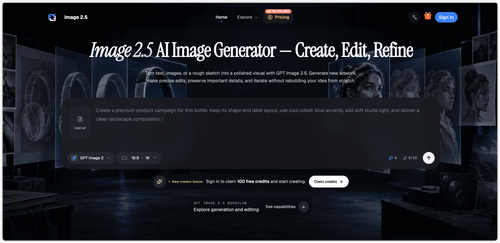
Image 2.5 stands out as a powerful solution for creators needing fast, flexible, and high-quality image generation and editing. Its intuitive design and advanced features make it an essential tool for enhancing visual storytelling.
Key Advantages
- ✓High-quality output with custom dimensions up to 4K.
- ✓Iterative editing allows for continuous refinement without starting over.
- ✓Supports various input methods, including text, images, and sketches.
Trade-offs & Considerations
- •Complex prompts may take longer to process.
- •Higher quality settings can increase processing time and cost.
What is Image 2.5?
Image 2.5 is an AI-powered image generation and editing tool designed for creators who need to transform text, images, or sketches into polished visuals. It addresses the challenge of creating high-quality images efficiently without starting from scratch.
Key Features & Highlights
3 FeaturesCore capabilities and advantages of using Image 2.5 for your workflow:
How to use Image 2.5
To use Image 2.5, start by entering a text prompt or uploading images and sketches as references. Choose your desired size and quality settings, then generate your image. Finally, refine your creation through iterative edits to achieve the perfect visual result.
About Image 2.5
Image 2.5 is an exciting tool for indie builders and startup founders, offering a seamless blend of image generation and editing capabilities. It empowers users to produce stunning visuals from simple prompts or rough sketches, facilitating creativity while maintaining essential details. With its high-quality outputs and user-friendly interface, Image 2.5 is perfect for those looking to elevate their visual content quickly and effectively.
Real performance numbers in the last 30 days
Frequently Asked Questions
Common questions about Image 2.5, features, and launch details.
Q:What types of inputs can I use with Image 2.5?
You can use text prompts, images, or even rough sketches as inputs for generating and editing images in Image 2.5.
Q:Can I use the images created with Image 2.5 for commercial purposes?
Yes, Image 2.5 supports commercial usage under its paid plans and credit packs, allowing you to utilize generated images for your business projects.
Q:What are the differences between the Sunburst and Flare models?
Sunburst prioritizes editing precision and maximum image quality, while Flare is optimized for speed and everyday generation without compromising quality.
Related Design Apps
View All →
BuyHub
Search eBay, Vinted, Mercari and 100+ marketplaces at once
AiToolsList.Tools
AI Tools Directory, SaaS Products & Productivity Apps | AiToolsList.Tools
Story2Board
Story2Board — AI Co-Director for Storyboards
Startup Ai Tools
Best AI Tools Directory | Discover 5,000+ AI Tools

VidMake AI
Viral AI Video Generator
devquiver
Hand-tested backlink directories with a submission tracker