 Indietool
Phishly
AI phishing detection in one click.
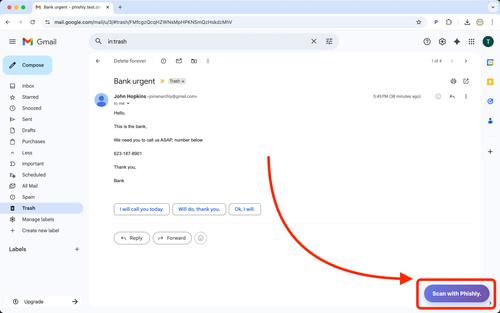
Phishly is an innovative AI-driven tool designed to detect phishing emails quickly and efficiently. Available as a Chrome extension for Gmail and as a web tool, it allows users to scan emails with just one click, providing instant security insights to protect against online threats.
Individuals and small businesses using Gmail who need a quick, easy way to enhance email security without additional software installations.
Phishly offers a straightforward solution for detecting phishing emails, leveraging AI to provide instant security insights with just a click. Its utility lies in its simplicity and accessibility as a Chrome extension and web tool.
Phishly
Friday, October 17, 2025
3 / 100
Ahrefs Domain Rating measures backlink strength on a 0 to 100 scale.
- Real-time phishing alerts
- User-friendly interface
- Comprehensive security tips
- Cross-platform compatibility
- Easy one-click scanning for quick phishing detection
- Integrates directly with Gmail via Chrome extension
- No need for complex configurations or additional software
- Limited to Gmail users
- Does not offer protection beyond email scanning
Getting started with Phishly is a breeze! First, install the Chrome extension from the Chrome Web Store or access the web tool from the Phishly website. Once installed, simply log in to your Gmail account. When you receive an email that raises suspicion, click on the Phishly icon in your toolbar. The extension will instantly analyze the email and provide you with detailed security insights. Regularly using Phishly can help you stay ahead of potential threats and protect your sensitive information effortlessly.
Phishly is a game-changer for startup founders who often juggle multiple responsibilities and face the looming threat of phishing attacks. This tool leverages advanced AI algorithms to provide real-time detection of phishing attempts, giving users the peace of mind they need to focus on growing their businesses. The simplicity of one-click scanning makes it incredibly user-friendly, while its integration with Gmail enhances its functionality. In an era where cyber threats are increasingly sophisticated, Phishly stands out as an essential resource for founders who want to safeguard their communications and maintain their professional integrity.
Real performance numbers in the last 30 days
Questions
What types of phishing attacks does Phishly protect against?
Phishly protects against various phishing attacks, including email scams, fraudulent websites, and SMS phishing (smishing).
Is Phishly available on both iOS and Android?
Yes, Phishly is available for download on both iOS and Android devices for maximum accessibility.
How does Phishly detect phishing attempts?
Phishly uses advanced algorithms and machine learning to analyze web content and detect suspicious patterns indicative of phishing attempts.
Best Phishly Alternatives & Similar Productivity Tools (2026)
View all| Tool | Category | Summary / Best For | Pricing | Profile |
|---|---|---|---|---|
| Phishly (Current) | Productivity | Phishly is an innovative AI-driven tool designed to detect phishing emails quickly and efficiently. Available as a Chrome extension for Gmail and as a web tool, it allows users to scan emails with just one click, providing instant security insights to protect against online threats. | See site | — |
| Tracee AI | Marketing | social scheduling mcp and agent tool | See site | View |
| PicNext | Ai | AI Product Photography & Ad Creative Studio | PicNext | See site | View |
| Qooling | Business | The agentic QHSE platform for your frontline workers | See site | View |
| Agentopia | Developer Tools | A cozy office that visualizes your AI agents at work | See site | View |
| TTAPI | Ai | TTAPI — Unified AI API Gateway for Image, Video, Music & LLMs | See site | View |
| Kyanu AI | Productivity | Know which candidates fit before you open a single profile. | See site | View |
 Tracee AIsocial scheduling mcp and agent tool
 PicNextAI Product Photography & Ad Creative Studio | PicNext
 QoolingThe agentic QHSE platform for your frontline workers
 AgentopiaA cozy office that visualizes your AI agents at work
 TTAPITTAPI — Unified AI API Gateway for Image, Video, Music & LLMs
 Kyanu AIKnow which candidates fit before you open a single profile.