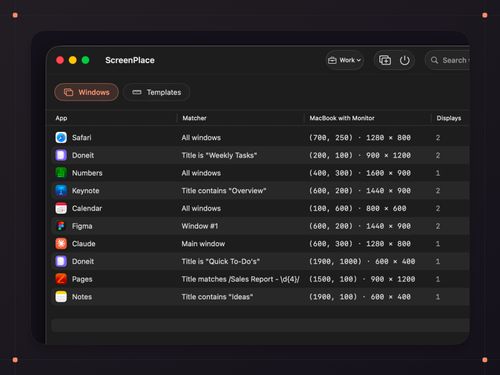
Magical Window Management for Your Mac
ScreenPlace is a Mac-specific window management tool that remembers window positions and restores them automatically, offering a streamlined and organized workspace. Its auto-apply feature and reusable templates enhance productivity by managing multiple displays and workspaces with ease.
Key Advantages
- ✓One-time purchase with no subscription fees
- ✓Supports unlimited workspaces and multi-display setups
- ✓Offers global shortcuts for quick window management
Trade-offs & Considerations
- •Limited to macOS users only
- •Initial setup requires granting accessibility access
What is ScreenPlace?
ScreenPlace is a powerful window management tool designed specifically for Mac users. It intelligently remembers the positions of your application windows and restores them to their designated locations automatically, ensuring a tidy and efficient workspace tailored to your preferences.
Key Features & Highlights
5 FeaturesCore capabilities and advantages of using ScreenPlace for your workflow:
How to use ScreenPlace
Getting started with ScreenPlace is a breeze! First, download and install the app from the official website. Once installed, open ScreenPlace and configure your preferred window layouts for different tasks or projects. You can easily save these layouts and assign keyboard shortcuts for quick access. As you work, ScreenPlace will automatically remember the positions of your windows, restoring them to their saved layouts whenever you need them. Enjoy a clutter-free workspace and let your creativity flow with ease!
About ScreenPlace
As a startup founder, maintaining productivity is paramount, and ScreenPlace is an innovative tool that can significantly enhance your workflow. This app solves the common frustration of lost window arrangements, allowing you to focus on your work instead of constantly rearranging your screen. With its intuitive design and powerful functionality, ScreenPlace brings a touch of magic to your desktop experience. Imagine opening your Mac to a perfectly organized workspace every time! By simplifying window management, it allows you to reclaim valuable time and mental energy—essential resources for any entrepreneur navigating the challenges of building a business.
Real performance numbers in the last 30 days
Frequently Asked Questions
Common questions about ScreenPlace, features, and launch details.
Q:Is ScreenPlace compatible with all versions of macOS?
ScreenPlace is compatible with macOS Tahoe (26) and later versions.
Q:Do I need to pay a subscription fee for ScreenPlace?
No, ScreenPlace requires a one-time payment, and there are no subscription fees.
Q:Can I use ScreenPlace on multiple monitors?
Yes, ScreenPlace supports multi-display configurations, allowing you to manage windows across all connected monitors seamlessly.
Related Productivity Apps
View All →
Story2Board
Story2Board — AI Co-Director for Storyboards

Startup Ai Tools
Best AI Tools Directory | Discover 5,000+ AI Tools

VidMake AI
Viral AI Video Generator

devquiver
Hand-tested backlink directories with a submission tracker

SubRedds
Explore the largest subreddits and view them as galleries

Codersera
AI Agent Task Manager — Run Multiple AI Coding Agents in Parallel